60
• For Windows 98/98SE/2000/Me, follow the
procedure explained in “Stage 4-B: Copying
images to a Computer” on page 61.
This section describes an example of
copying images to a “My Documents”
folder.
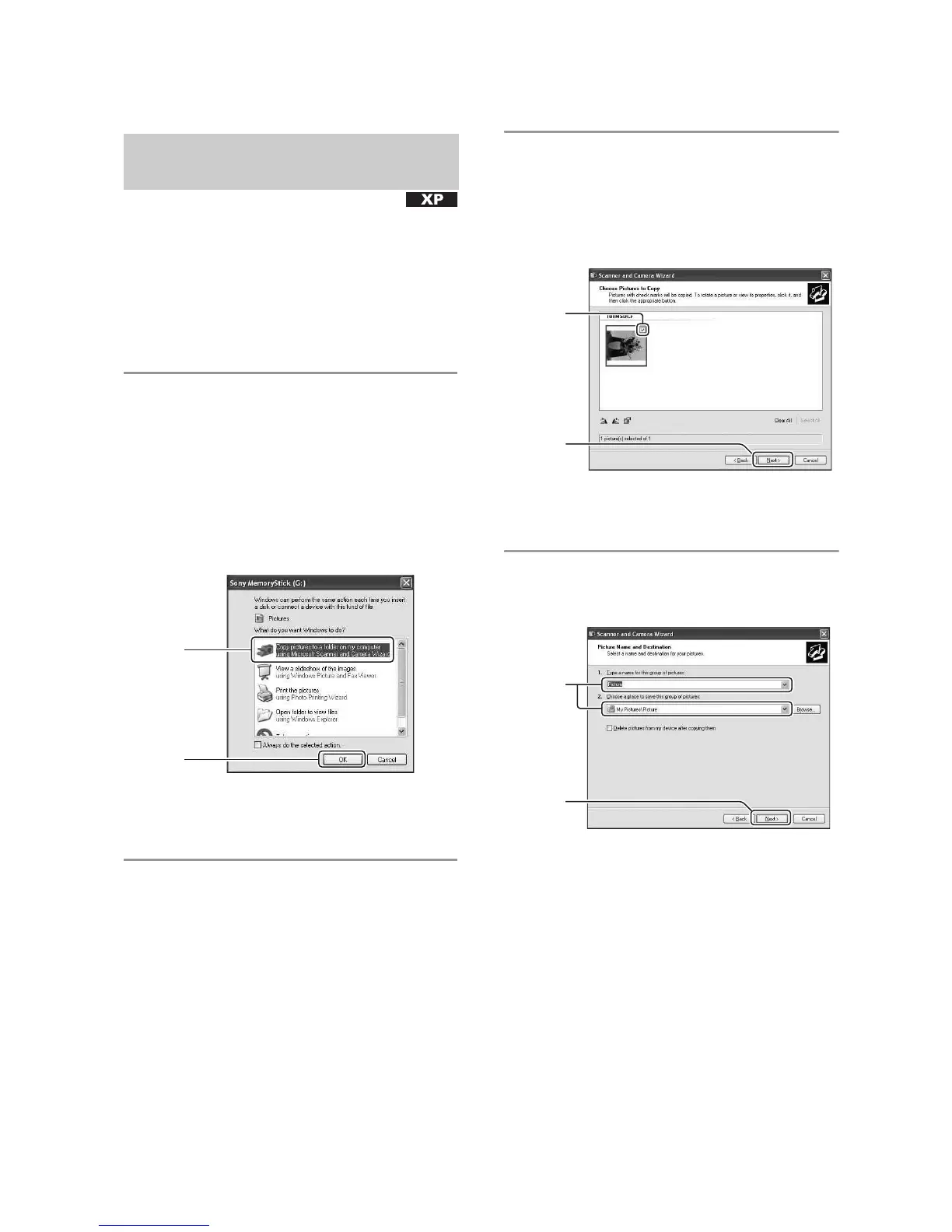
1 After making a USB connection in
Stage 3, click [Copy pictures to a
folder on my computer using
Microsoft Scanner and Camera
Wizard]
t [OK] as the wizard
screen appears automatically on
the desktop.
The “Scanner and Camera Wizard”
screen appears.
2 Click [Next].
The images saved on the “Memory
Stick” of the camera appear.
• If no “Memory Stick” is inserted, images in
the internal memory appear.
3 Click the check box of unwanted
images to remove the checkmark
so they are not copied, then click
[Next].
The “Picture Name and Destination”
screen appears.
4 Select a name and destination for
the images, then click [Next].
Image copying starts. When the copying
is completed, the “Other Options”
screen appears.
• This section describes an example of
copying images to the “My Documents”
folder.
Stage 4-A: Copying images to a
computer
1
2
1
2
1
2



 To Next Page
 Loading...








