6
Basic techniques for better images
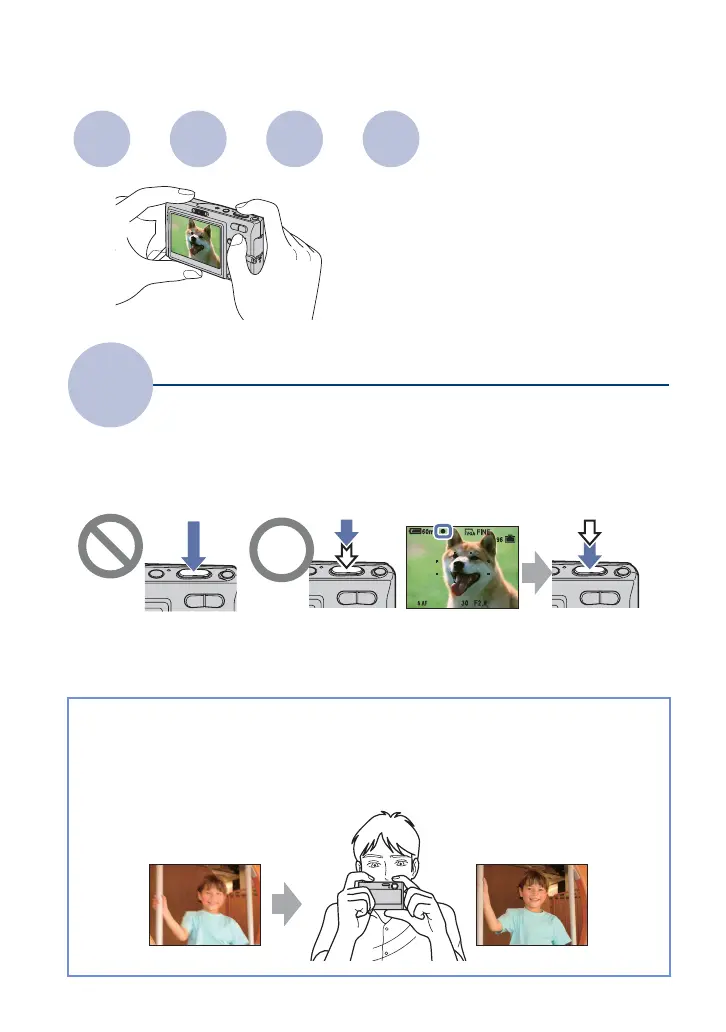
When you press the shutter button halfway down, the camera adjusts the focus automatically
(Auto Focus). Remember to press the shutter button only halfway down.
To shoot a still image difficult to focus on
t [Focus] (page 35)
If the image looks blurred even after focusing, it may be because of camera shake.
t See
“Hints for preventing blur” (as follows).
Focus
Focusing on a subject successfully
Press the shutter
button fully down
suddenly.
Press the shutter
button halfway
down.
AE/AF lock indicator
flashing , lit/beeps
Then press the
shutter button
fully down.
Hints for preventing blur
Hold the camera steady, keeping your arms at your side. It is recommended to lean
against a tree or a building nearby to steady yourself. Shooting with a 2-second delay
self-timer, activating the anti-blur function, or using a tripod is also effective. Use the
flash when you shoot under a low light condition.
Focus Exposure Color Quality
This section describes the basics so you can
enjoy your camera. It tells you how to use
various camera functions such as the mode
switch, the menus (page 30), and so on.













 To Next Page