27
Basic Operations
Viewing/deleting images
1 Select with the mode switch.
2 Select an image with b/B on the control button.
Movie:
Press
z to play back a movie. (Press z again to stop playback.)
Press
b/B to rewind/fast forward. (Press z to return to normal playback.)
Press
v/V to adjust the volume.
• Movies with the image size [160] are displayed a size smaller.
To delete images
1 Display the image you want to delete and press (Delete).
2 Select [Delete] with
v, then press z.
To cancel the deletion
Select [Exit], then press z.
To view an enlarged image (playback zoom)
Press while displaying a still image.
To undo the zoom, press .
Adjust the portion: v/V/b/B
Cancel playback zoom: z
• To store enlarged images: [Trimming] (page 52)
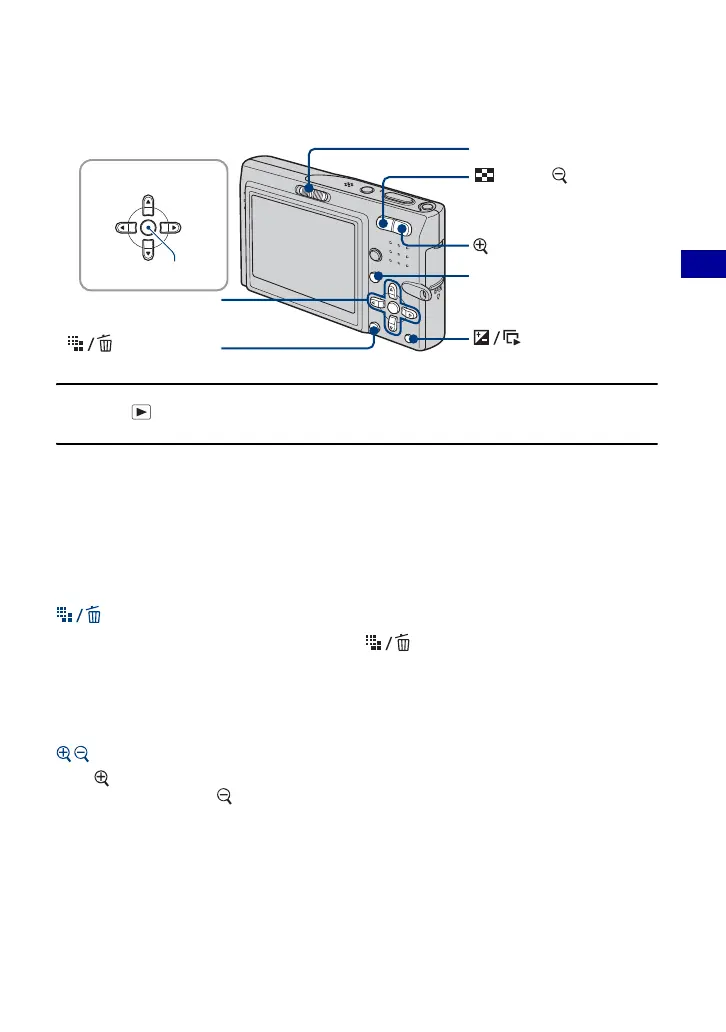
(Delete) button
Mode switch
Control button
MENU button
(Playback zoom) button
(Index)/ (Playback
zoom) button
(Slide Show)
button
v/V/b/B button
z button













 To Next Page