6-27
DSC-T20/T25_ADJ
6. CAMERA Adjustment 4
[Automatic Adjustment Program execution items and
sequence]
1. Data Setting during Camera Adj.
2. Picture Frame Setting
3. F No. Compensation
4. Measure Gain, LV Adj.
5. Mechanical Shutter Adj.
6. AWB 3200K-5800K Standard Data Input
7. AWB 3200K-5800K Check
8. Color Reproduction Adj. & Check
9. CCD Linearity Check
10. CCD White Defect Compensation Check
11. CCD Black Defect Compensation Check
12. Release of Data Setting during Camera Adj.
[Adjusting method]
1) Click the [Start] button of the CAMERA Adjustment 4.
2) The Automatic Adjustment Program executes the “1. Data Set-
ting during Camera Adj.”.
3) Upon successful completion of “1. Data Setting during Cam-
era Adj.”, “2. Picture Frame Setting” is executed. The follow-
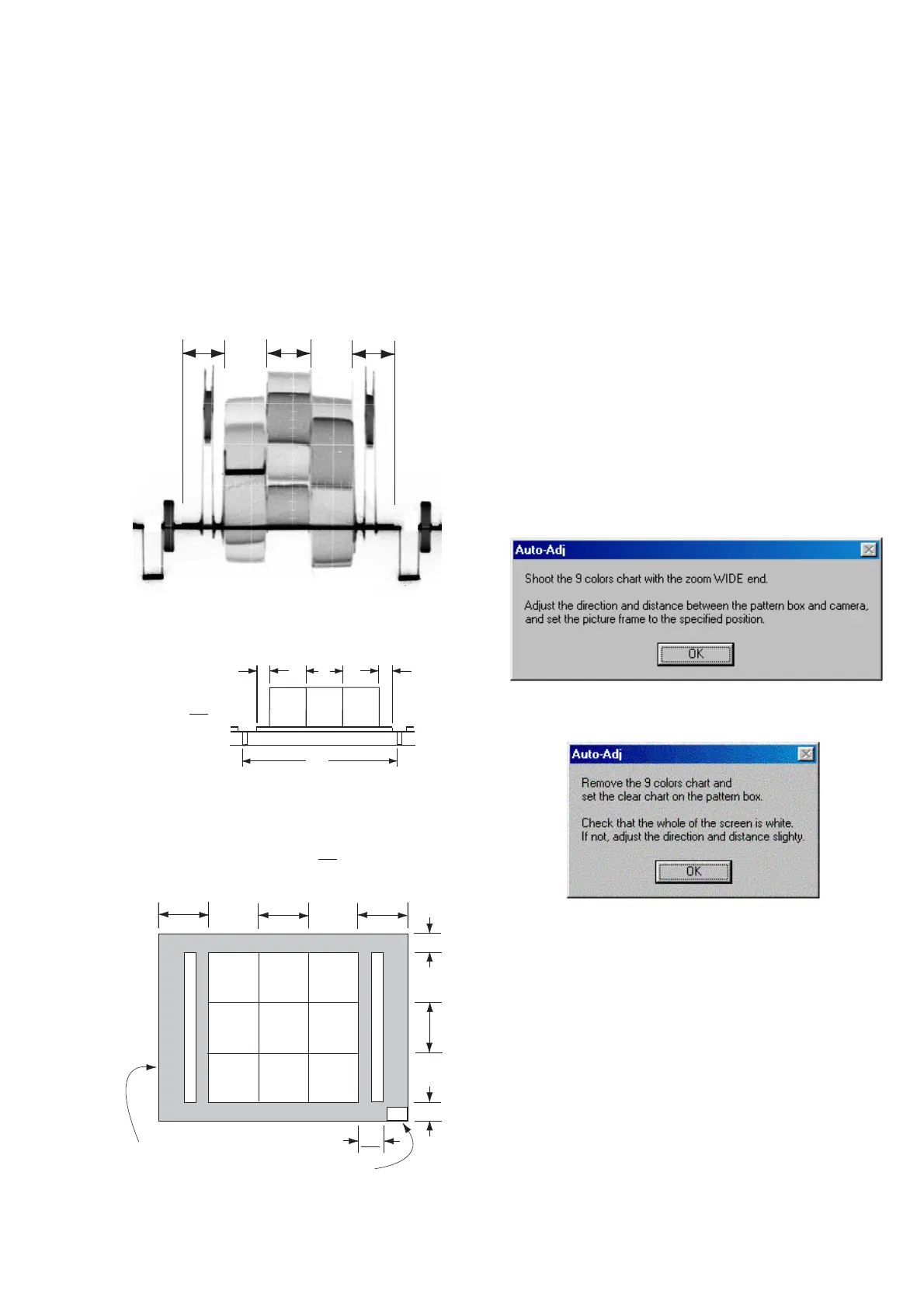
ing message is displayed, and then referring to Fig. 6-1-23 to
Fig. 6-1-25, set the subject and click the [OK] button.
After that, the next message is displayed. Then, change the chart
in accordance with the message.
5. Picture Frame Setting (Standard Picture Frame)
In the “CAMERA Adjustment 4”, set the picture frame so as to
attain the positions shown in the following figure when shooting
the 9 colors chart.
Check on the oscilloscope
Measurement Point:Video terminal of USB, A/V, DC IN cable for
multi-use terminal (75 Ω terminated)
1. Horizontal period
Fig. 6-1-23
2. Vertical period
Fig. 6-1-24
Check on the monitor TV or the LCD screen
Fig. 6-1-25
A
A
B
A = B
V
B
CC
C =
B
3
Transparent window
Effective picture frame
AAB
BlueC14
Magenta
WhiteCyan
Red
YellowGreen
W14
C
C
B
C =A = B
C14: Filter for AWB 5800K adjustment
A
2
B
3





 To Next Page