6-32
DSC-T20/T25_ADJ
1-7-2. Adjustment Items of LCD System Adjustment
The adjustment items of LCD system adjustment are as listed in
Table 6-1-5. The Automatic Adjustment Program executes the ad-
justment items if the LCD Adjustment Start button is clicked.
Button
Adjustment
Adjusting Address
Name Signal Page Address
LCD V-COM Adj. 11 60 0301
Adjustment White Balance Adj. 11 60 0309, 030A
1-7. LCD SYSTEM ADJUSTMENTS
1-7-1. Function of Each Button on LCD System
Adjustment Screen
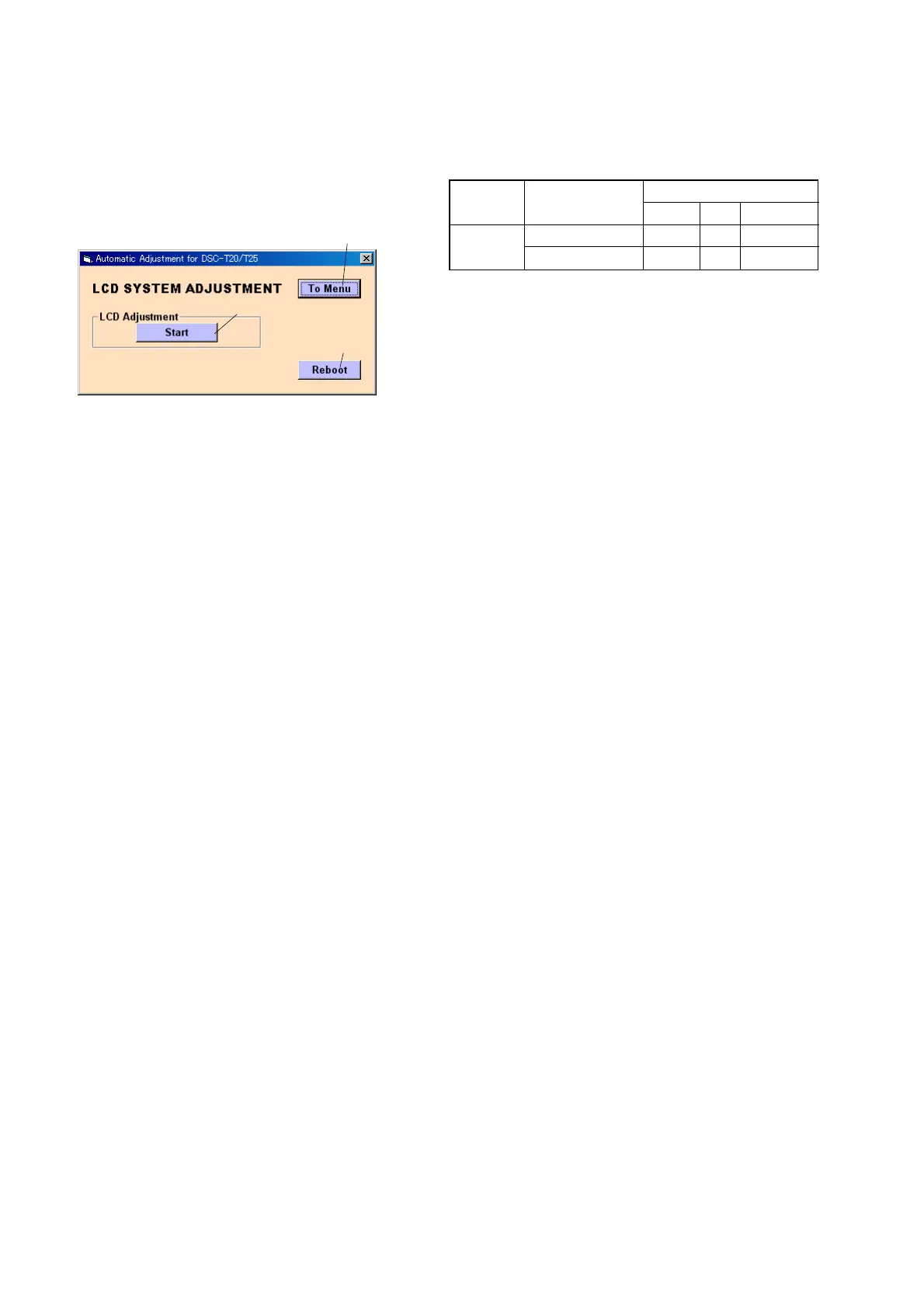
Click the [LCD SYSTEM ADJUSTMENT] button on the Main Menu
screen, and the “LCD SYSTEM ADJUSTMENT” screen in Fig.
6-1-29 will appear.
Fig. 6-1-29
1 [To Menu] button
The Main Menu screen comes back.
2 [Start] button
“LCD Adjustment” starts.
3 [Reboot] button
When this button is clicked, the camera is rebooted.
3
2
1
Table 6-1-5


 To Next Page
 Loading...