EasyManua.ls Logo

Sony DSC-TF1 - Page 60

Sony DSC-TF1
165 pages
Print Icon
To Next Page IconTo Next Page
To Previous Page IconTo Previous Page
Loading...
DRO
In-Camera Guide
(Settings)
*1 In [Advanced Flash] mode, the maximum still image size you can select is [4M].
*2 In Movie Mode, [Spot] cannot be selected.
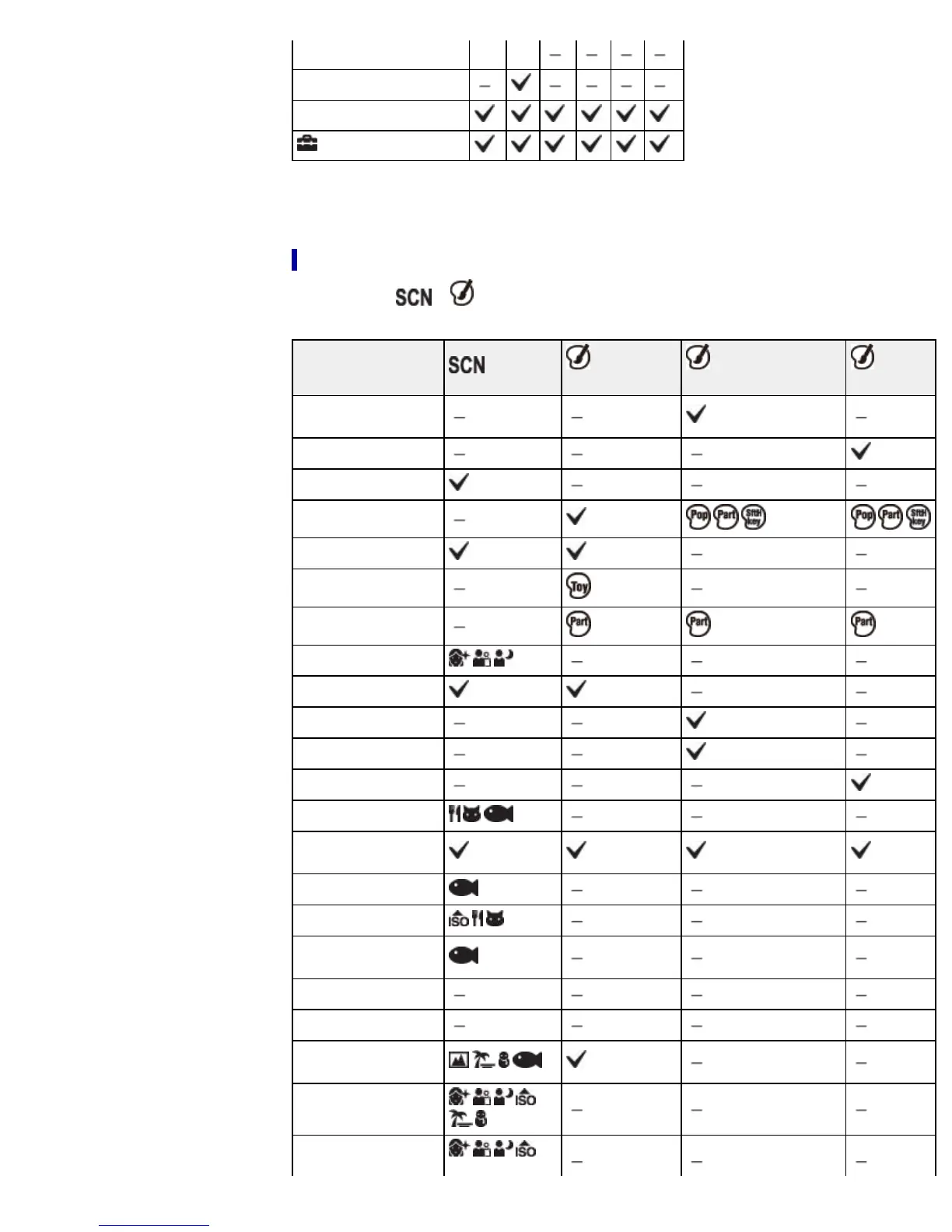
MENU items available in Scene Selection/Picture Effect mode
The icons below or indicate the available modes.
Menu items
(Still
images)
(Panoramic
images)
(Movies)
Panorama Shooting
Scene
Movie shooting scene
Scene Selection
Picture Effect
Easy Mode
Color hue
Extracted Color
Soft Skin Effect*
1
Still Image Size
Shooting Direction
Panorama Image Size
Movie Size
Macro
Exposure
Compensation
ISO
White Balance*
2
Underwater White
Balance
Focus
Metering Mode
Cont. Shooting
Settings
Smile Shutter
Smile Detection
60

Table of Contents

Other manuals for Sony DSC-TF1

Related product manuals