DSX-B700/B700W/B710D
12
Sony CONFIDENTIAL
For Authorized Servicer
(B700: AEP, UK/B710D)
Cautions
ˎ Run all ground (earth) leads to a common
ground (earth) point.
ˎ Do not get the leads trapped under a screw, or
caught in moving parts (e.g., seat railing).
ˎ Before making connections, turn the car ignition
off to avoid short circuits.
ˎ Connect the power supply leads ʔ to the unit
and speakers before connecting it to the auxiliary
power connector.
ˎ Be sure to insulate any loose unconnected leads
with electrical tape for safety.
ˎ Choose the installation location carefully so that
the unit will not interfere with normal driving
operations.
ˎ Avoid installing the unit in areas subject to dust,
dirt, excessive vibration, or high temperature,
such as in direct sunlight or near heater ducts.
ˎ Use only the supplied mounting hardware for a
safe and secure installation.
Note on the power supply lead (yellow)
When connecting this unit in combination with other
stereo components, the amperage rating of the car
circuit to which the unit is connected must be higher
than the sum of each component’s fuse amperage
rating.
Note on installing in cars with a start-stop system
The unit may restart when starting the engine from
start-stop. In this case, turn off the start-stop system of
your car.
Mounting angle adjustment
Adjust the mounting angle to less than 30°.
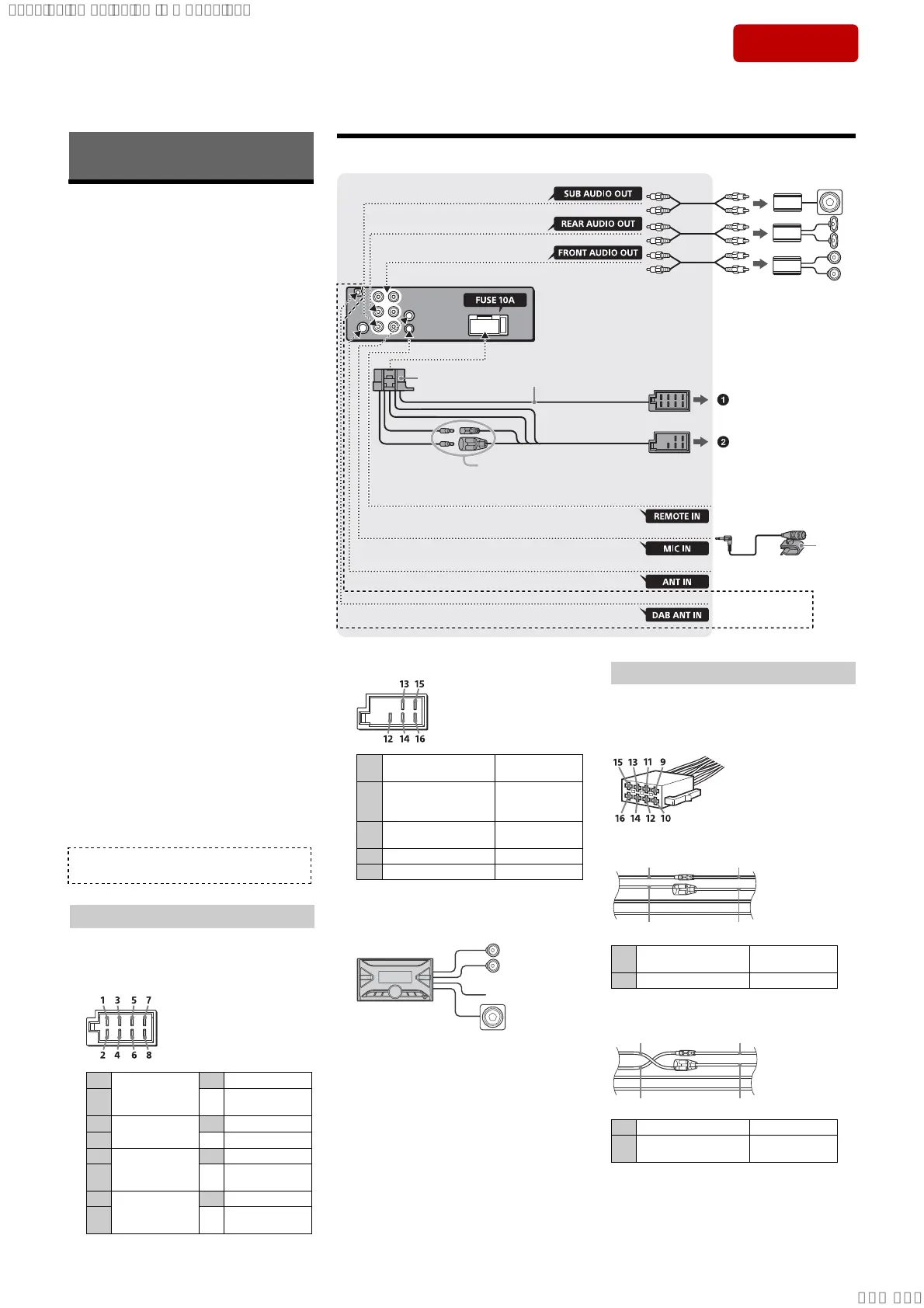
Connection/Installation
*1 Not supplied
*2 Speaker impedance: 4 to 8 × 4
*3 RCA pin cord (not supplied)
*4 Depending on the type of car, use an adaptor for a
wired remote control (not supplied). For details on
using the wired remote control, see “Using the wired
remote control”.
*5 Whether in use or not, route the microphone input
cord such that it does not interfere with driving
operations. Secure the cord with a clamp, etc., if it is
installed around your feet.
For details on installing the microphone, see
“Installing the microphone”.
*6 Depending on the type of car, use an adaptor (not
supplied) if the antenna (aerial) connector does not
fit.
*7 Set [ANT-PWR] to [ON] (default) or [OFF] depending
on the type of DAB antenna (aerial).
Max. supply current 0.1 A
(B710D)
If you have a power antenna (aerial) without a relay
box, connecting this unit with the supplied power
supply leads ʔ may damage the antenna (aerial).
ɞ To the car’s speaker connector
Making connections
1
Rear speaker
(right)
È Purple
2
¾
Purple/black
striped
3
Front speaker
(right)
È Gray
4
¾ Gray/black striped
5
Front speaker
(left)
È White
6 ¾
White/black
striped
7
Rear speaker
(left)
È Green
8 ¾
Green/black
striped
Memory hold connection
When the yellow power supply lead is connected,
power will always be supplied to the memory
circuit even when the ignition switch is turned off.
Speaker connection
ˎ Before connecting the speakers, turn the unit off.
ˎ Use speakers with an impedance of 4 to 8 ,
and with adequate power handling capacities to
avoid damage.
ɟ To the car’s power connector
Subwoofer Easy Connection
You can use a subwoofer without a power amplifier
when it is connected to a rear speaker lead.
Notes
ˎ Preparation of the rear speaker leads is required.
ˎ Use a subwoofer with an impedance of 4 to 8 ,
and with adequate power handling capacities to
avoid damage.
12
continuous power
supply
Yellow
13
power antenna (aerial) /
power amplifier control
(REM OUT)
Blue/white striped
14
switched illumination
power supply
Orange/white
striped
15 switched power supply Red
16 ground (earth) Black
Check your car’s auxiliary power connector, and
match the connections of leads correctly
depending on the car.
Common connection
When the positions of the red and yellow
leads are inverted
Power connection diagram
12
continuous power
supply
Yellow
15 switched power supply Red
12 switched power supply Yellow
15
continuous power
supply
Red
Auxiliary power connector
Connection
from a wired remote control
(not supplied)*
4
from a car antenna (aerial)*
6
*
3
*
3
Subwoofer*
1
For details, see “Making
connections” .
Power amplifier*
1
See “Power connection diagram”
for details.
*
2
*
3
*
5
from DAB antenna (aerial)
(not supplied)*
7
2
3
(B710D)
Ver. 1.1
SYSSET
2019/10/2421:43:03(GMT+09:00)



 To Next Page