DSX-B700/B700W/B710D
13
Sony CONFIDENTIAL
For Authorized Servicer
(B700: AEP, UK/B710D)
When the car without ACC position
After matching the connections and switching
power supply leads correctly, connect the unit to
the car’s power supply. If you have any questions
and problems connecting your unit that are not
covered in this manual, consult the car dealer.
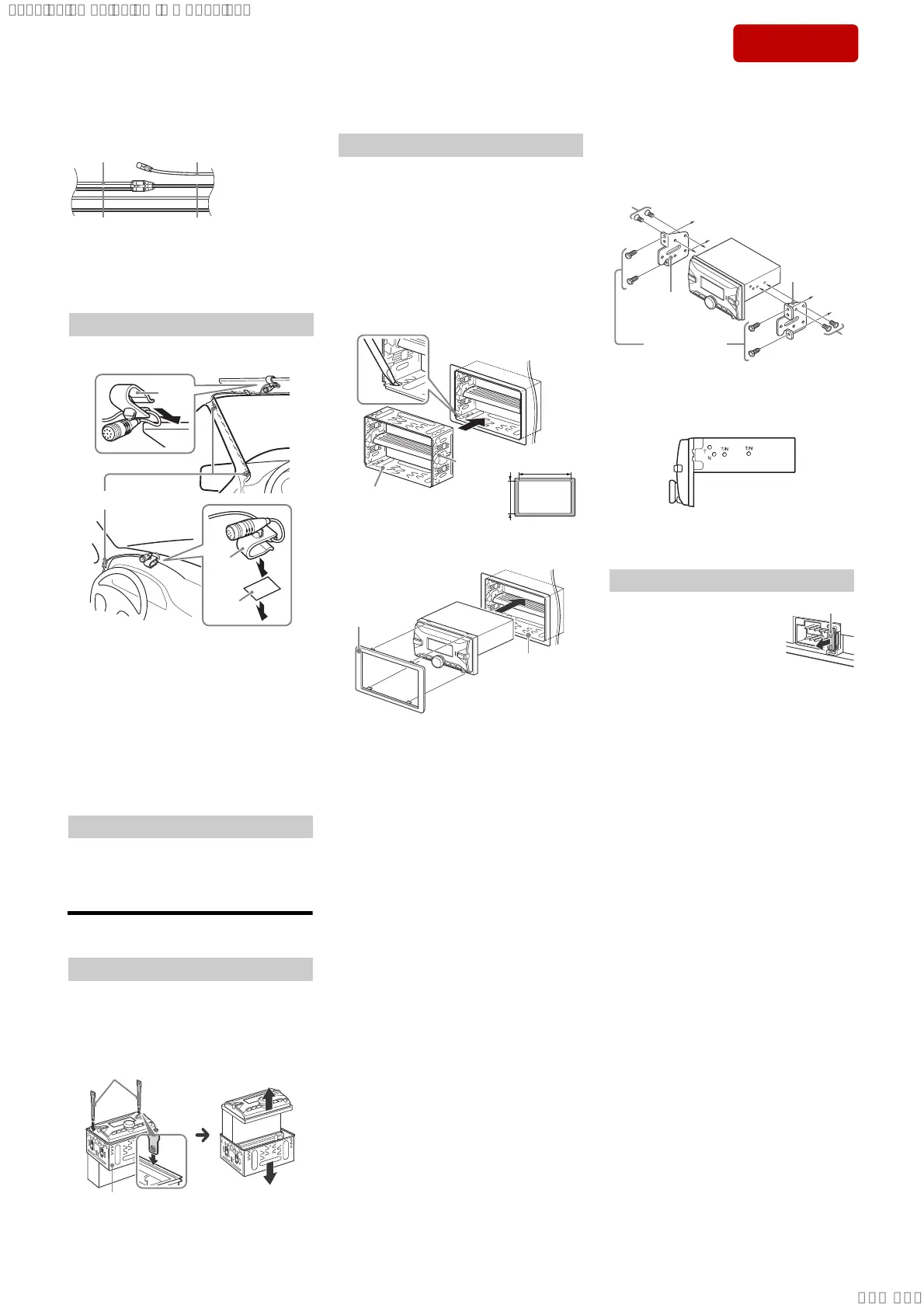
To capture your voice during handsfree calling, you
need to install the microphone ʕ.
Cautions
ˎ It is extremely dangerous if the cord becomes
wound around the steering column or gearstick.
Be sure to keep it and other parts from interfering
with your driving operations.
ˎ If airbags or any other shock-absorbing
equipment is in your car, contact the store where
you purchased this unit, or the car dealer, before
installation.
Note
Before attaching the double-sided tape ʖ, clean the
surface of the dashboard with a dry cloth.
Installing the microphone
1 To enable the wired remote control, set
[STR CONTROL] in [STEERING] to
[PRESET].
Installation
Before installing the unit, remove the mounting
sleeve ʗ from the unit.
1 Insert both release keys ʘ until they
click, and pull down the mounting sleeve
ʗ, then pull up the unit to separate.
Using the wired remote control
Removing the mounting sleeve
For Japanese cars, see “Mounting the unit in a
Japanese car”.
Mounting the unit with the supplied
mounting sleeve
Before installing, make sure the catches on both
sides of the mounting sleeve 5 are bent inwards
3.5 mm (
5
/32 in).
1 Position the mounting sleeve 5 inside
the dashboard, then bend the claws
outward for a tight fit.
2 Mount the unit onto the mounting
sleeve 5.
Note
If the catches are straight or bent outwards, the unit will
not be installed securely and may spring out.
Mounting the unit in the dashboard
Larger than
182 mm (7
1
/4 in)
Larger than
111 mm
(4
3
/8 in)
Catch
5
5
7
Mounting the unit in a Japanese car
You may not be able to install this unit in some
makes of Japanese cars. In such a case, consult your
Sony dealer.
When mounting this unit to the preinstalled
brackets of your car, use the mounting screws 1 in
the appropriate screw holes based on your car:
T for TOYOTA and N for NISSAN.
Note
To prevent malfunction, install only with the mounting
screws 1.
When replacing the fuse, be sure
to use one matching the
amperage rating stated on the
original fuse. If the fuse blows,
check the power connection and
replace the fuse. If the fuse blows
again after replacement, there
may be an internal malfunction. In such a case,
consult your nearest Sony dealer.
Fuse replacement
1
To dashboard/center console
Parts supplied with
your car
1
Bracket
Bracket
Fuse (10 A)
SYSSET
2019/10/2421:43:03(GMT+09:00)



 To Next Page