DSX-B700/B700W/B710D
5
Sony CONFIDENTIAL
For Authorized Servicer
NOTE OF REPLACING THE MAIN BOARD
When replacing the MAIN board, there are point to notes and neces-
sary to perform a few work. Be sure to refer to the following.
Required works:
• Destination setting
(Refer to “DESTINATION SETTING METHOD” on the fol-
lowing)
• Initializing
(Refer to “IMPORTANT NOTE OF INITIALIZING” on page
9)
Operation check works:
• BLUETOOTH FUNCTION CHECKING METHOD USING A
SMARTPHONE OR CELLULAR PHONE (page 8)
• OPERATION CHECK OF THE USB (page 9)
DESTINATION SETTING METHOD
When the MAIN board or IC501 on the MAIN board is replaced,
the destination setting is necessary. Set destination according to the
procedure below.
Setting procedure:
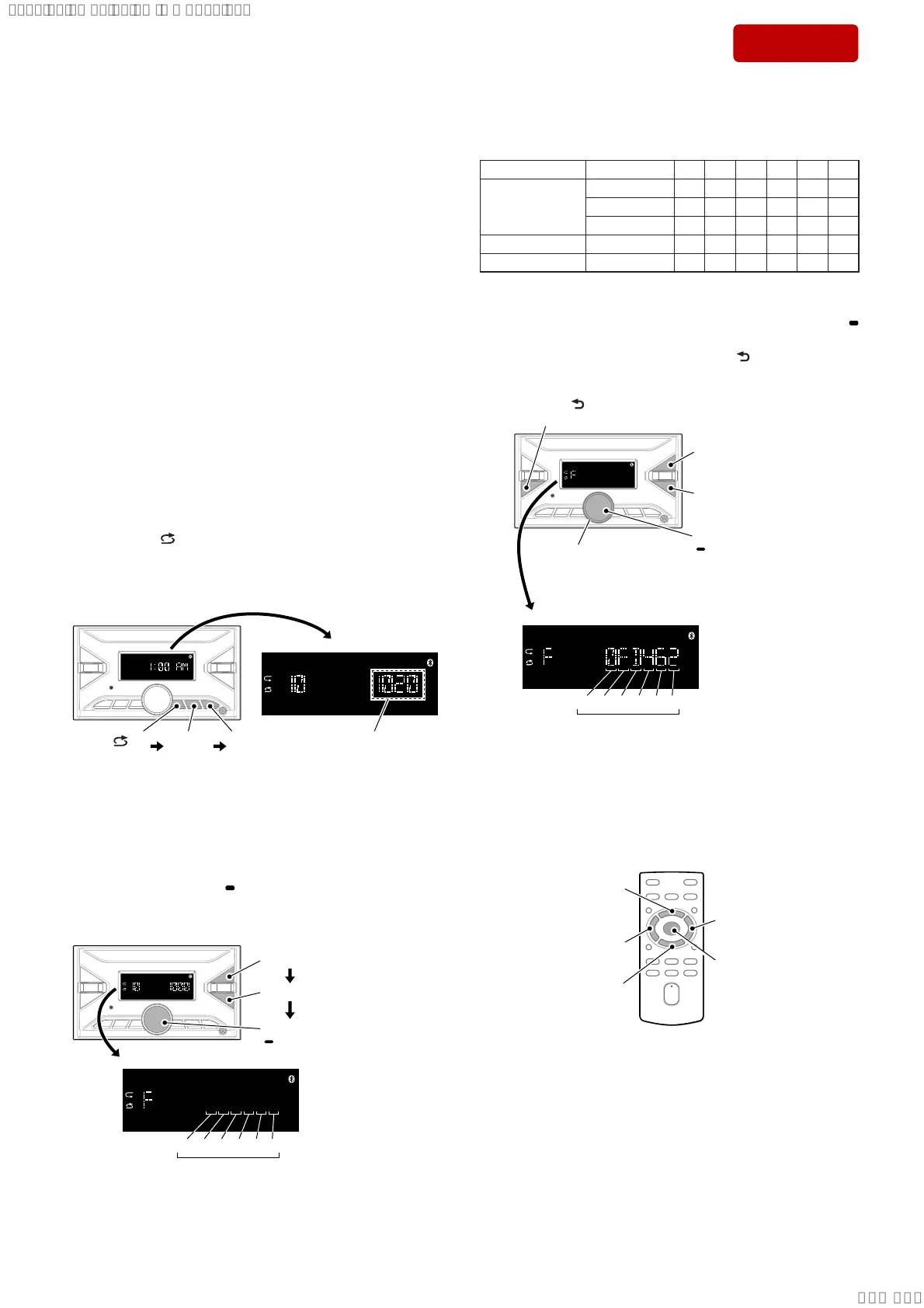
1. In the state of source off (the clock is displayed on the liquid
crystal display), enter the test mode by pressing the buttons in
order of the [
4] → [MIC 5] → [u 6] (press only the [u 6]
button for 2 seconds) and display the software main version.
(Displayed characters/values in the following fi gure are exam-
ple)
[ 4]
press
[MIC 5]
press
Software main version
DSX-B700/B700W :
1020 or higher
DSX-B710D :
1010 or higher
[u 6]
press for
2 seconds
Note 1: There is not displayed “AM” , depending on the destination.
2. In the state in which the software main version is displayed on
the liquid crystal display, enter the destination setting mode by
pressing the buttons in order of the [> M] → [m .] →
[PUSH ENTER MENU/
VOICE].
(Displayed characters/values in the following fi gure are exam-
ple)
[m .] press
[> M] press
Destination code
(“XXXXXX” is displayed
with alphanumeric
characters)
OP0OP1OP2OP3OP4OP5
6 digits
XXXXXX
[PUSH ENTER/MENU/
VOICE] press
3. Input the 6 digits destination code.
Destination Code
Model Destination OP5 OP4 OP3 OP2 OP1 OP0
DSX-B700
US, CND 0 F D 4 6 2
AEP, UK 0 C D 4 5 1
E, AUS 3 C F C 5 0
DSX-B700W US, CND 0 E D 4 3 2
DSX-B710D AEP, UK 4 C D 4 8 1
Rotate the control dial, and select the alphanumeric character of
“0 to F”.
The digit advances by pressing the [PUSH ENTER MENU/
VOICE] or [> M] button.
The digit returns by pressing the [MODE ] or [m .] but-
ton.
Contorol dial rotate to
select the alphanumeric
characters.
[m .] press
to return the digit.
[> M] press
to advance the digit.
[MODE ] press
to return the digit.
Destination code (example DSX-B700: US, CND)
OP0OP1OP2OP3OP4OP5
6 digits
[PUSH ENTER/MENU/
VOICE] press to
advance the digit.
XXXXXX
Note 2: Destination code input can also be done with the remote command-
er supplied with this unit.
Instead of rotating the control dial, press the [V] or [v] button.
To advance the digit for press the [b] or [ENTER] button, to return
the digit for press the [B] button.
Note 3: The model to which the remote commander is not attached can also
be operated by using the optional remote commander.
[b] press to
advance the digit.
[B] press to return
the digit.
[V] press to select
the alphanumeric
characters.
[v] press to select
the alphanumeric
characters.
[ENTER] press to
advance the digit.
– Continued on next page –
Ver. 1.1
SYSSET
2019/10/2421:43:03(GMT+09:00)



 To Next Page