DSX-B700/B700W/B710D
6
Sony CONFIDENTIAL
For Authorized Servicer
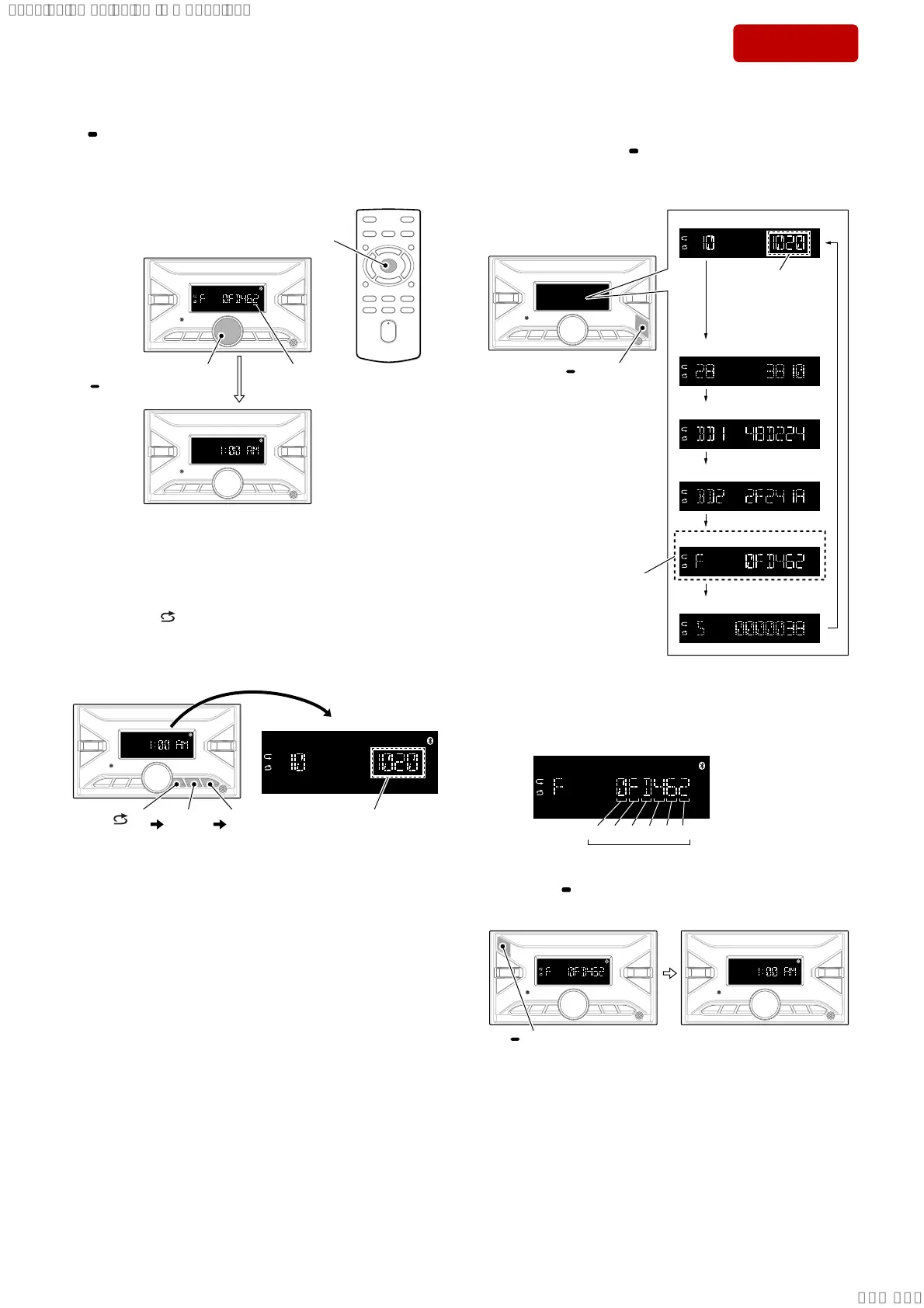
4. The setting is completed by pressing the [PUSH ENTER MENU/
VOICE] button on the main unit or [ENTER] button on the re-
mote commander at the state of cursor position of “OP0”, then
the display turns off, the initialization operation is done, and the
display returns to the clock display.
cursor position
of OP0
or
[ENTER]
press
[PUSH ENTER/MENU/
VOICE] press
Note 4: There is not displayed “AM” , depending on the destination.
5. Perform the check whether there is no mistake in the destination
code.
In the state of source off (the clock is displayed on the liquid
crystal display), enter the test mode by pressing the buttons in
order of the [ 4] → [MIC 5] → [u 6] (press only the [u 6]
button for 2 seconds) and display the software main version.
(Displayed characters/values in the following fi gure are exam-
ple)
[ 4]
press
[MIC 5]
press
Software main version
DSX-B700/B700W :
1020 or higher
DSX-B710D :
1010 or higher
[u 6]
press for
2 seconds
Note 5: There is not displayed “AM” , depending on the destination.
6. In the state in which the software main version is displayed
on the liquid crystal display, enter the destination code display
mode by pressing the [
SCRL DSPL] button 4 times.
(Displayed characters/values in the following fi gure are exam-
ple)
Software main version
(Not used for the servicing)
Destination code
(Not used for the servicing)
[ SCRL DSPL]
press
Set to this state
of display.
Bluetooth adress (BD1)
Bluetooth adress (BD2)
DSX-B700/B700W :
1020 or higher
DSX-B710D :
1010 or higher
7. Confi rm the alphanumeric character of 6 digits on the liquid
crystal display is a value set in step 3.
Note 6: If the setting is incorrect, start from step 1 again.
Destination code (example DSX-B700: US, CND)
OP0OP1OP2OP3OP4OP5
6 digits
8. Press the [ OFF SRC] button for 1 second or more to execute
reset and return to the normal condition.
[ OFF SRC] press
for 1 second or more
Note 7: There is not displayed “AM” , depending on the destination.
9. This completes the destination setting work.
SYSSET
2019/10/2421:43:03(GMT+09:00)



 To Next Page