EasyManua.ls Logo

Sony DXF-801 - Horizontal Hold Adjustment

Sony DXF-801
58 pages
Print Icon
To Next Page IconTo Next Page
To Previous Page IconTo Previous Page
Loading...
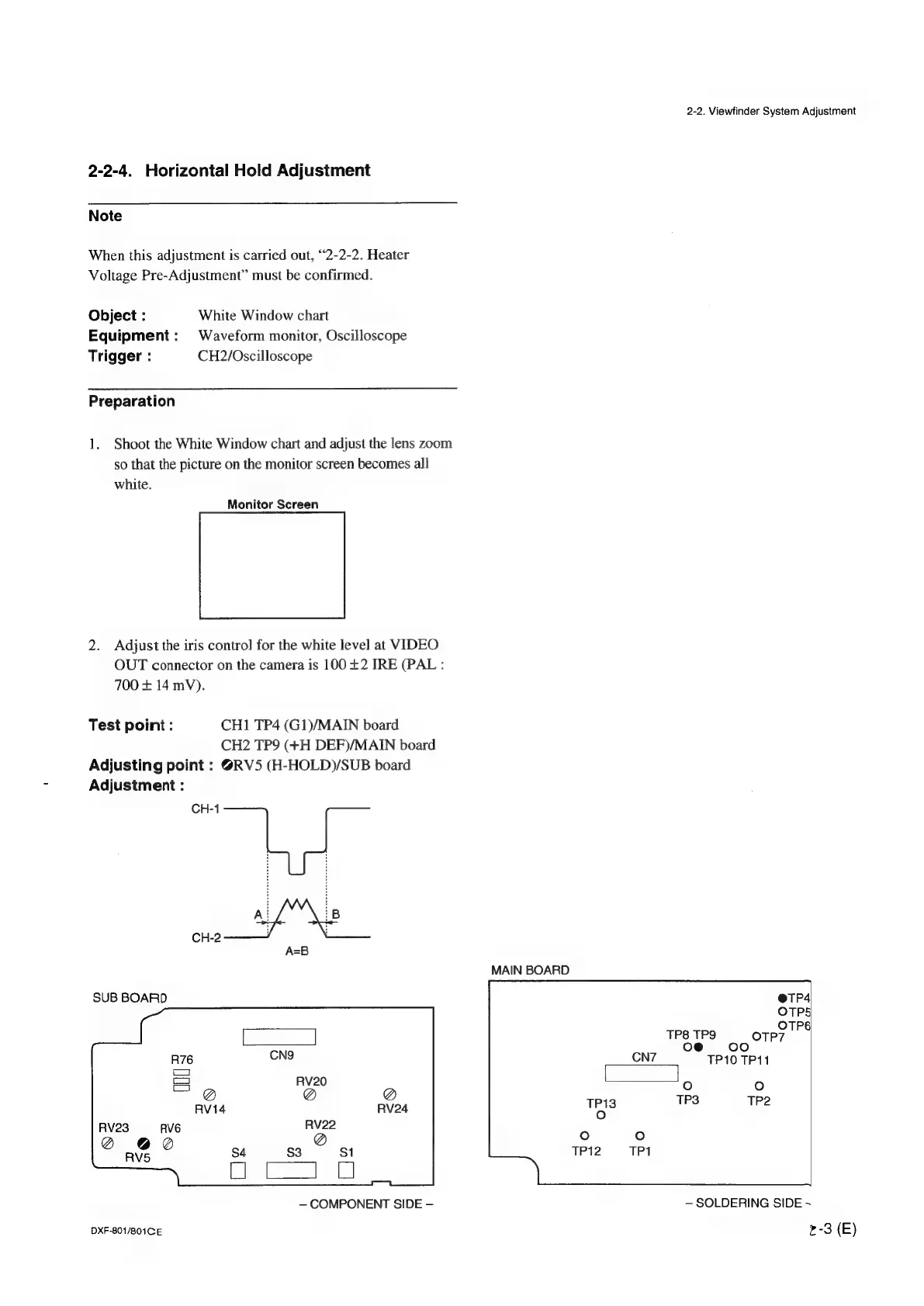
2-2-4.
Horizontal
Hold
Adjustment
Note
When
this
adjustment
is
carried
out,
“2-2-2.
Heater
Voltage
Pre-Adjustment’”
must
be
confirmed.
Object
:
White
Window
chart
Equipment:
Waveform
monitor,
Oscilloscope
Trigger
:
CH2/Oscilloscope
Preparation
1.
Shoot
the
White
Window
chart
and
adjust
the
lens
zoom
so
that
the
picture
on
the
monitor
screen
becomes
all
white.
Monitor
Screen
2.
Adjust
the
iris
control
for
the
white
level
at
VIDEO
OUT
connector
on
the
camera
is
100
+2
TRE
(PAL
:
700
+
14
mV).
Test
point:
CH1
TP4
(G1)/MAIN
board
CH2
TP9
(+H
DEF)/MAIN
board
Adjusting
point
:
@RV5
(H-HOLD)/SUB
board
Adjustment
:
CH-1
CH-2
A=B
SUB
BOARD
COMPONENT
SIDE
DXF-801/801CE
MAIN
BOARD
TP13
ie)
oO
TP12
2-2.
Viewfinder
System
Adjustment
@eTP4
OTPS
°
TP8
TPS
orp?
o@
oo
CN7
TP10
TP11
fe)
°
TP3
TP2
°
TP1
SOLDERING
SIDE
~
r-3
(E)

Other manuals for Sony DXF-801

Related product manuals