EasyManua.ls Logo

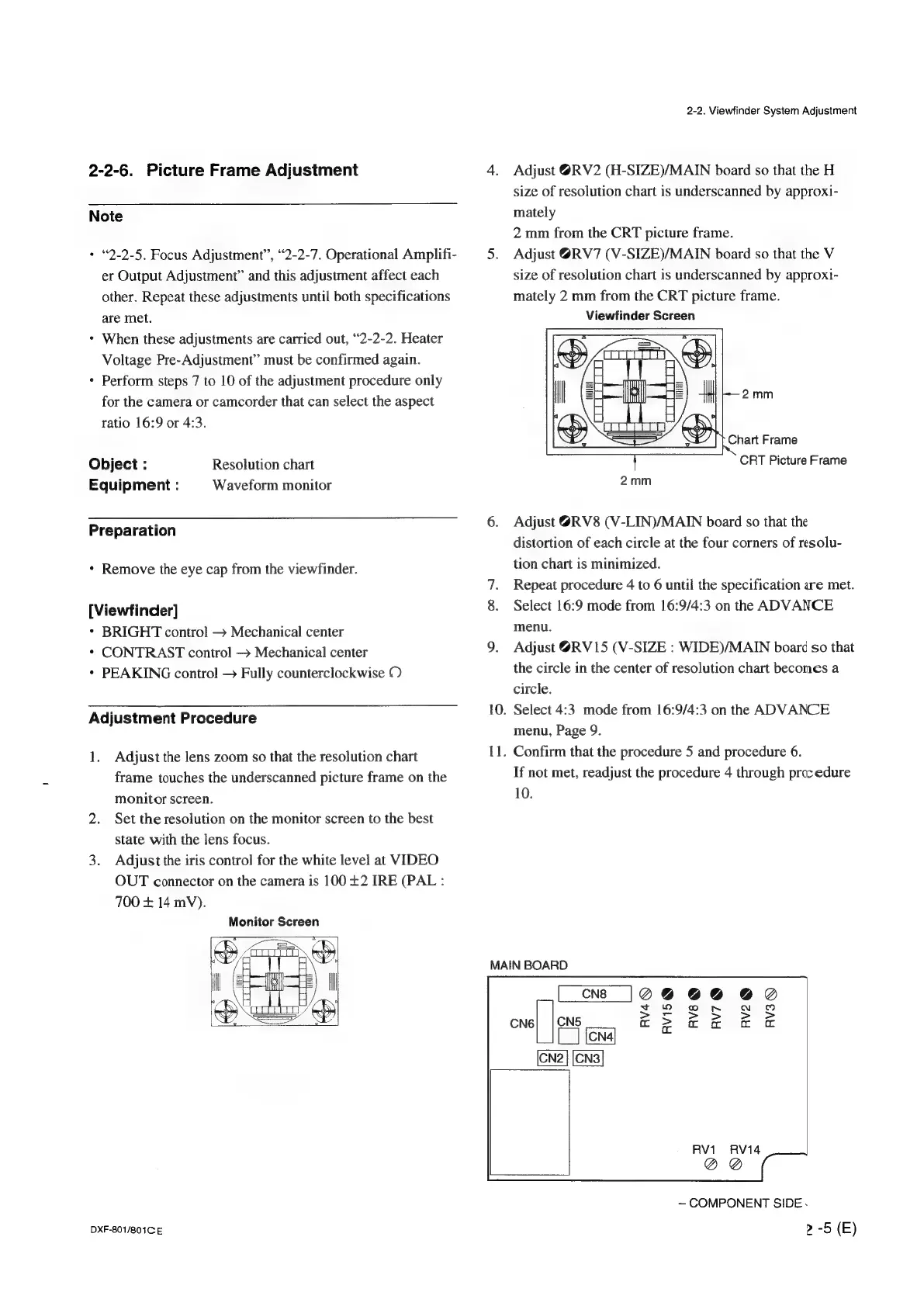
Sony DXF-801 - Picture Frame Adjustment; Adjustment Procedure

Sony DXF-801
58 pages
Print Icon
To Next Page IconTo Next Page
To Previous Page IconTo Previous Page
Loading...
2-2-6.
Picture
Frame
Adjustment
Note
+
“2-2-5.
Focus
Adjustment”,
“2-2-7.
Operational
Amplifi-
er
Output
Adjustment”
and
this
adjustment
affect
each
other.
Repeat
these
adjustments
until
both
specifications
are
met.
When
these
adjustments
are
carried
out,
“2-2-2.
Heater
Voltage
Pre-Adjustment”
must
be
confirmed
again.
Perform
steps
7
to
10
of
the
adjustment
procedure
only
for
the
camera
or
camcorder
that
can
select
the
aspect
ratio
16:9
or
4:3.
Object
:
Resolution
chart
Equipment
:
Waveform
monitor
Preparation
Remove
the
eye
cap
from
the
viewfinder.
[Viewfinder]
BRIGHT
control
>
Mechanical
center
CONTRAST
control
Mechanical
center
PEAKING
control
>
Fully
counterclockwise
O
Adjustment
Procedure
1.
Adjust
the
lens
zoom
so
that
the
resolution
chart
frame
touches
the
underscanned
picture
frame
on
the
monitor
screen.
Set
the
resolution
on
the
monitor
screen
to
the
best
state
with
the
lens
focus.
Adjust
the
iris
control
for
the
white
level
at
VIDEO
OUT
connector
on
the
camera
is
100
+2
IRE
(PAL:
700
+
14
mV).
Monitor
Screen
DXF-801/801C
E
2-2.
Viewfinder
System
Adjustment
Adjust
@RV2
(H-SIZE)/MAIN
board
so
that
the
H
size
of
resolution
chart
is
underscanned
by
approxi-
mately
2
mm
from
the
CRT
picture
frame.
Adjust
@RV7
(V-SIZE)/MAIN
board
so
that
the
V
size
of
resolution
chart
is
underscanned
by
approxi-
mately
2
mm
from
the
CRT
picture
frame.
Viewfinder
Screen
~=—
2mm
Chart
Frame
CRT
Picture
Frame
Adjust
@RV8
(V-LIN)/MAIN
board
so
that
the
distortion
of
each
circle
at
the
four
corners
of
resolu-
tion
chart
is
minimized.
Repeat
procedure
4
to
6
until
the
specification
are
met.
Select
16:9
mode
from
16:9/4:3
on
the
ADVANCE
menu.
Adjust
@RV15
(V-SIZE
:
WIDE)/MAIN
board
so
that
the
circle
in
the
center
of
resolution
chart
becomes
a
circle.
.
Select
4:3.
mode
from
16:9/4:3
on
the
ADVANCE
menu,
Page
9.
.
Confirm
that
the
procedure
5
and
procedure
6.
If
not
met,
readjust
the
procedure
4
through
prec
edure
10.
MAIN
BOARD
CN6|
|
CNS
|
ES]
CN2
|
[CN3|
RV1
RV14
@
COMPONENT
SIDE.
2
-5
(E)

Other manuals for Sony DXF-801

Related product manuals