EasyManua.ls Logo

Sony DXF-801 - Vertical Hold Adjustment

Sony DXF-801
58 pages
Print Icon
To Next Page IconTo Next Page
To Previous Page IconTo Previous Page
Loading...
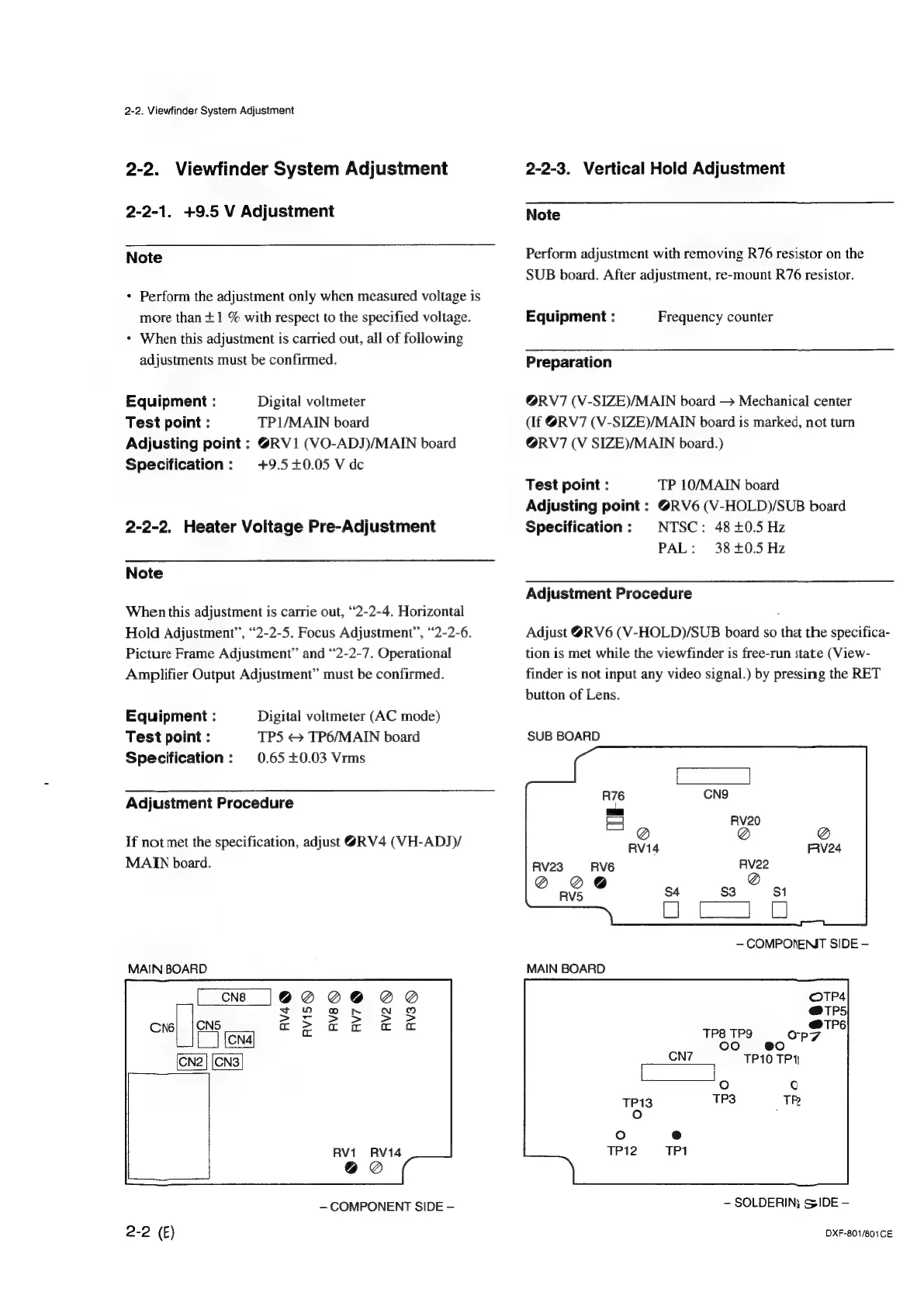
2-2.
Viewfinder
System
Adjustment
2-2.
Viewfinder
System
Adjustment
2-2-1.
+9.5
V
Adjustment
Note
*
Perform
the
adjustment
only
when
measured
voltage
is
more
than
+1
%
with
respect
to
the
specified
voltage.
*
When
this
adjustment
is
carried
out,
all
of
following
adjustments
must
be
confirmed.
Equipment
:
Digital
voltmeter
Test
point
:
TP1/MAIN
board
Adjusting
point
:
@RV1
(VO-ADJ)/MAIN
board
Specification:
+9.5+0.05
V
dc
2-2-2.
Heater
Voltage
Pre-Adjustment
Note
When
this
adjustment
is
carrie
out,
“2-2-4.
Horizontal
Hold
Adjustment”,
“2-2-5.
Focus
Adjustment”,
“2-2-6.
Picture
Frame
Adjustment”
and
“2-2-7.
Operational
Amplifier
Output
Adjustment”
must
be
confirmed.
Equipment
:
Test
point
:
Specification
:
Digital
voltmeter
(AC
mode)
TPS
<>
TP6/MAIN
board
0.65
+0.03
Vrms
Adjustment
Procedure
If
not
met
the
specification,
adjust
@RV4
(VH-ADJ)/
MAIN
board.
MAIN
BOARD
RV1
RVI4
@@
~—
COMPONENT
SIDE
-
2-2
(E)
2-2-3.
Vertical
Hold
Adjustment
Note
Perform
adjustment
with
removing
R76
resistor
on
the
SUB
board.
After
adjustment,
re-mount
R76
resistor.
Equipment
:
Frequency
counter
Preparation
@RV7
(V-SIZE)/MAIN
board
Mechanical
center
(if
@RV7
(V-SIZE)/MAIN
board
is
marked,
not
turn
@RV7
(V
SIZE)/MAIN
board.)
Test
point
:
TP
10/MAIN
board
Adjusting
point
:
@RV6
(V-HOLD)/SUB
board
Specification:
NTSC:
48
+0.5
Hz
PAL:
38+0.5
Hz
Adjustment
Procedure
Adjust
@RV6
(V-HOLD)/SUB
board
so
that
the
specifica-
tion
is
met
while
the
viewfinder
is
free-run
state
(View-
finder
is
not
input
any
video
signal.)
by
pressing
the
RET
button
of
Lens.
SUB
BOARD
RV14
RV23
RVG
Q@
@@
RV5
MAIN
BOARD
TP8 TP9
CN7
fete)
@0
ee
TP10
TP
1
———el
°
©
~
SOLDERIN;
SIDE
DXF-801/801CE

Other manuals for Sony DXF-801

Related product manuals