14
3-2. Attaching the microphone bushing
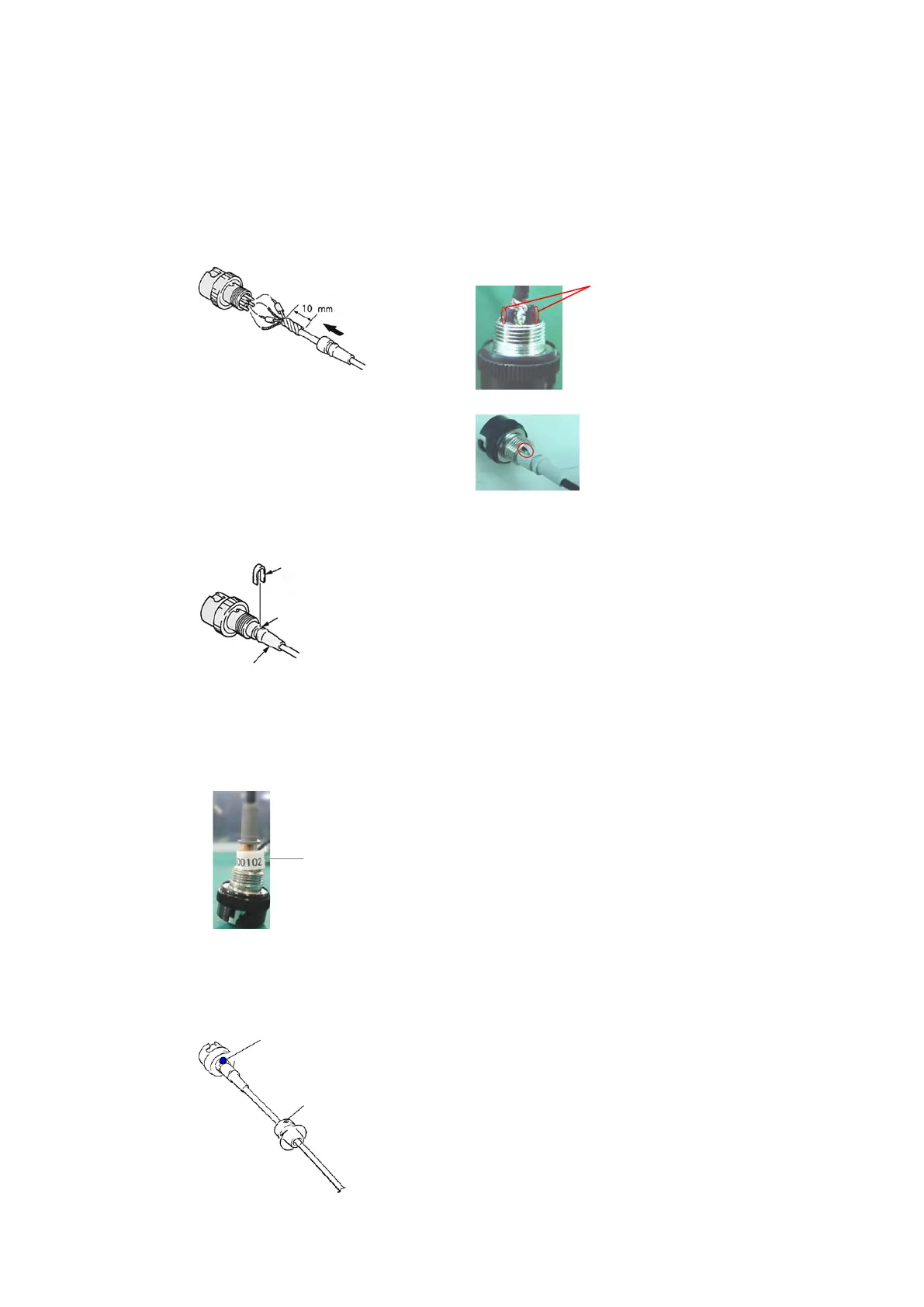
Apply the adhesive agent (Locktite (Prism 403) or equivalent) between the edge of the coating of
the microphone cable and the point about 10mm from the edge (Fig. 25), and the side of the heat
shrinkable tube (Fig. 26) and attach the microphone bushing.
At that time, the cut of the microphone bushing would be by the side of #4pin. (shown in red circle
of Fig. 27)
3-3. Attaching the cord clamp
Put the cord clamp in the groove of the microphone bushing as shown in the Fig. 28 and caulk it.
3-4. Attaching the connector cover
1) Attaching the serial number label
Attach the serial number label to the lower part of the microphone bushing. (Fig. 29)
2) Applying locking agent for screw
Apply the locking agent for screw (ThreeBond 1401B:7-432-114-11 or equivalent) as indicated
by the blue dot in Fig. 30 and attache the connector cover.
Apply the adhesive agent to
whole circumference of the
microphone cable between the
edge of the coating and the point
about 10mm from the edge.
Microphone bushing
Apply the adhesive agent
to the side of the heat
shrinkable tubes also.


 To Next Page
 Loading...