EasyManua.ls Logo

Sony ECM-999 - Page 3

Sony ECM-999
15 pages
Print Icon
To Next Page IconTo Next Page
To Previous Page IconTo Previous Page
Loading...
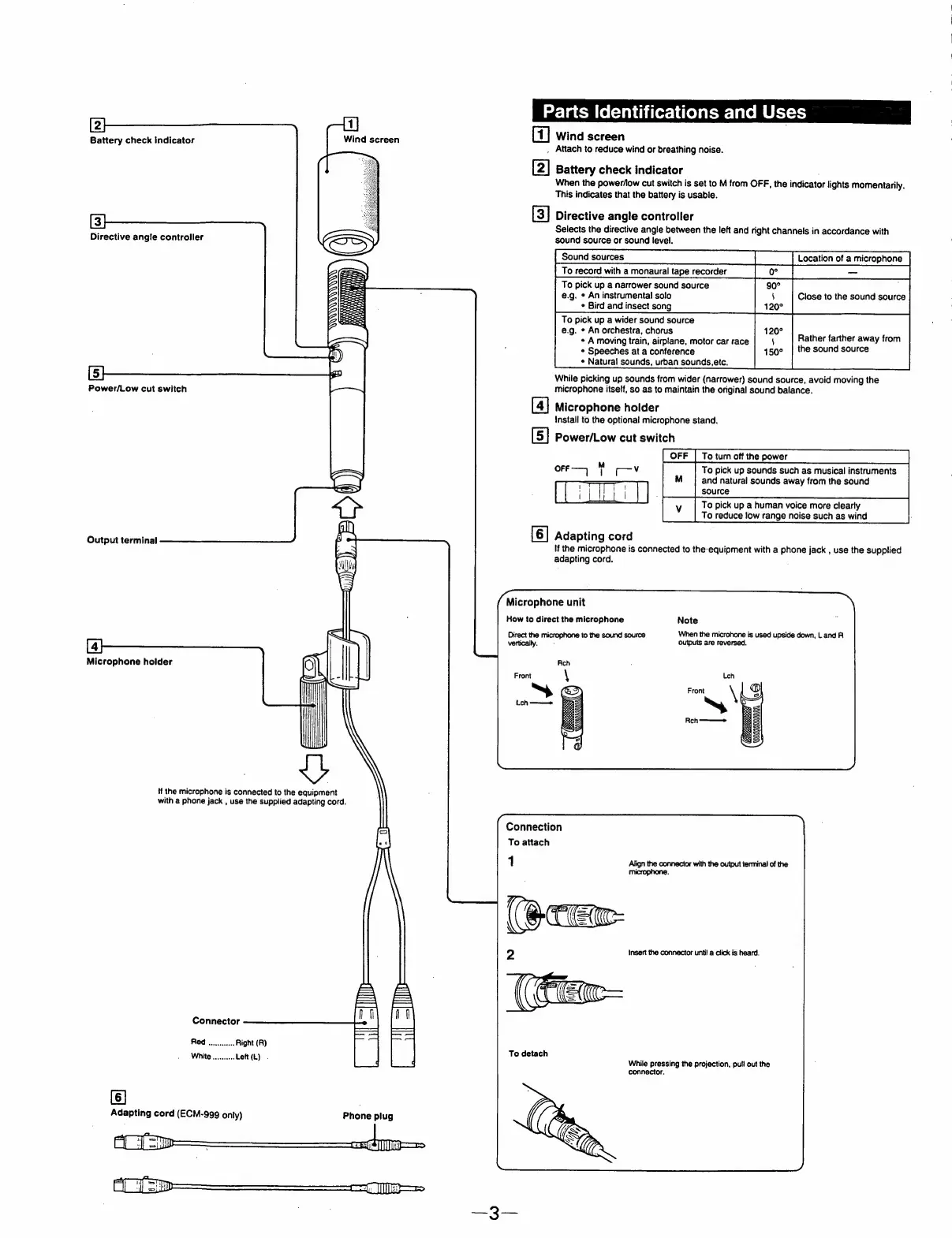
Battery
check
indicator
Directive
angle
controller
Power/Low
cut
switch
Output
terminal
Microphone
holder
Hf
the
microphone
is
connected
to
the
equipment
with
a
phone
jack
,
use
the
supplied
adapting
cord.
Connector
Red
ow.
Right
(R)
White
..........
Left(L)
.
[6]
Adapting
cord
(ECM-999
only)
AC
Sp
y
AC]
=p
Wind
screen
|
gil
eo
on
Phone
plug
=
=
=|
{ND
=
=.
—-=
age}
&omm
(o(=lay
Cbatorslile)
aloes
late
Uses
G4)
Wind
screen
_
Attach
to
reduce
wind
or
breathing
noise.
[2]
[3]
[4]
[5]
[6]
Battery
check
indicator
When
the
power/low
cut
switch
is
set
to
M
from
OFF,
the
indicator
lights
momentarily.
This
indicates
that
the
battery
is
usable.
Directive
angle
controller
Selects
the
directive
angle
between
the
left
and
right
channels
in
accordance
with
sound
source
or
sound
level.
Location
of
a
microphone
Sound
sources
|
To
record
with
a
monaural
tape
recorder
|
oe
|
mY
To
pick
up
a
narrower
sound
source
90°
e.g.
*
An
instrumental
solo
5
Close
to
the
sound
source
120°
120°
¢
Bird
and
insect
song
To
pick
up
a
wider
sound
source
i)
150°
e.g.
*
An
orchestra,
chorus
*
A
moving
train,
airplane,
motor
car
race
«
Speeches
at
a
conference
¢
Natural
sounds,
urban
sounds,etc.
Rather
farther
away
from
the
sound
source
While
picking
up
sounds
from
wider
(narrower)
sound
source,
avoid
moving
the
microphone
itself,
so as
to
maintain
the
original
sound
balance.
Microphone
holder
Install
to
the
optional
microphone
stand.
Power/Low
cut
switch
|
OFF
|
To
turn
off
the
power
To
pick
up
sounds
such
as
musical
instruments
and
natural
sounds
away
from
the
sound
orr—>
-—v
TIT)
| 4
ses
To
pick
up
a
human
voice
more
clearly
To
reduce
low
range
noise
such
as
wind
.
Adapting
cord
If
the
microphone
is
connected
to
the-equipment
with
a
phone
jack
,
use
the
supplied
adapting
cord.
Microphone
unit
How
to
direct
the
microphone
Note
Direct
the
microphone
to
the
sound
source
vertically.
When
the
microhone
is
used
upside
down,
L
and
R
Connection
To
attach
1
Align
the
connector
with
the
output
terminal
of
the
microphone.
CEM
To
detach
insert
the
connector
until
a
click
is
heard.
While
pressing
the
projection,
pull
out
the

Related product manuals