Help Guide
Wireless Microphone
ECM-W3 / ECM-W3S
Attaching the connector protect holder/stand
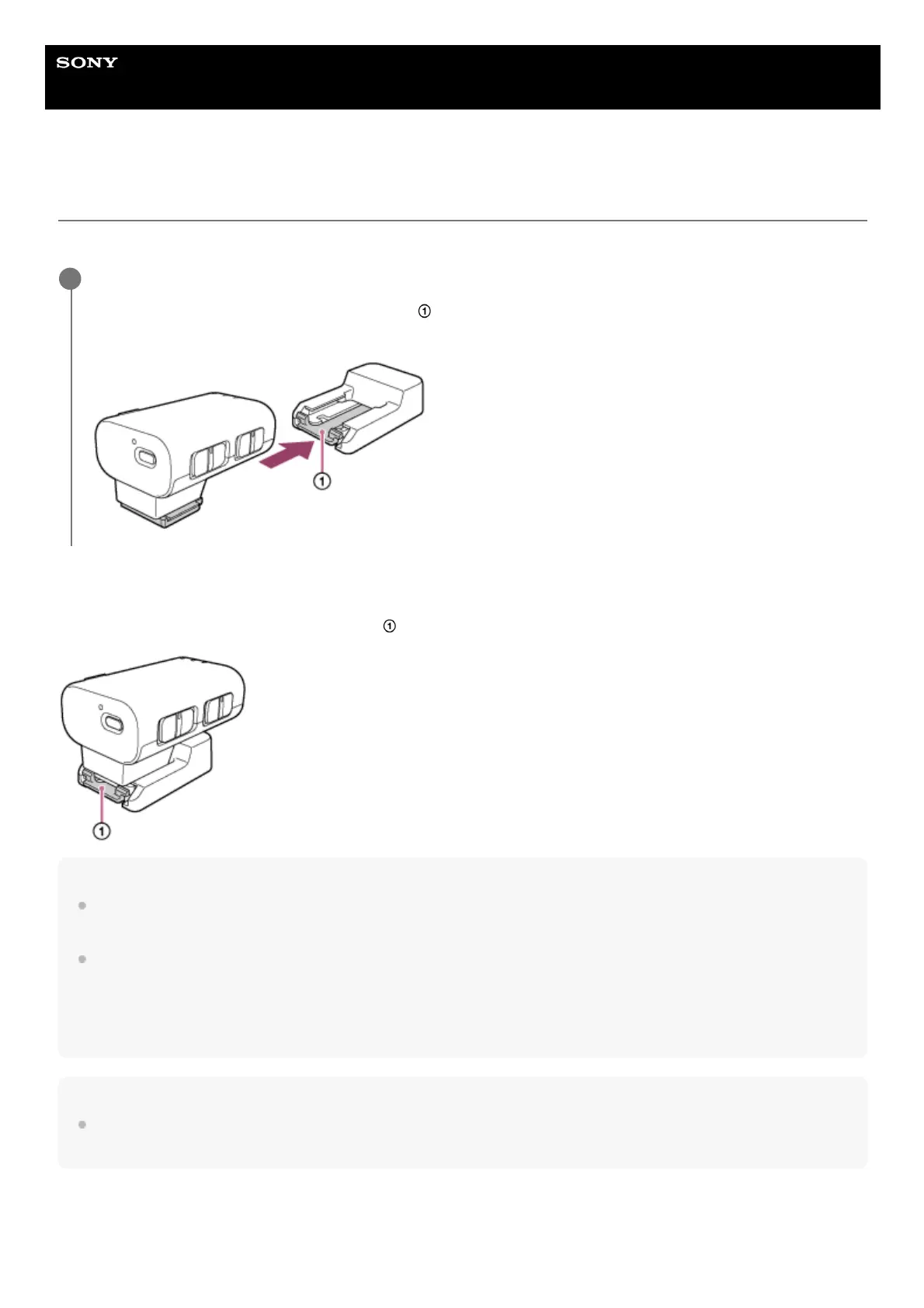
Before carrying around the receiver, attach the connector protect holder/stand (supplied) to the receiver.
To remove the connector protect holder/stand
Slightly push down and hold the retention latch (
) on the connector protect holder/stand, and then pull out the receiver.
Hint
When placing the receiver away from a camera, attach the connector protect holder/stand to the receiver. Then you can place
and use the receiver on a flat surface.
The connector protect holder/stand can be screwed to a tripod through the screw hole for tripod attachment (1/4 in. in diameter)
on the connector protect holder/stand as well.
To screw the connector protect holder/stand to the tripod, use a tripod with the screw that is shorter than 5.5 mm (7/32 in.) in
length. To a tripod with the longer screw, the connector protect holder/stand cannot be secured firmly and may be damaged by
the screw.
Note
When you do not intend to use the receiver, attach the connector protect holder/stand to the Multi Interface foot for connector
protection.
Slide the Multi Interface foot of the receiver into the connector protect holder/stand until it clicks into place.
Slightly push down and hold the retention latch (
) on the connector protect holder/stand, and then slide the
receiver into the connector protect holder/stand.
1



 To Next Page