EasyManua.ls Logo

Sony EV-C3 - Playing Back a Tape (Alternative Connection); TV Connection without Audio;Video Inputs; TV;VTR Switch Usage

Sony EV-C3
22 pages
Print Icon
To Next Page IconTo Next Page
To Previous Page IconTo Previous Page
Loading...
26
27
Editing
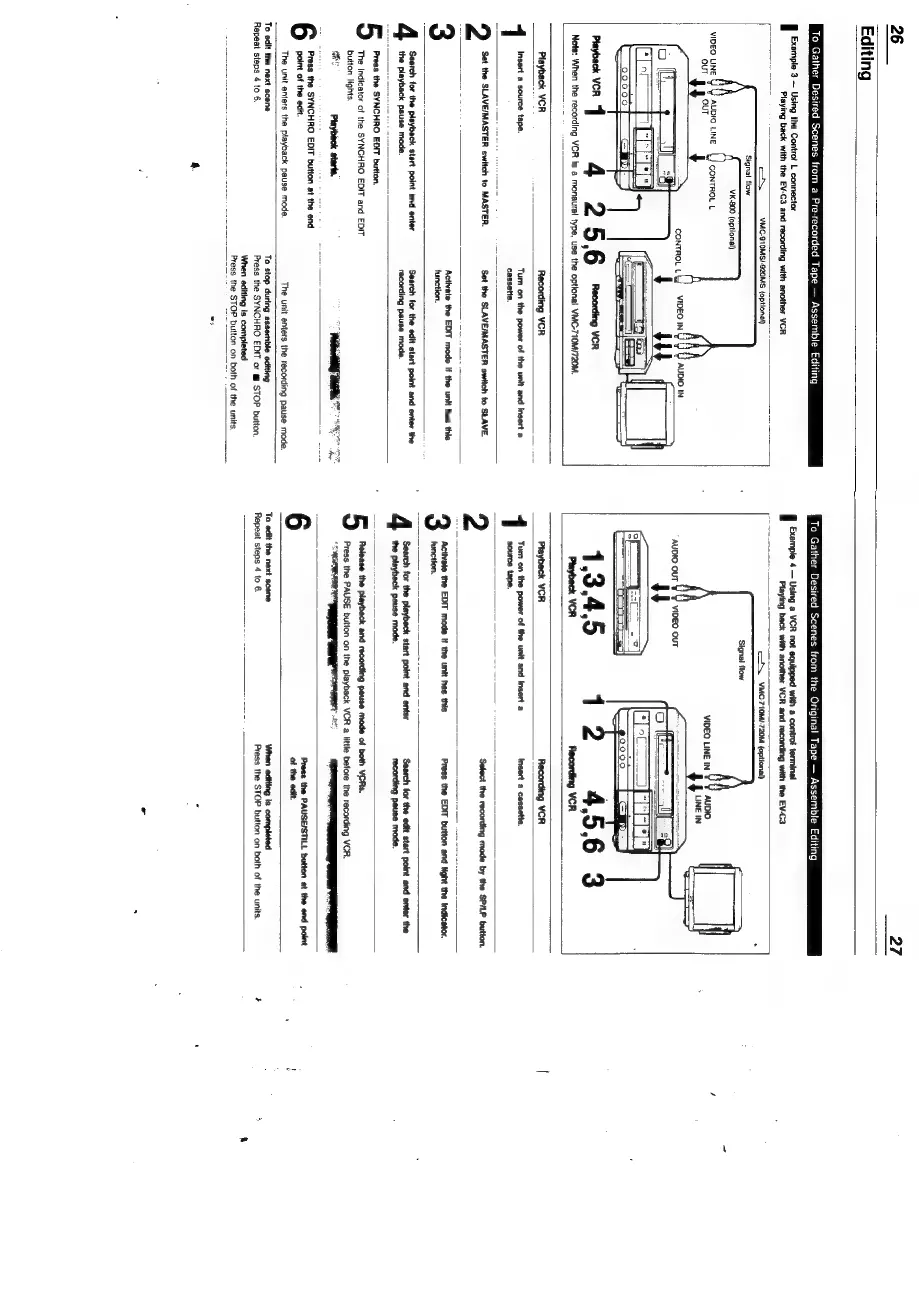
To
Gather
Desired
Scenes
from
a
Pre-recorded
Tape
Assemble
Editing
Example
3
Using
the
Controt
L
connector
Playing
back
with
the
EV-C3
and
recording
with
another
VCR
oN
VMC-910MS/-920MS
(optional)
_
Signal
flow
VK.800
(optional)
Playback
VCR
1
Note:
When
the
recording
VCR
is
a
monaural
type,
be
the
optional
VMC-710M/720M.
To
Gather
Desired
Scenes
from
the
Original
Tape
Assemble
Editing
Example
4
Using
a
VCR
not
equipped
with
a
controt
terminal
Suse
doural
ish
eased
acai
sav
aaa
~~
\VMC-710Mi-720M
(optional)
Playback
VCR
Recording
VCR
Turn
on
the
power
of
the
unit
and
insert
a
cassette.
Set
the
SLAVE/MASTER
switch
to
SLAVE.
1
Insert
a
source
tape.
2
Set
the
SLAVE/MASTER
switch
to
MASTER.
Activate
the
EDIT
mode
If
the
unit
has
this
function.
Search
for
the
edit
start
point
and
enter
the
recording
pause
mode.
Search
tor
the
playback
start
point
and
enter
the
uae
Pause
mode.
5
Press
the
SYNCHRO
EDIT
button.
The
indicator
of
the
SYNCHRO
EDIT
and
EDIT
button
lights.
lM
EES.
a
he
Press
the
SYNCHRO
EDIT
button
at
the
end
point
of
the
edit.
The
unit
enters
the
playback
pause mode.
The
unit
enters
the
recording
pause
mode.
To
edit
the
next
scene
Repeat
steps
4
to
6.
To
stop
during
assemble
editing
Press
the
SYNCHRO
EDIT
or
@
STOP
button.
When
editing
is
completed
Press
the
STOP
|
button
on
t
both
of
the
units,
Playback
VCR
Recording
VCR
Tum
on
the
power
of
the
unit
and
insert
a
Insert
a
cassette.
source
tape.
2
Select
the
recording
mode
by
the
SP/LP
button.
ee
ee
Press
the
EDIT
button
and
light
the
Indicator,
Search
for
the
playbeck
start
poirl
and
ener
the
playback
pause
mode.
Search
for
the
edit
start
point
and
enter
the
recording
pause
mode.
Release
the
playback
and
recording
pause
mode
of
both
VERS.
Press
the
PAUSE
button
on
the
playback
VCR
a
little
before
the
recording
VCR.
Press
the
PAUSE/STILL
button
at
the
end
point
of
the
edit.
To
edit
the
next
scene
Repeat
steps
4
to
6.
When
editing
is
completed
Press
the
STOP
button
on
both
of
the
units.

Related product manuals