EasyManua.ls Logo

Sony EV-C3 - Page 13

Sony EV-C3
22 pages
Print Icon
To Next Page IconTo Next Page
To Previous Page IconTo Previous Page
Loading...
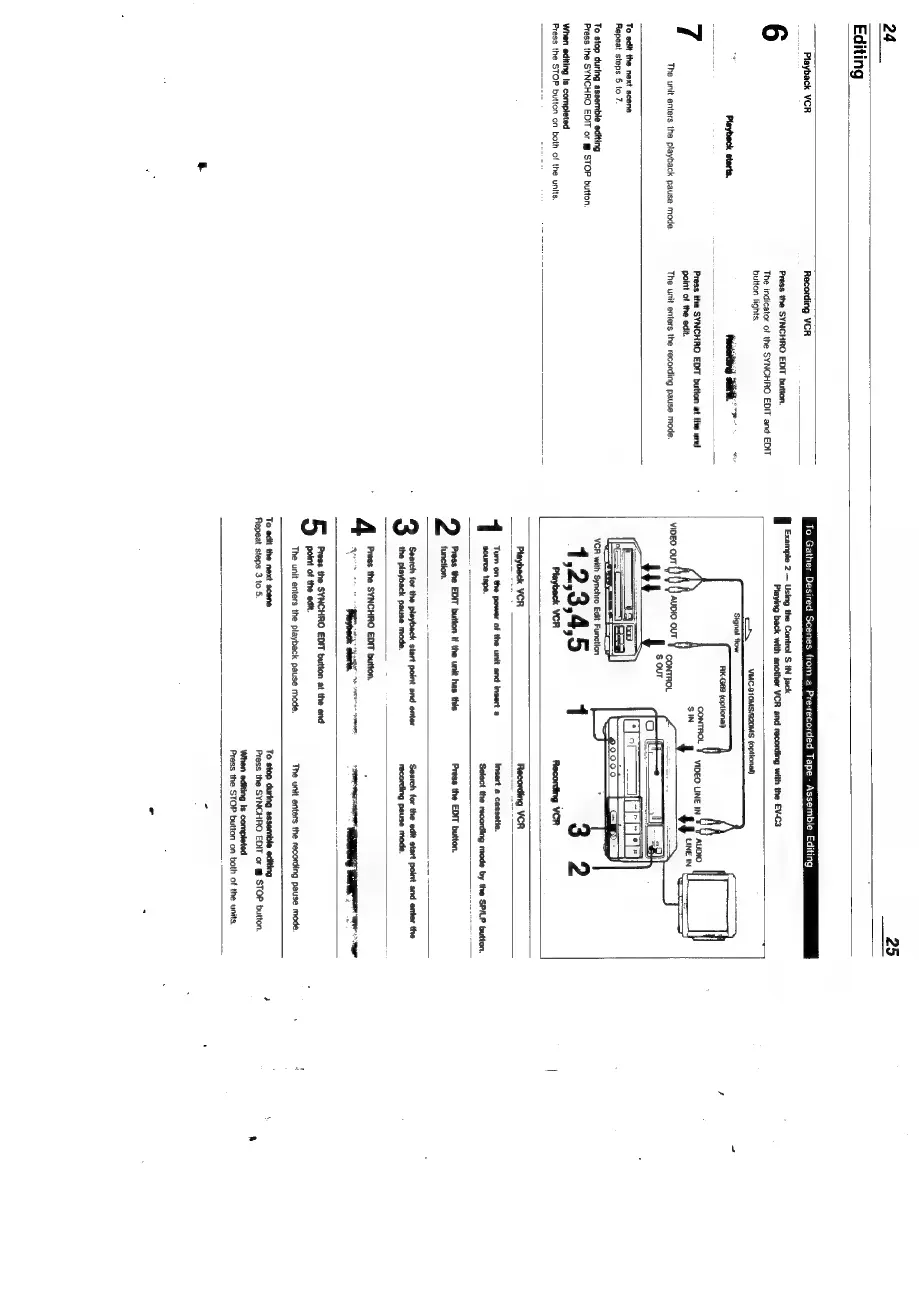
24
Editing
Playback
VCR
The
unit
enters
the
playback
pause
mode.
Recording
VCR
Press
the
SYNCHRO
EDIT
button.
The
indicator
ot
the
SYNCHRO
EDIT
and
EDIT
button
lights.
Press
the
SYNCHRO
EDIT
button
at
the
end
point
of
the
edit.
The
unit
enters
the
recording
pause
mode.
To
edit
the
next
scene
Repeat
steps
§
to
7.
To
stop
during
assemble
editing
Press
the
SYNCHRO
EDIT
or
STOP
button.
When
editing
Is
completed
Press
the
STOP
button
on
both
of
the
units.
Example
2
Using
the
Control
S
IN
Jack
To
Gather
Desired
Scenes
from
a
Pre-recorded
Tape
-
Assemble
Editing
Playing
back
with
another
VCR
and
recording
with
the
EV-C3
VMC-910MS/920MS
(optional)
VCR
with
"
Synchro
Edit
Function
=
gcd
ses
lavback
VCR
_~
acorn
VCR:
‘source
tape.
Press
the
EDIT
button
if
the
unit
has
this
function.
Insert
a
cassette.
‘Select
the
recording
mode
by
the
SP/LP
button.
Press
the
EDIT
button.
Search
for the
playback
start
point
and
enter
the
playback
pause
mode.
Search
for the
edit
start
point
and
enter
the
recording
pause
mode.
Press
the
SYNCHRO
EDIT
button.
Lapp
arta:
TTT
iain
-
'h
.
enidindiilial
is
Press
the
SYNCHRO
EDIT
button
at
the
end
point
of
the
edit.
The
unit
enters
the
playback
pause mode.
The
unit
enters
the
recording
pause mode.
To
edit
the
next
scene
Repeat
steps
3
to
5.
To
stop
during
assemble
editing
Press
the
SYNCHRO
EDIT
or
@
STOP
button.
‘When
editing
is
completed
Press
the
STOP
button
on
both
of
the
units.

Related product manuals