EasyManua.ls Logo

Sony EV-C3 - Playing Back a Tape; TV Connection with Audio;Video Inputs; Playback Operation Steps; Auto Playback Functions

Sony EV-C3
22 pages
Print Icon
To Next Page IconTo Next Page
To Previous Page IconTo Previous Page
Loading...
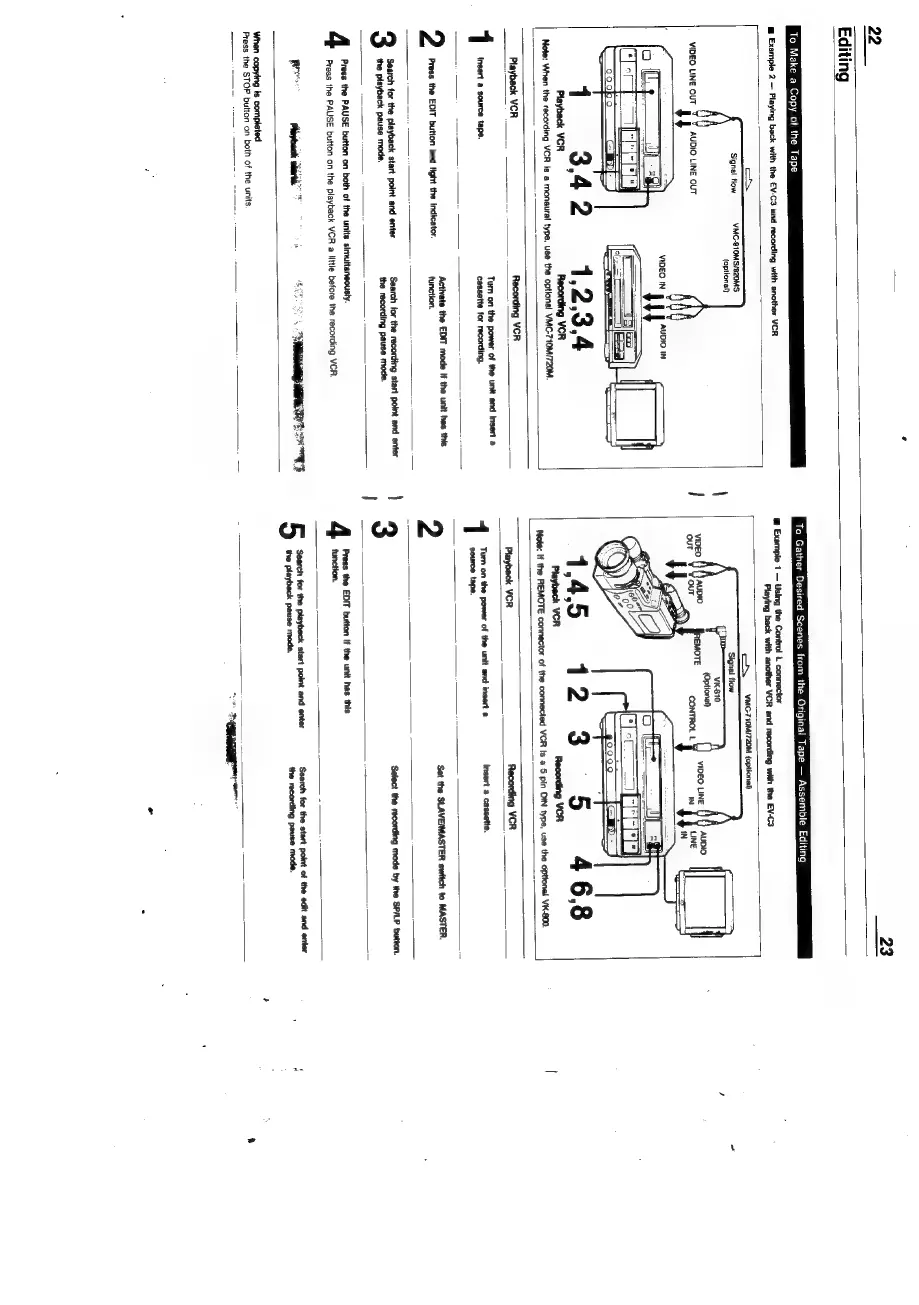
22
Editing
To
Make
a
Copy
of
the
Tape
@
Example
2
Playing
back
with
the
EV-C3
and
recording
with
another
VCR
‘Signal
tlow
VMC-S10MS/820MS
(optional)
VIDEO
LINE
OUT
AUDIO
LINE
OUT
4
Playback
VCR
To
Gather
Desired
Scenes
from
the
Original
Tape
Assemble
Editing
@
Example
1
Using
the
Control
L
connector
Playing
back
with
another
VCR
and
recording
with
the
EV-C3
Note:
When
the
recording
VCR
Is
a
monaural
type,
use
the
optional
VMC-710M/720M.
—___
YMC-710M/720M
(optional)
(go000
fem)
12.
Note:
If
the
REMOTE
connector
of
the
connected
VCR
Is
a
5
pin
DIN
type,
use
the
opttonal
VK-800.
Playback
vcR
:
Recording
VCR
Tum
on
the
power
of
the
unit
and
Insert
a
1
Insert
a
source
tape.
cassette
for
recording.
Activate
the
EDIT mode
If
the
unit
has
this
Press
the
EDIT
button
and
light
the
indicator.
function.
Search
for
the
recording
start
point
and
enter
the
recording
pause
mode.
the
playback
pause mode.
4
Press
the
PAUSE
button
on
both
of
the
units
simultaneously.
Press
the
PAUSE
button
on
the
playback
VCR
a
little
before
the
recording
VCR.
Re
ria
ern
‘When
copying
ts
completed
Press
the
STOP
button
on
both
of
the
units,
Playback
VCR
Recording
VCR
Tum
on
the
power
of
the
unit
and
insert
@
Insert
a
cassette.
source
tape.
2
Set
the
SLAVEIMASTER
switch
to
MASTER.
3
Select
the
recording
mode
by
the
SP/LP
button.
Press
the
EDIT
button
If
the
unit
has
this
function.
Search
for the
start
point
of
the
edit
and
enter
the
recording
pause
mode.
‘Search
for the
playbeck
start point
and
enter
the
playback
pause
mode.
eee

Related product manuals