EasyManua.ls Logo

Sony EV-C3 - Editing; Tape Copying Method; Assemble Editing Basics; Insert Editing Procedure

Sony EV-C3
22 pages
Print Icon
To Next Page IconTo Next Page
To Previous Page IconTo Previous Page
Loading...
38
39
Antenna
Connection
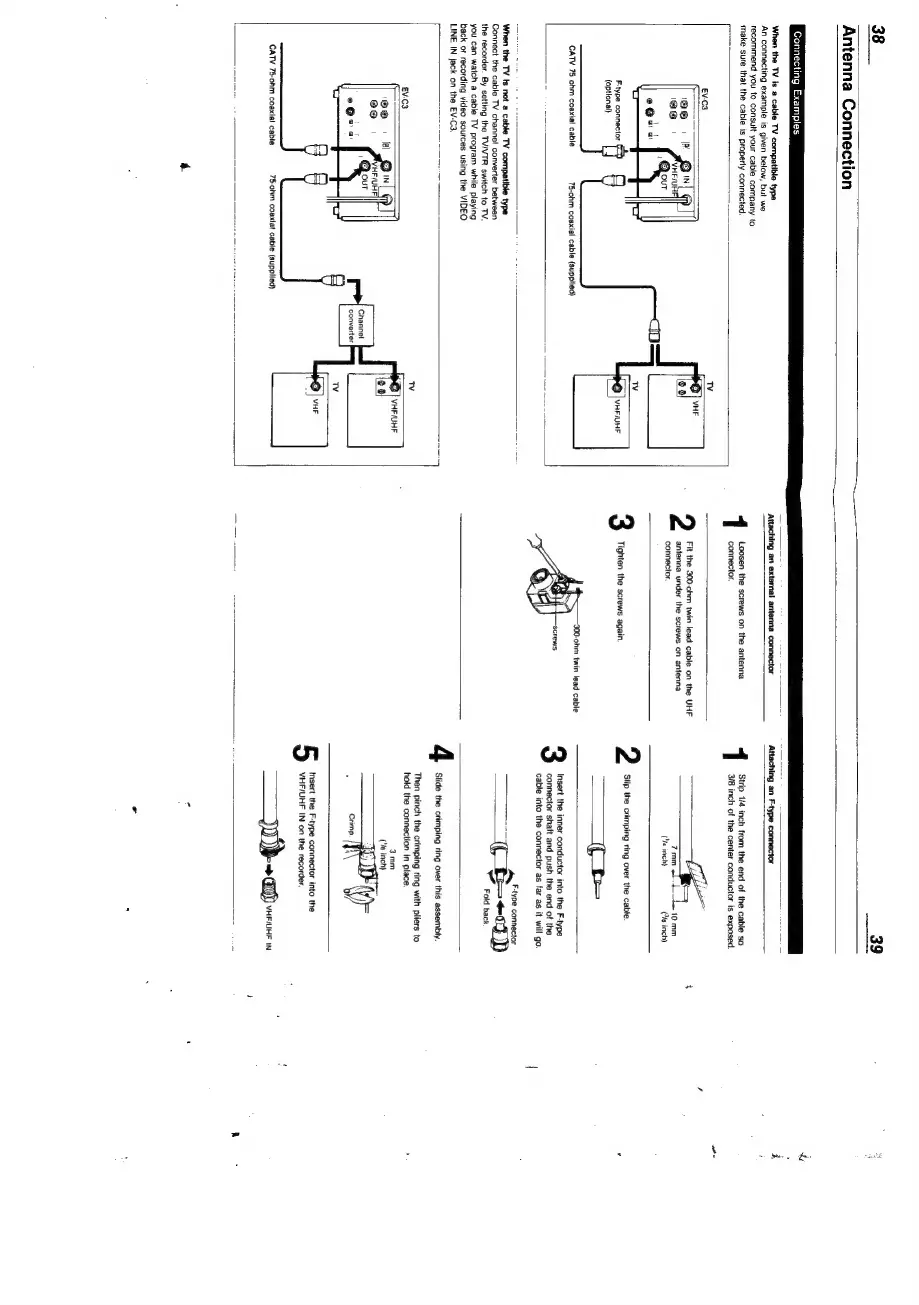
Connecting
Examples
When
the
TV
is
a
cable
TV
compatible
type
An
connecting
example
is
given
below,
but
we
recommend
you
to
consutt
your
cable
company
to
make
sure
that
the
cable
is
properly
connected.
Attaching
‘an
extemal antenna
connector
\ttaching
an
Ftype
connector
©
|
VHFIUHF
Fype
connector
(optional)
75-ohm
coaxial
cable
(supptied)
CATV
75
ohm
coaxial
cable
1
connector.
2
Fit
the
300-ohm
twin
lead
cable
on
the
UHF
Strip
1/4
inch
from
the
end
of
the
cable
so
ch
of
the
center
conductor
is
exposed.
When
the
TV
ts
not
a
cable
TV
compatible
type
Connect
the
cable
TV
channel
converter
between
the
recorder.
By
setting
the
TV/VTR
switch
to
TV,
you
can
watch
a
cable
TV
program
while
playing
back
or
recording
video
sources
using
the
VIDEO
LINE
IN
jack
on
the
EV-C3,
®
|
VHF/UHF
Ck)
Channel
converter
CATV
75-ohm
coaxial
cable
75-ohm
coaxlat
cable
(supplied)
antenna
under
the
screws
on
antenna
7
mm
4b
10
mm
connector.
(Ye
inch)
Cia
inch)
:
Slip
the
crimping
ring
over
the
cable.
Tighten
the
screws
again.
———
te
Insert
the
inner
conductor
into
the
F-type
connector
shaft
and
push
the
end
of
the
cable
into
the
connector
as
far
as
an
Fyne
connector
oJ)
Fold
back
Slide
the
crimping
ring
over
this
assembly.
Then
pinch
the
crimping
ring
with
pliers
to
hold
the
connection
in
place.
3mm
(‘Va
inch)
5
Insert
the
F-type
connector
into
the
VHF/UHF
IN
on
the
recorder.
)
ban
VHF/UHF
IN

Related product manuals