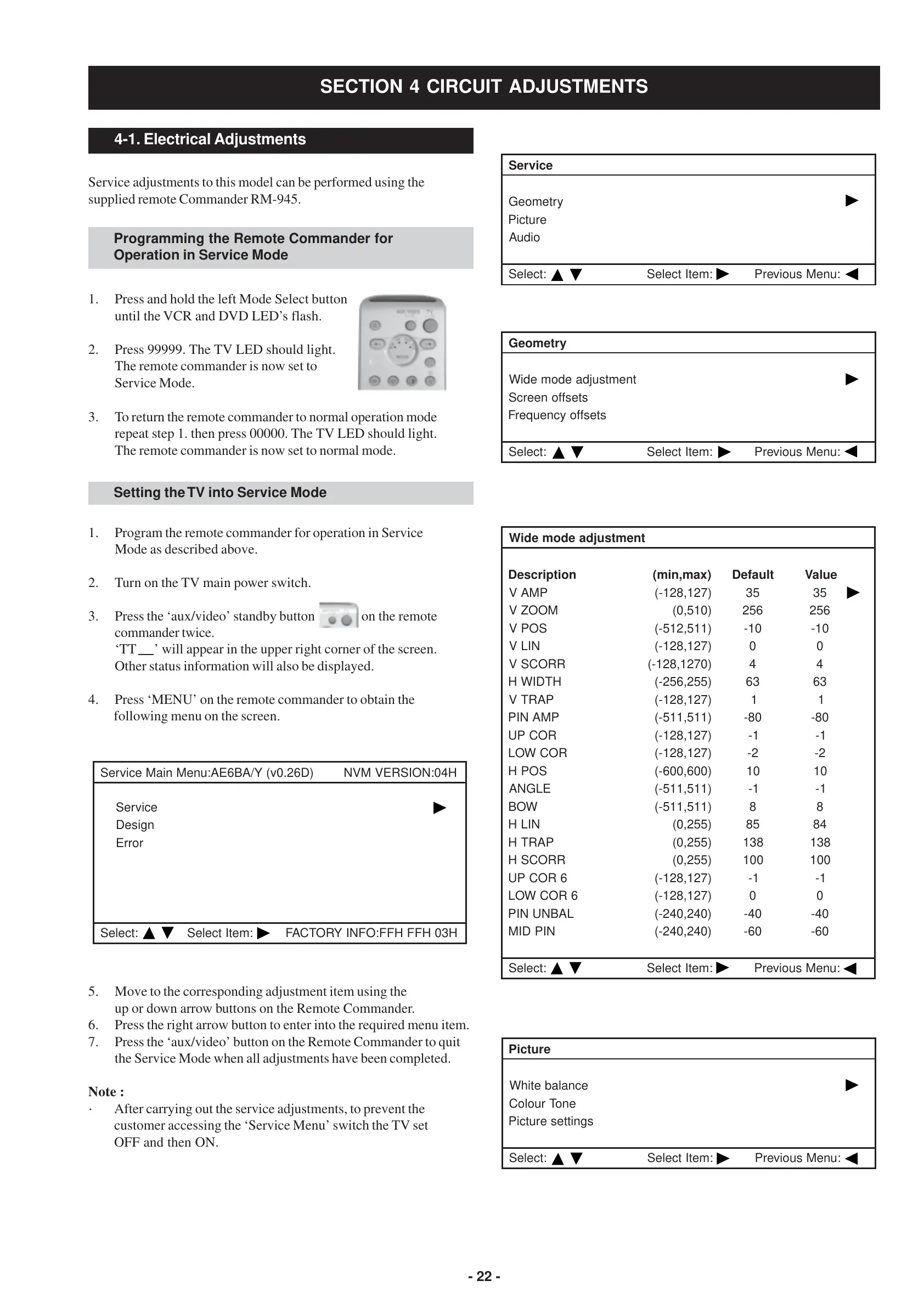
- 22 -
4-1. Electrical Adjustments
Service adjustments to this model can be performed using the
supplied remote Commander RM-945.
SECTION 4 CIRCUIT ADJUSTMENTS
Programming the Remote Commander for
Operation in Service Mode
Setting the TV into Service Mode
1. Program the remote commander for operation in Service
Mode as described above.
2. Turn on the TV main power switch.
3. Press the ‘aux/video’ standby button on the remote
commander twice.
‘TT ’ will appear in the upper right corner of the screen.
Other status information will also be displayed.
4. Press ‘MENU’ on the remote commander to obtain the
following menu on the screen.
5. Move to the corresponding adjustment item using the
up or down arrow buttons on the Remote Commander.
6. Press the right arrow button to enter into the required menu item.
7. Press the ‘aux/video’ button on the Remote Commander to quit
the Service Mode when all adjustments have been completed.
Note :
· After carrying out the service adjustments, to prevent the
customer accessing the ‘Service Menu’ switch the TV set
OFF and then ON.
ecivreS
yrtemoeG
erutciP
oiduA
:tceleS:metItceleS:uneMsuoiverP
yrtemoeG
tnemtsujdaedomediW
stesffoneercS
stesffoycneuqerF
:tceleS:metItceleS:uneMsuoiverP
tnemtsujdaedomediW
noitpircseD)xam,nim(tluafeDeulaV
PMAV)721,821-(5353
MOOZV)015,0(652652
SOPV)115,215-(01-01-
NILV)721,821-(00
RROCSV)0721,821-(44
HTDIWH)552,652-(3636
PARTV)721,821-(11
PMANIP)115,115-(08-08-
ROCPU)721,821-(1-1-
ROCWOL)721,821-(2-2-
SOPH)006,006-(0101
ELGNA)115,115-(1-1-
WOB)115,115-(88
NILH)552,0(5848
PARTH)552,0(831831
RROCSH)552,0(001001
6ROCPU)721,821-(1-1-
6ROCWOL)721,821-(00
LABNUNIP)042,042-(04-04-
NIPDIM)042,042-(06-06-
:tceleS:metItceleS:uneMsuoiverP
erutciP
ecnalabetihW
enoTruoloC
sgnitteserutciP
:tceleS:metItceleS:uneMsuoiverP
H40:NOISREVMVN)D62.0v(Y/AB6EA:uneMniaMecivreS
ecivreS
ngiseD
rorrE
:tceleS:metItceleSH30HFFHFF:OFNIYROTCAF
3. To return the remote commander to normal operation mode
repeat step 1. then press 00000. The TV LED should light.
The remote commander is now set to normal mode.
1. Press and hold the left Mode Select button
until the VCR and DVD LED’s flash.
2. Press 99999. The TV LED should light.
The remote commander is now set to
Service Mode.




 To Next Page