9
Overview of Controls
Overview of Controls
Sony KV-AR21M30 Group A11 (GB)_4-097-821-11 (2)
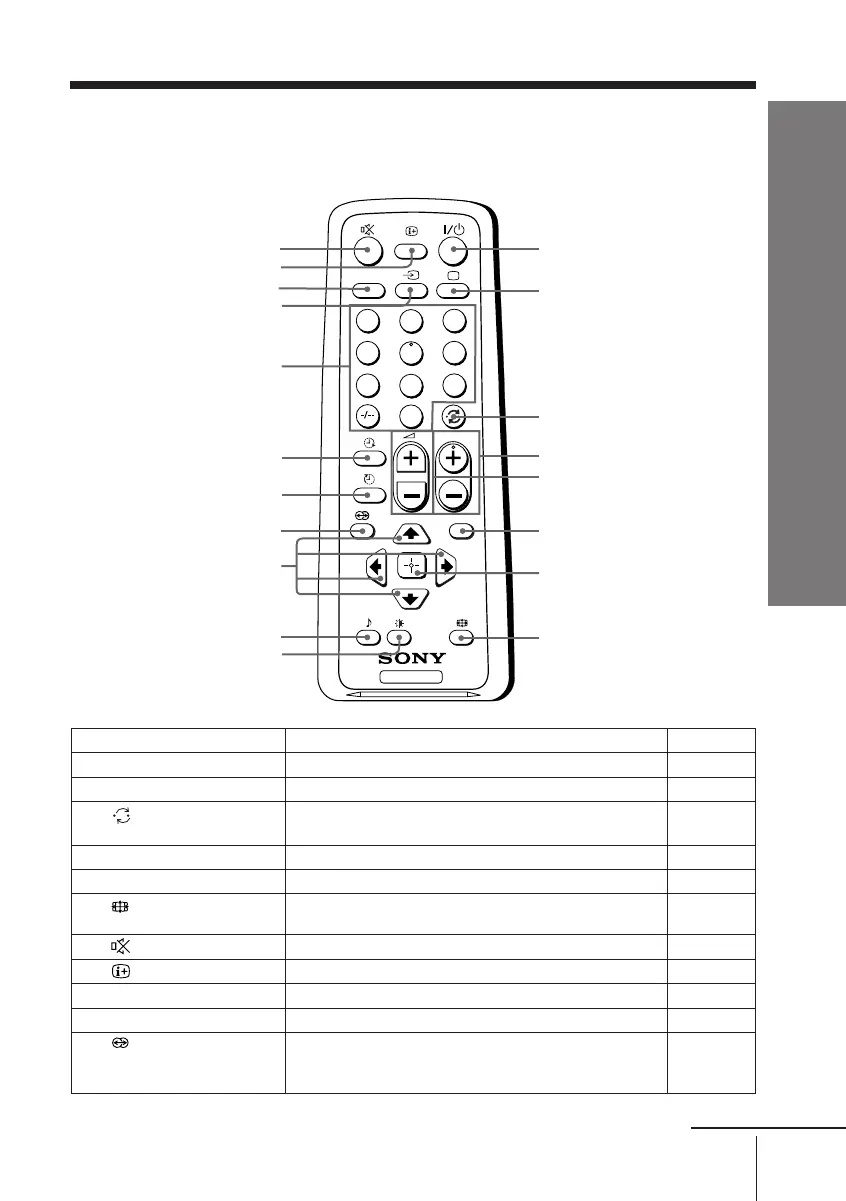
x Using the remote control and basic
functions
TV
1
2
3
4
6
7
8
9
0
5
MENU
PROG
A/B
1
2
3
6
7
4
5
qj
qd
9
qf
qg
qk
qh
8
0
qa
qs
ql
continue
Button Description Page
1 ?/1 Turn off temporarily or turn on the TV. –
2 a Display the TV program. –
3 Jump to last program number that has been –
watched for at least five seconds.
4 PROG +/– Select program number. –
5 2 +/– Adjust volume. –
8 Change the picture size: –
“On” (16:9 wide-mode), “Off”.
9 Mute the sound. –
0
Display on-screen information. –
qs t Select TV or video input. 23
qd 0 – 9, ÷ Input numbers. –
qh Select surround mode options: –
“SRS” (three dimensional surround),
“Simulated” (stereo-like monaural sound), “Off”.
01GB04INS-MIX.p65 30/7/1918, 4:56 PM9








 To Next Page