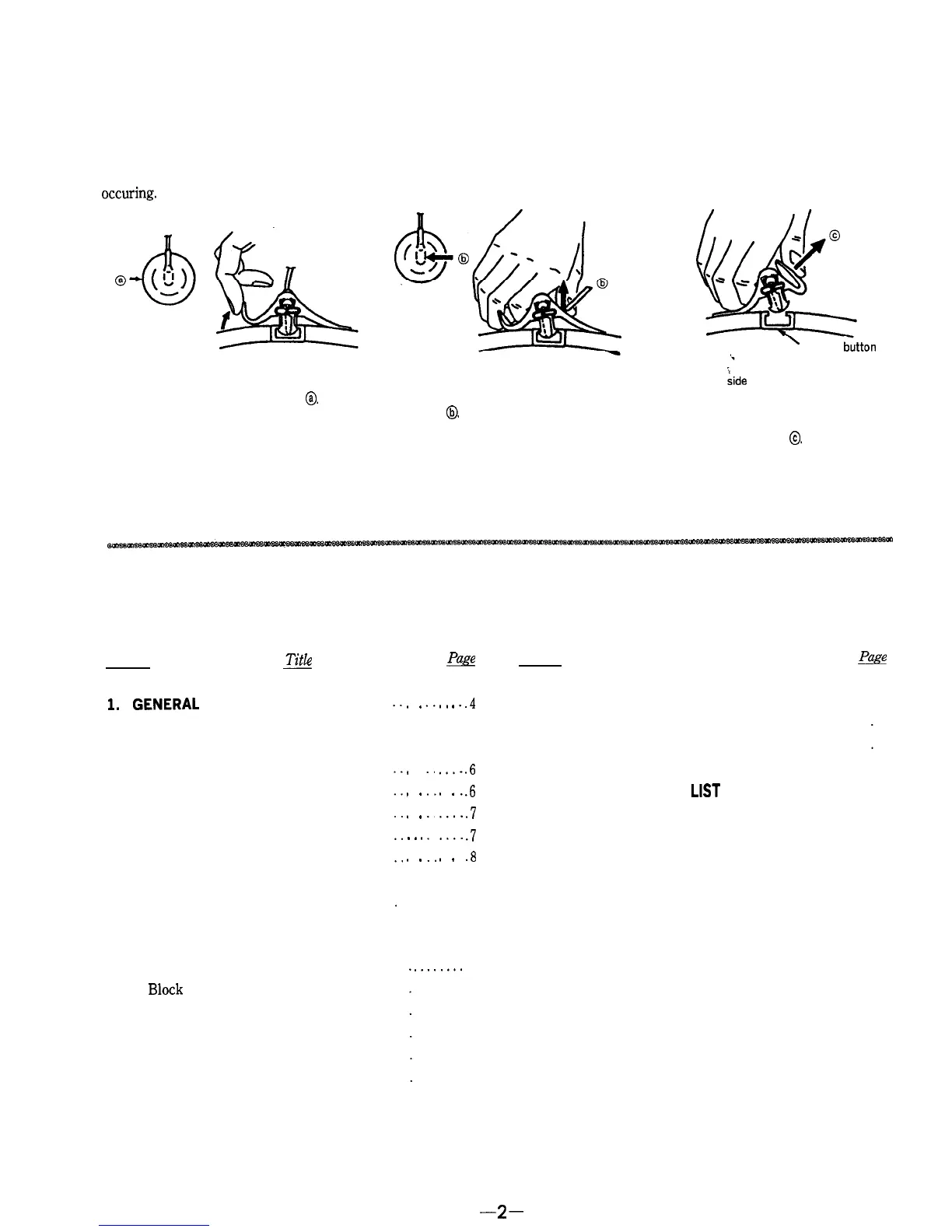
REMOVALOFANODECAP
Ground using the slotted screwdriver properly when remov-
ing the anode cap to prevent any electrical shocks from
occuring.
@Turn up one side of the rubber cap in the
direction indicated by the arrow
0.
@Using a thumb pull up the rubber cap
firmly in the direction indicated by the
arrow
@.
’
Anode button
@When one
Lide
of the rubber cap is
separated from the anode button, the
anode-cap can be removed by turning
up the rubber cap and pulling up it in the
direction of the arrow
0.
TABLEOFCONTENTS
Section
J-it&
*
Section
Title
&
1.
GENERAL . . . . . . . . . . . . . . . . . . .
2. DISASSEMBLY
2-1.
Rear Cabinet
........................
2-2.
D Board ............................
2-3. Dial Assy
............................
2-4.
Cathode-ray Tube
....................
2-5.
Dial Pointer Setting
..................
3. SAFETY RELATED ADJUSTMENTS .
. . . . . . . . . . .
9
.
.
.
.
.
.
.
.
.
.
.
.
.
.
.
.
.
.
.
.4
.6
.6
.7
.7
.8
5. EXPLODED VIEWS
5-1.
Rear Cabinet Section . . . . . . . . . . . . . . . . . . .
5-2. Front Cabinet Section
. . . . . . . . . . . . . . . . . . . .
6.
ELECTRICAL PARTS LIST
. . . . . . . . . . . . . . .
4. DIAGRAMS
4-1.
Semiconductor Lead Layouts . . . . . . . . .
4-2.
Block
Diagram.........................
4-3. Circuit Boards Location
. . . . . . . . . . . . . . .
4-4.
Printed Wiring Boards-A/R Boards-
4-5.
Schematic Diagram-A/R Boards- . . . . .
4-6.
Schematic Diagram-C/D/F Boards- . . .
4-7.
Printed Wiring Boards-C/D/F Boards-
........
10
........
11
........
14
........
14
........
17
........
21
........
25
30
31
32
-2-



 To Next Page