SECTION 1
GENERAL
This section is extracted from
instruction manual.
I
.A__‘_1^.%.h.&~
+-Lrl.d&.--.;,---
.__-.,..
.
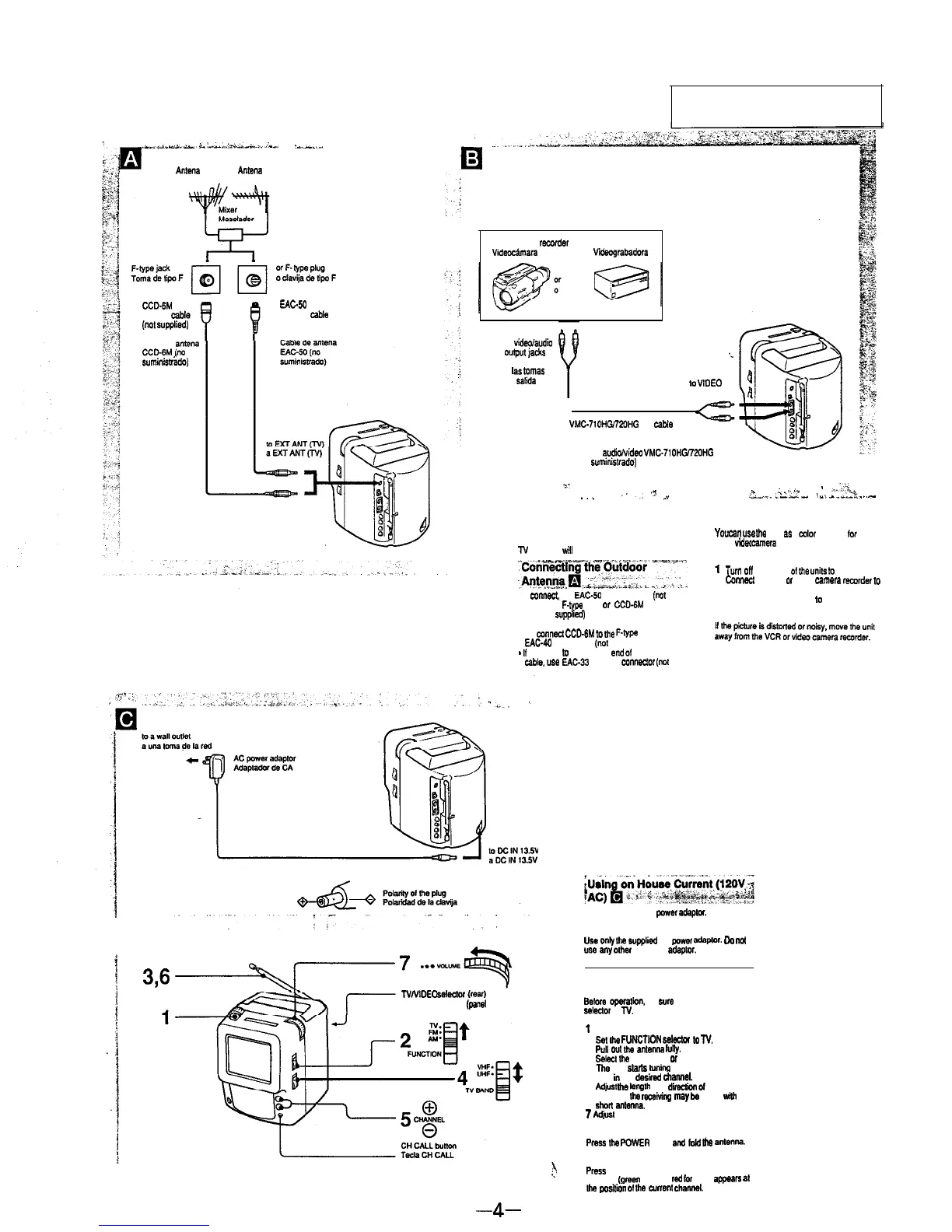
VHF antenna
UHF antenna
Anlena
de VHF
Antena
de UHF
Video camera recorder VCR
Videc&mara
Viirabadora
CCDdM
antenna cable
(“01
supplied)
EAC-M
antenna cab,*
(not supplied)
to
vidwlaudio
output
j&s
‘.
Cable de
antena
CCD-GM,(“o
suministmdo)
a
Las
tamaS
de
salida
de
video/audio.
10
VlDEO IN
a VIDEO IN
1
WC-71OHG’ZOHG AV caMe
(not supplied)
Cable de
audio/video
VMC.710H0720HG
(no suministrado)
_/.
,?
._
“”
,x
Connecting an
External Antenna
_
“_.,‘V
-
,.:,t
L‘,.-Av.
-L-e
I
wja.
23.
. .
..-
Using as a Monitor
q
YOU
Cal
usa
lhe
unit
a6
a
color
monitor
for
your
VCR or
video
camera
recorder.
Connection
1
2
Turn
Off
the power
of
the
“nits
lo
be used.
Co”“%1 the VCR 0, video camera warder
10
3
the VIDEO IN jacks.
Set the NNIDEO selector ta VIDEO.
Note
N
receiving
will
improve.
To
connect.
“se EAC-60 antenna cable
(““1
supplied) lo, F-typs plug
o,
CCDdM
antenna
cable (not
supplied)
for F-type jack
. To mnnect CCD4M m
Die
F.type
plug. use
EAC-40
F-type joint (not supplied).
-
II
you need
to
prepare the
end
of
the antenna
cable. us* EAC-33 antenna
co”“eclOr
(not
supplied).
Power Sources
Use the supplied AC
power
adapton
Note
Use
only
Ihe
svppliod
AC
powor
ada~to,.
Da
not
“se
any
olhe, AC power adaptw.
q
1
3,6
NNIDEO
selectci
(rear)
Watching the TV
q
Belore
operalion.
be sure to set the NNIDEO
%4wttw to
N.
Selector NNIDEO
(panel
posterior)
1 Press the POWER switch.
2
Sel
the
FUNCTtON
s&do,
to
N.
3
Pull
out
the
antenna
hlny.
4
Sdec,
Ihe
band. VHF
01
UHF.
The unit
sPrls
tuning automatically.
6
Tune in the
desired
channel.
6 wpst
the
kngth
and
dim
or
the antenna
For UHF,
ttw
,ocetvt”g
may
be
better
wi,h
he
short
antenna.
7
Adiwt the volume.
To turn off the TV
Press
the
POWER stitch
and
totd
the
a”te”“a.
To indicate the current channel
.!
Press
the CH CALL button.
The tins (green to, VHF, red
for
UHF) appea= at
th4
pvorition
Of
Ihe
cuent dl.““at.
-4-


 To Next Page