41
Dubbing/Editing
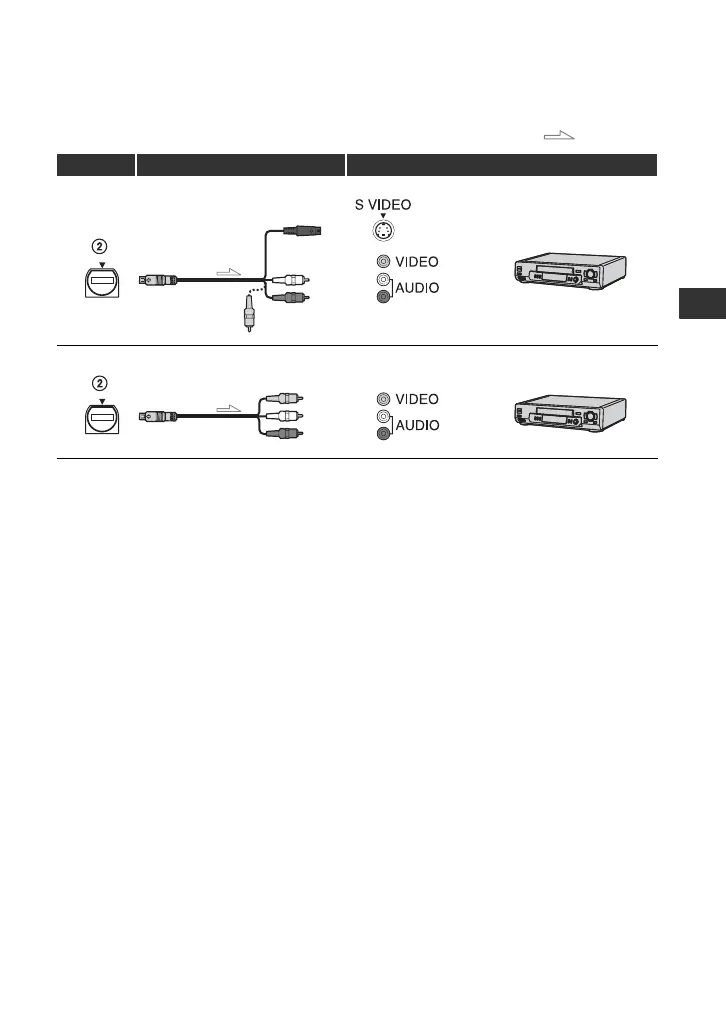
Using an A/V connecting cable with S VIDEO or an A/V connecting cable
* When connecting the VCR to a monaural device, connect the yellow plug of the A/V connecting cable to
the video jack on the device, then connect the white (left channel) or red (right channel) plug to the audio
jack on the device.
b Notes
• Set [DISP OUTPUT] to [LCD PANEL] (the default setting) when connecting with an A/V connecting
cable (p. 59).
• When connecting with an A/V connecting cable, set [TV TYPE] (p. 57) according to the display device to
play back recorded picture.
• To record the picture displaying the date/time data on the screen when connected with an A/V connecting
cable, set [DISP OUTPUT] to [V-OUT/PANEL] (p. 59).
z Tips
• When you connect the VCR to the other VCR or DVD/HDD recorder via the S VIDEO jack by using an
A/V connecting cable with S VIDEO (optional), higher quality DV format pictures can be produced than
when using an A/V connecting cable. When you make an S VIDEO connection only, audio will not be
output.
: Signal flow
VCR Cable External device
A/V connecting cable with
S VIDEO (optional)
(Red)
(White)
(Yellow)
AV device with S VIDEO jack
t SD quality
A/V connecting cable
(supplied)
(Red)
(White)
(Yellow)
AV device with audio/video jacks*
t SD quality
Continued ,






 To Next Page