HCD-GPX33/GPX55/GPX77/GPX88
9
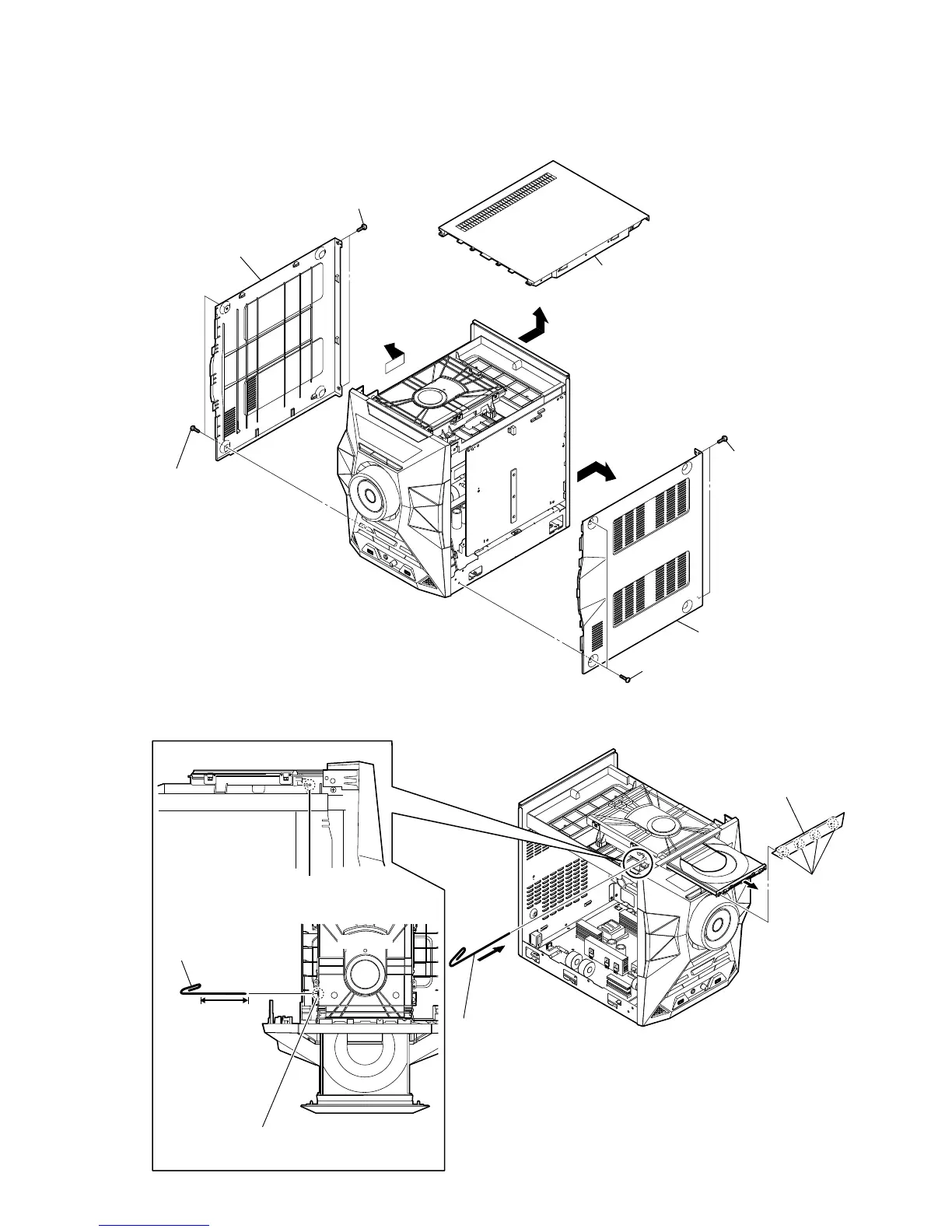
2-3. LOADING PANEL
Note: Follow the disassembly procedure in the numerical order given.
2-2. SIDE-L PANEL, SIDE-R PANEL, TOP PANEL
1 Insert the clip etc.
tray
CD drive
Insert the clip etc. processed
to the length of 8 cm or
more in the hole on the
side of the chassis
and push.
8 cm or more
hole
– Side view –
– Top view –
Note:
Push after it inserts it in this hole well.
4 panel, loading assy
3 four claws
2
7
3
1 two screws
(+BVTP 3 u 10)
2 two screws
(+BVTP 3 u 10)
4 panel, side-L
8 panel, side-R
6 two screws
(+BVTP 3 u 10)
0 panel, top
5 two screws
(+BVTP 3 u 10)
9



 To Next Page