EasyManua.ls Logo

Sony HCD-H77 - Page 12

Sony HCD-H77
71 pages
Print Icon
To Next Page IconTo Next Page
To Previous Page IconTo Previous Page
Loading...
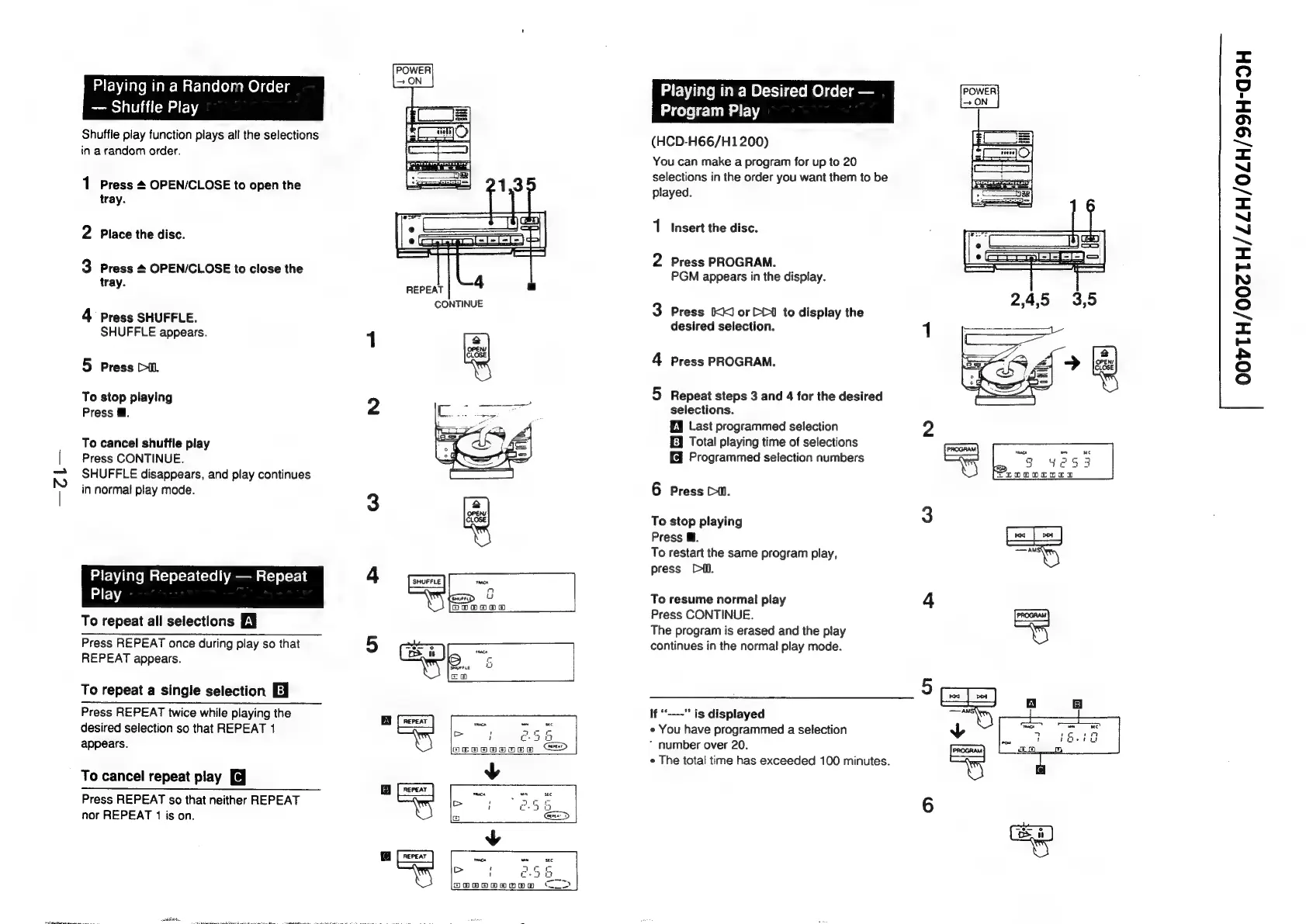
Playing
in
a
Random
Order
Shuffle
Play
Shuffle
play
function
plays
all
the
selections
in
a
random
order.
1
Press
&
OPEN/CLOSE
to
open
the
tray.
nh
Place
the
disc.
w
Press
&
OPEN/CLOSE
to
close
the
tray.
4
Press
SHUFFLE.
SHUFFLE
appears.
5
Press
Dil.
To
stop
playing
Press
@.
To
cancel
shuffle
play
Press
CONTINUE.
SHUFFLE
disappears,
and
play
continues
in
normal
play
mode.
Playing
Repeatedly
Repeat
Play
To
repeat
all
selections
ZY
Press
REPEAT
once
during
play
so
that
REPEAT
appears.
To
repeat
a
single
selection
Ej
Press
REPEAT
twice
while
playing
the
desired
selection
so
that
REPEAT
1
appears.
To
cancel
repeat
play
Press
REPEAT
so
that
neither
REPEAT
nor
REPEAT
1
is
on.
i
sett
ol
>|
alt
ofl
|
SHUFFLE
taacx
n
u
OoBooad
Playing
in
a
Desired
Order
POWER
Program
Play
(HCD-H66/H1200)
You
can
make
a
program
for
up
to
20
selections
in
the
order
you
want
them
to
be
played.
1
Insert
the
disc.
2
Press
PROGRAM.
PGM
appears
in
the
display.
3
Press
KK
or
DD1
to
display
the
desired
selection.
4
Press
PROGRAM.
5
Repeat
steps
3
and
4
for
the
desired
selections.
EY
Last
programmed
selection
E]
Total
playing
time
of
selections
Programmed
selection
numbers
6
Press
Dw.
To
stop
playing
3
Press
@.
ca
To
restart
the
same
program
play,
=o
press
Di.
To
resume
normal
play
4
Press
CONTINUE.
The
program
is
erased
and
the
play
continues
in
the
normal
play
mode.
If
“----"
is
displayed
¢
You
have
programmed
a
selection
number
over
20.
¢
The
total
time
has
exceeded
100
minutes.
OOVTH/002TH/ZZH/0ZH/99H-G9H

Related product manuals