EasyManua.ls Logo

Sony HCD-H77 - Sleep Timer and Microphone Operations

Sony HCD-H77
71 pages
Print Icon
To Next Page IconTo Next Page
To Previous Page IconTo Previous Page
Loading...
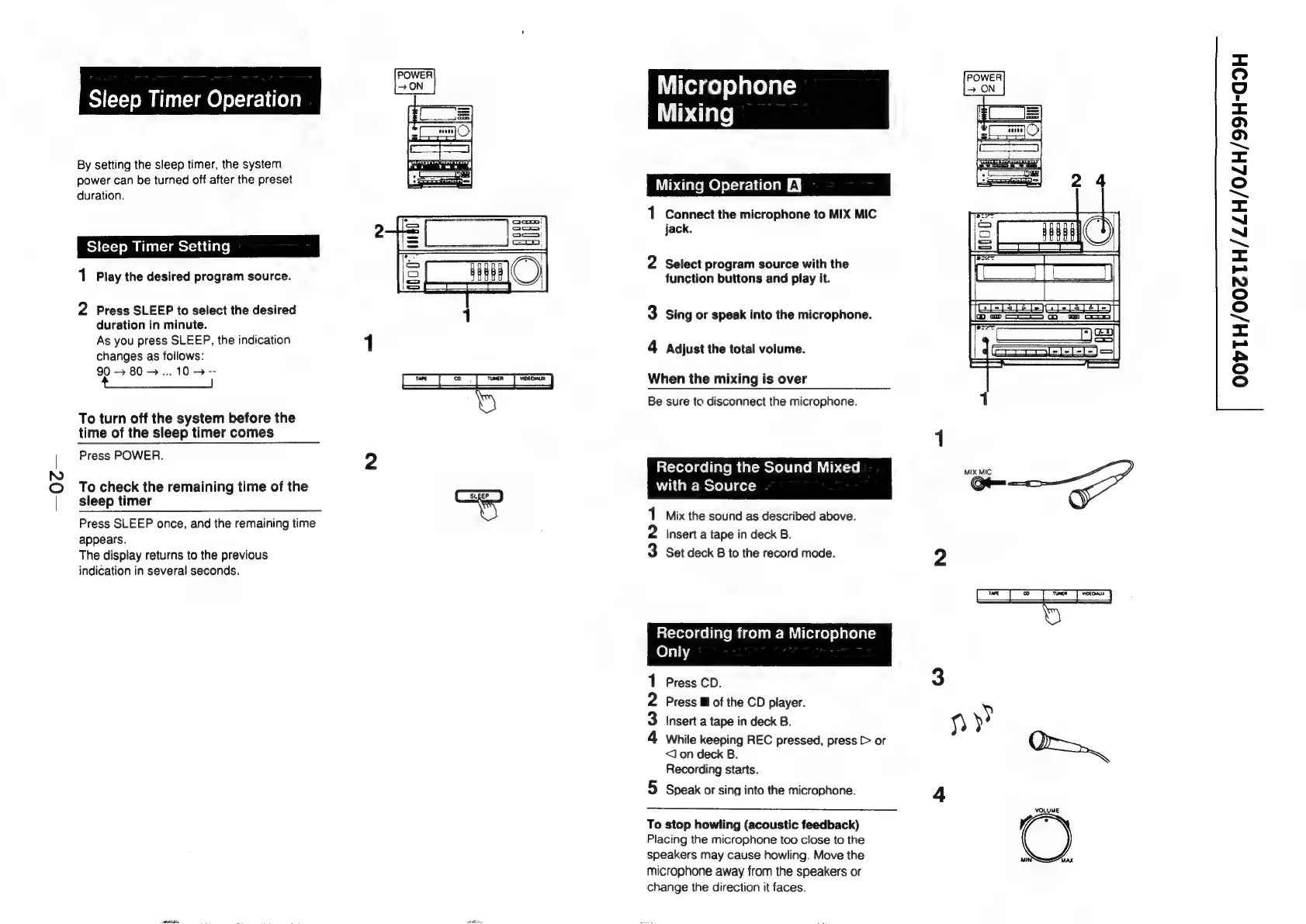
Sleep
Timer
Operation
By
setting
the
sleep
timer,
the
system
power
can
be
turned
off
after
the
preset
duration.
Sleep
Timer
Setting
1
Play
the
desired
program
source.
2
Press
SLEEP
to
select
the
desired
duration
in
minute.
As
you
press
SLEEP,
the
indication
changes
as
follows:
90
>
80>...
10
>
--
ee
To
turn
off
the
system
before
the
time
of
the
sleep
timer
comes
Press
POWER.
To
check
the
remaining
time
of
the
sleep
timer
Press
SLEEP
once,
and
the
remaining
time
appears.
The
display
returns
to
the
previous
indication
in
several
seconds.
POWER
ON
(suger
FA
Witold
fo)
elated
aT
=
Mixing
Mixing
Operation
£3
1
Connect
the
microphone
to
MIX
MIC
jack.
2
Select
program
source
with
the
function
buttons
and
play
it.
3
Sing
or
speak
into
the
microphone.
4
Adjust
the
total
volume.
When
the
mixing
is
over
Be
sure
ta
disconnect
the
microphone.
lat-rerelcollalemeir-metel
lave
miuib
<-2e|
Mix
MIC
with
a
Source
Om
1
Mix
the
sound
as
described
above.
2
Insert
a
tape
in
deck
B.
3
Set
deck
B
to
the
record
mode.
2
Recording
from
a
Microphone
Only
Press
CD.
3
Press
@
of
the
CD
player.
Insert
a
tape
in
deck
B.
9)
y>
While
keeping
REC
pressed,
press
[>
or
<Jon
deck
B.
Or
Recording
starts.
Speak
or
sing
into
the
microphone.
4
hOND
on
VOLUME
To
stop
howling
(acoustic
feedback)
Placing
the
microphone
too
close
to
the
speakers
may
cause
howling.
Move
the
ne
microphone
away
from
the
speakers
or
change
the
direction
it
faces.
Max
<=
QO
"4
=<
fe)
(>)
<=
(=)
~—s
=
~“
~
=
=
NO
fo]
(=)
~
<x
=
h
oO
fo)

Related product manuals