EasyManua.ls Logo

Sony HCD-H77 - Timer-activated Operation

Sony HCD-H77
71 pages
Print Icon
To Next Page IconTo Next Page
To Previous Page IconTo Previous Page
Loading...
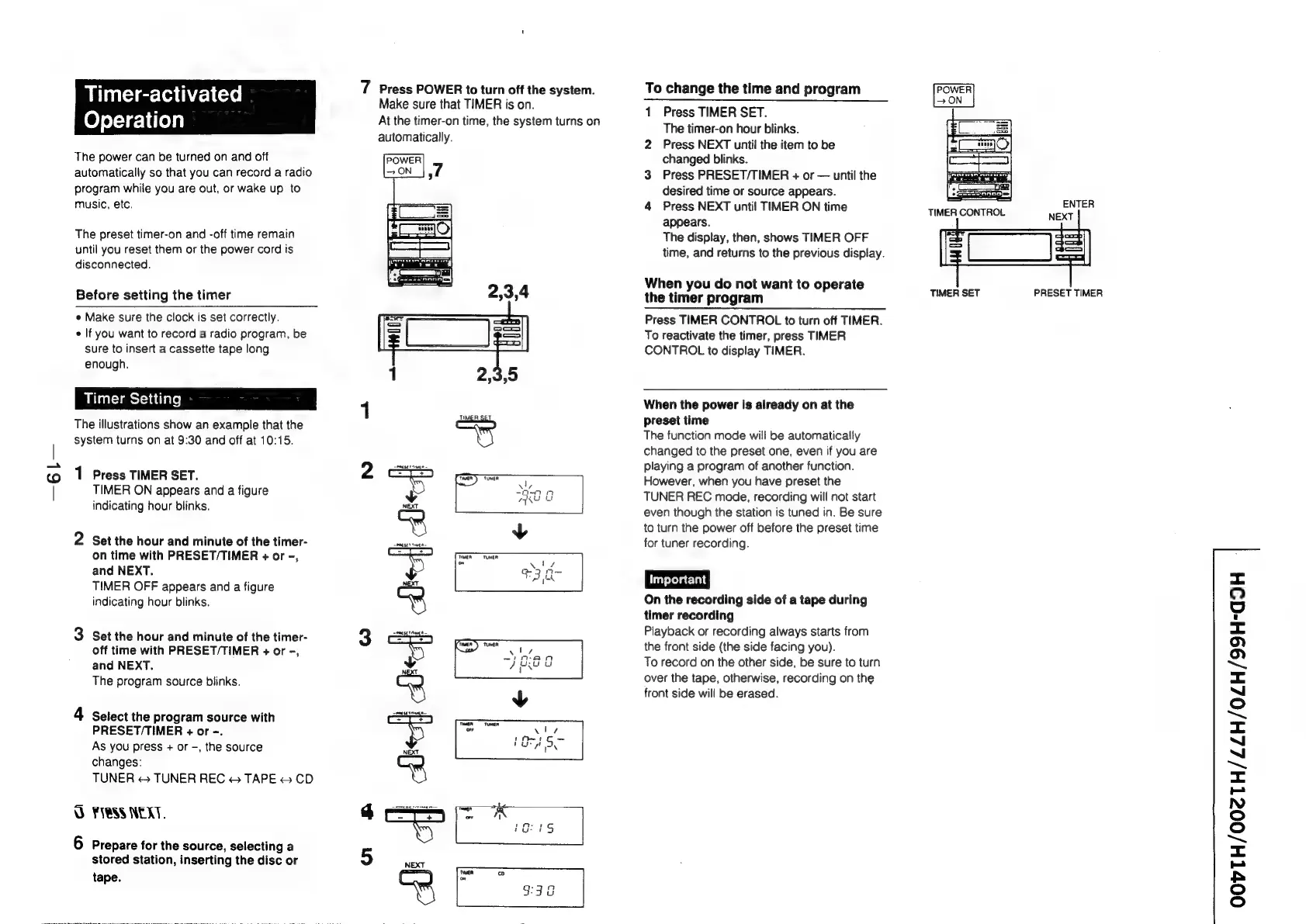
Timer-activated
Operation
The
power
can
be
turned
on
and
off
automatically
so
that
you
can
record
a
radio
program
while
you
are
out,
or
wake
up
to
music,
etc.
The
preset
timer-on
and
-off
time
remain
until
you
reset
them
or
the
power
cord
is
disconnected.
Before
setting
the
timer
e
Make
sure
the
clock
is
set
correctly.
e
If
you
want
to
record
a
radio
program,
be
sure
to
insert
a
cassette
tape
long
enough.
The
illustrations
show
an
example
that
the
system
turns
on
at
9:30
and
off
at
10:15.
1
Press
TIMER
SET.
TIMER
ON
appears
and
a
figure
indicating
hour
blinks.
2
Set
the
hour
and
minute
of
the
timer-
on
time
with
PRESET/TIMER
+
or
-,
and
NEXT.
TIMER
OFF
appears
and
a
figure
indicating
hour
blinks.
3
Set
the
hour
and
minute
of
the
timer-
off
time
with
PRESET/TIMER
+
or
-,
and
NEXT.
The
program
source
blinks.
4
Select
the
program
source
with
PRESET/TIMER
+
or
-.
As
you
press
+
or
-,
the
source
changes:
TUNER
«
TUNER
REC
©
TAPE
©
CD
UO
FESS
NEXT.
6
Prepare
for
the
source,
selecting
a
stored
station,
inserting
the
disc
or
tape.
7
Press
POWER
to
turn
off
the
system.
Make
sure
that
TIMER
is
on.
At
the
timer-on
time,
the
system
turns
on
automatically.
TF
es
ron
|
-
|
+
o
a
rm
yi
©
ues
5
NEXT
tea
cD
z
To
change
the
time
and
program
1
Press
TIMER
SET.
The
timer-on
hour
blinks.
2
Press
NEXT
until
the
item
to
be
changed
blinks.
3
Press
PRESET/TIMER
+
or
until
the
desired
time
or
source
appears.
4
Press
NEXT
unti!
TIMER
ON
time
appears.
The
display,
then,
shows
TIMER
OFF
time,
and
returns
to
the
previous
display.
When
you
do
not
want
to
operate
the
timer
program
Press
TIMER
CONTROL
to
turn
off
TIMER.
To
reactivate
the
timer,
press
TIMER
CONTROL
to
display
TIMER.
When
the
power
is
already
on
at
the
preset
time
The
function
mode
will
be
automatically
changed
to
the
preset
one,
even
if
you
are
playing
a
program
of
another
function.
However,
when
you
have
preset
the
TUNER
REC
mode,
recording
will
not
start
even
though
the
station
is
tuned
in.
Be
sure
to
turn
the
power
off
before
the
preset
time
for
tuner
recording.
On
the
recording
side
of
a
tape
during
timer
recording
Playback
or
recording
always
starts
from
the
front
side
(the
side
facing
you).
To
record
on
the
other
side,
be
sure
to
turn
over
the
tape,
otherwise,
recording
on
the
front
side
will
be
erased.
TIMER
SET
PRESET
TIMER
<=
OQ
id
<
(o>)
(*>)
om
<=
~l
(=)
~~
<=
~
~
>
<=
=
N
©
oO
~~
=<
=
AS
©
©

Related product manuals