EasyManua.ls Logo

Sony HCD-H77 - Page 18

Sony HCD-H77
71 pages
Print Icon
To Next Page IconTo Next Page
To Previous Page IconTo Previous Page
Loading...
To
record
desired
selections
on
the
front
side
Before
pressing
EDIT,
program
the
desired
selection.
How
the
CD
player
determines
the
selections
Ey
The
CD
player
selects
the
selections
from
the
first
one
in
the
CD,
summing
up
each
playing
time.
When
the
total
playing
time
exceeds
the
specified
tape
length,
the
last
selection
is
eliminated.
Then,
the
CD
player
looks
for
a
selection
whose
length
is
within
the
remaining
tape
and
substitutes
it
for
the
eliminated
one.
Tape
Dubbing
Cicelin
me
(te)
@-WCom
=)
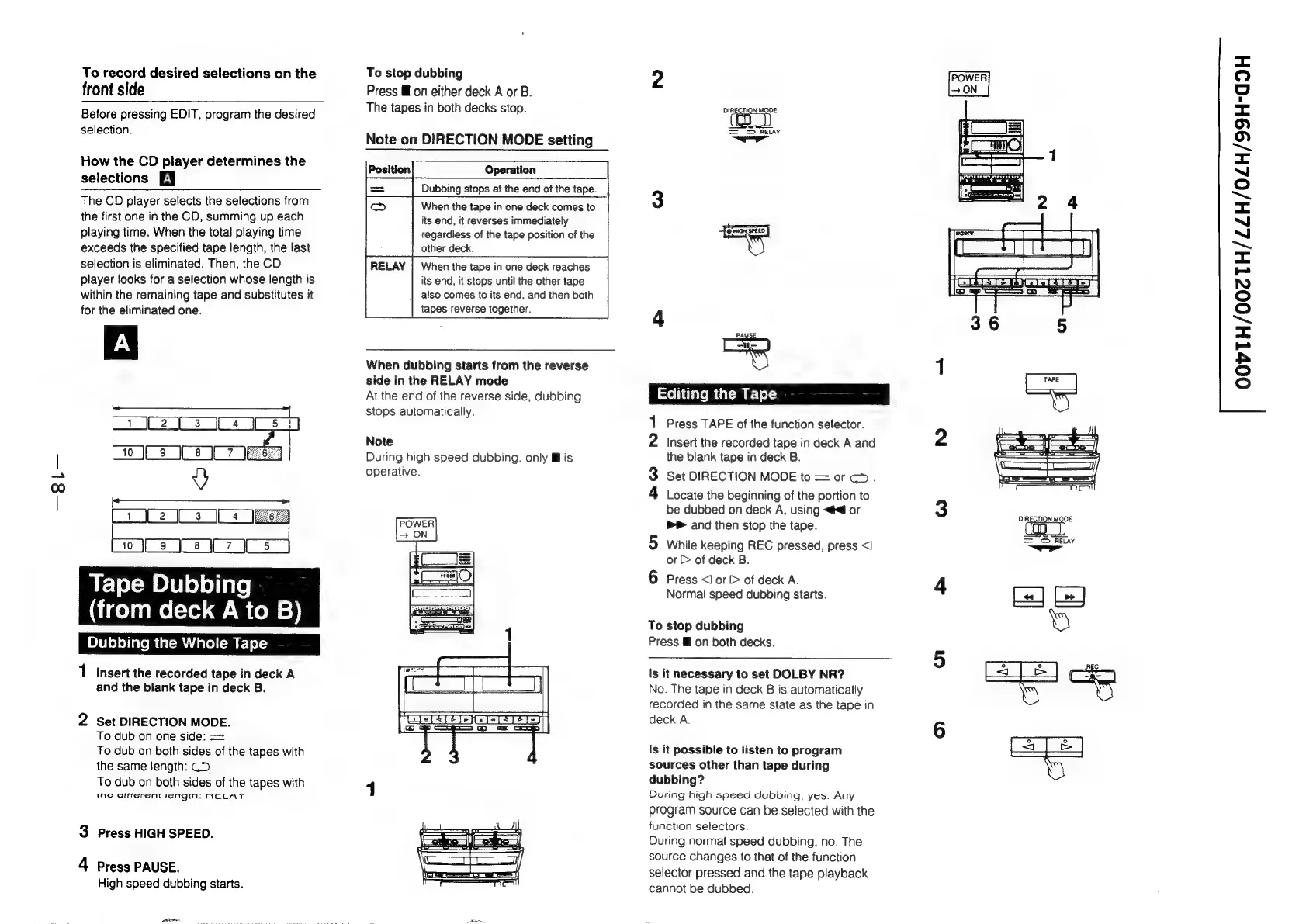
Dubbing
the
Whole
Tape
1
Insert
the
recorded
tape
in
deck
A
and
the
blank
tape
in
deck
B.
2
Set
DIRECTION
MODE.
To
dub
on
one
side:
==
To
dub
on
both
sides
of
the
tapes
with
the
same
length:
CD
To
dub
on
both
sides
of
the
tapes
with
tae
differcnt
tengtn:
ACLAYT
3
Press
HIGH
SPEED.
4
Press
PAUSE.
High
speed
dubbing
starts.
To
stop
dubbing
Press
Mf
on
either
deck
A
or
B.
The
tapes
in
both
decks
stop.
Note
on
DIRECTION
MODE
setting
Operation
Dubbing
stops
at
the
end
of
the
tape.
When
the
tape
in
one
deck
comes
to
its
end,
it
reverses
immediately
regardiess
of
the
tape
position
of
the
other
deck.
When
the
tape
in
one
deck
reaches
its
end,
it
stops
until
the
other
tape
also
comes
to
its
end,
and
then
both
tapes
reverse
together.
When
dubbing
starts
from
the
reverse
side
in
the
RELAY
mode
At
the
end
of
the
reverse
side,
dubbing
stops
automatically.
Note
During
high
speed
dubbing.
only
Ml
is
operative.
2
POWER
7
ON
=
©
RELAY
Coll
Clave
Uat=
am
re
oy)
==
ate
1
Press
TAPE
of
the
function
selector.
2
Insert
the
recorded
tape
in
deck
A
and
2
the
blank
tape
in
deck
B.
3
Set
DIRECTION
MODE
to
=
or
cD.
4
Locate
the
beginning
of
the
portion
to
be
dubbed
on
deck
A,
using
<<
or
3
Peete
bP
and
then
stop
the
tape.
‘(ap
_)
5
while
keeping
REC
pressed,
press
<1
a
or
&
of
deck
B.
Press
<
or
&
of
deck
A.
Normal
speed
dubbing
starts.
4
[+]
[>
]
To
stop
dubbing
‘ei
Press
@
on
both
decks.
Is
it
necessary
to
set
DOLBY
NR?
No.
The
tape
in
deck
B
is
automatically
recorded
in
the
same
state
as
the
tape
in
aD
oy
Is
it
possible
to
listen
to
program
ja
|
|
sources
other
than
tape
during
Ne
dubbing?
During
high
speed
dubbing,
yes.
Any
program
source
can
be
selected
with
the
function
selectors.
During
normal
speed
dubbing,
no.
The
source
changes
to
that
of
the
function
selector
pressed
and
the
tape
playback
cannot
be
dubbed.
<=
oO
4
=
fe)
0)
>
=<
~
(=)
~s
<=
~“
~
sm
<x
=
NO
(=)
(oe)
~
<=
=
AAS
(>)
oO

Related product manuals