EasyManua.ls Logo

Sony HCD-H77 - Page 17

Sony HCD-H77
71 pages
Print Icon
To Next Page IconTo Next Page
To Previous Page IconTo Previous Page
Loading...
(HCD-H70/H77/H1400)
If
the
tape
ends
in
the
middle
of
a
selection
EY
Important
Total
playing
time
of
the
program
of
each
—.
side
must
be
within
the
length
of
each
The
tape
is
rewound
to
the
beginning
of
the
side
of
the
tape
selection.
Then
the
selection
is
re-recorded
«
Up
to
20th
selection
in
the
disc
can
be
so
that
it
fades
out
naturally
at
the
end
of
programmed.
21st
selection
cannot
be
the
tape.
programmed.
If
the
recording
is
to
be
continued
to
the
reverse
side,
the
selection
that
faded
out
on
ry
the
front
side
is
recorded
from
its
beginning
on
the
reverse
side.
Programming
selections
eee
ene
while
checking
i
lat-m
Co)
¢-1
en
eas
oe
a
ee
playing
time
Program
Edit
C238
IL7
js
ICs)
You
can
adjust
the
total
playing
time
to
the
tape
duration.
wo
Reverse
side
1
Press
PROGRAM.
“PGM”
appears
in
the
display.
2
Choose
the
desired
selection
to
be
prorammed
with
or
pP{and
check
the
time.
3
if
satisfactory,
go
to
the
next
step.
If
not,
repeat
step
2
and
choose
another
selection.
4
Press
PROGRAM.
5
Repeat
steps
2
to
4
to
program.the
desired
selections
for
side
A.
“A”
remains
lit.
6
Press
it
on
the
remote
commander.
“P”
appears
in
the
display
and
the
total
playing
time
is
reset
ot
0.
“B”
lights
up.
7
Repeat
steps
2
to
4
to
program
the
desired
selections
for
side
B.
8
Press
CD
SYNCHRO
and
PAUSE
on
the
cassette
deck.
The
CD
play
and
recording
start
simultaneously.
When
the
CD
play
of
side
A
ends,
the
CD
player
enters
pause
mode.
When
the
tape
comes
to
the
beginning
of
side
B,
the
CD
play
of
side
B
starts
and
the
recording
starts
automatically.
soli
tiered
mer
OM
(olmat-eelceiiare|
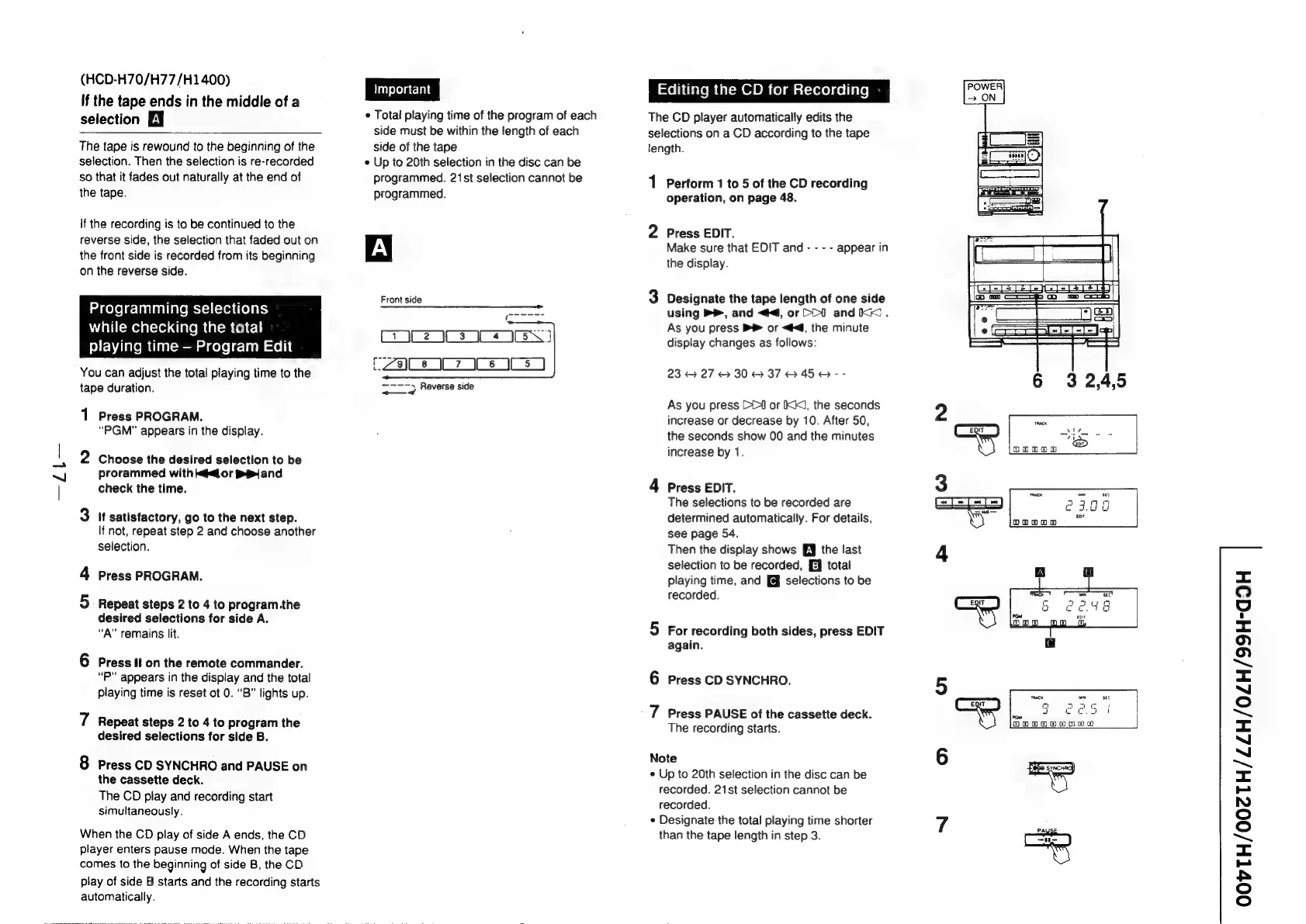
The
CD
player
automatically
edits
the
selections
on
a
CD
according
to
the
tape
Jength.
1
Perform
1
to
5
of
the
CD
recording
operation,
on
page
48.
2
Press
EDIT.
Make
sure
that
EDIT
and
-
-
- -
appear
in
the
display.
3
Designate
the
tape
length
of
one
side
using
B®,
and
<4,
or
CO
andkK.
As
you
press
or
<6,
the
minute
display
changes
as
follows:
23
27
&
30
@
37
6H
45H
--
As
you
press
[1
or
IKK,
the
seconds
increase
or
decrease
by
10.
After
50,
the
seconds
show
00
and
the
minutes
increase
by
1.
4
Press
EDIT.
The
selections
to
be
recorded
are
determined
automatically.
For
details,
see
page
54.
Then
the
display
shows
[J
the
last
selection
to
be
recorded,
[EJ
total
playing
time,
and
[@
selections
to
be
recorded.
5
For
recording
both
sides,
press
EDIT
again.
6
Press
CD
SYNCHRO.
7
Press
PAUSE
of
the
cassette
deck.
The
recording
starts.
Note
¢
Up
to
20th
selection
in
the
disc
can
be
recorded.
21st
selection
cannot
be
recorded.
¢
Designate
the
total
playing
time
shorter
than
the
tape
length
in
step
3.
sec
noes
=
(=J~
T=]
=]
aann
——
cau
tor
*
oowom
a
at
2
ec.
rom
fosegosogOkOgugogg)
<=
©
4
=<
fe)!
(°2)
~
=
“J
Oo
sm
“J
~
~~
i
_
NO
©
oO
~~
<=
ary
AAS
©
(o)

Related product manuals