EasyManua.ls Logo

Sony HCD-H77 - Page 16

Sony HCD-H77
71 pages
Print Icon
To Next Page IconTo Next Page
To Previous Page IconTo Previous Page
Loading...
CD
Recording
(Deck
B)
0]
DR
a
{orelceliavem@ler-ie-itcels)
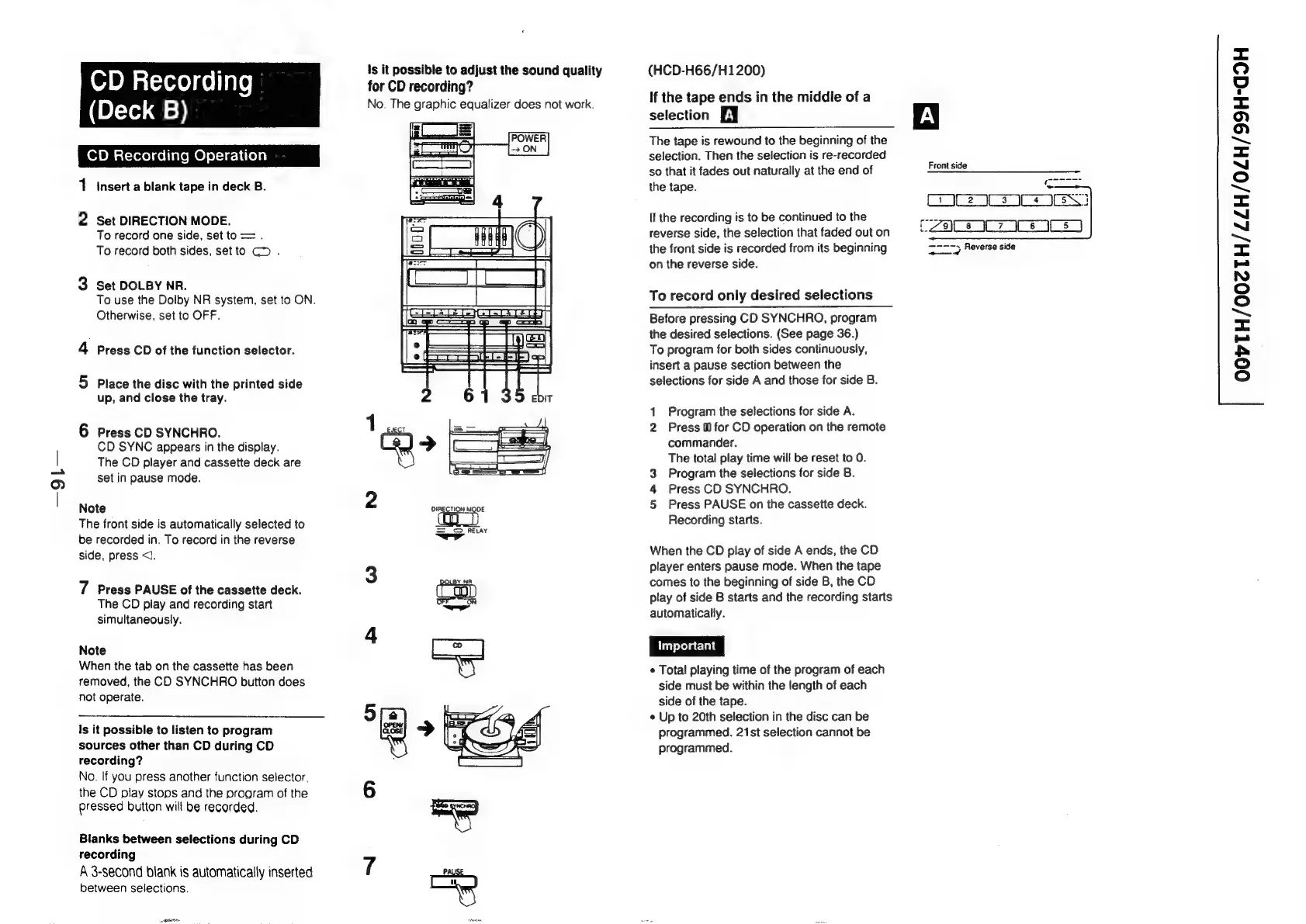
1
insert
a
blank
tape
in
deck
B.
2
Set
DIRECTION
MODE.
To
record
one
side,
set
to
=
.
To
record
both
sides,
setto
GD
.
3
Set
DOLBY
NR.
To
use
the
Dolby
NR
system,
set
to
ON.
Otherwise,
set
to
OFF.
4
Press
CD
of
the
function
selector.
5
Place
the
disc
with
the
printed
side
up,
and
close
the
tray.
6
Press
CD
SYNCHRO.
CD
SYNC
appears
in
the
display.
The
CD
player
and
cassette
deck
are
set
in
pause
mode.
Note
The
front
side
is
automatically
selected
to
be
recorded
in.
To
record
in
the
reverse
side,
press
<1.
7
Press
PAUSE
of
the
cassette
deck.
The
CD
play
and
recording
start
simultaneously.
Note
When
the
tab
on
the
cassette
has
been
removed,
the
CD
SYNCHRO
button
does
not
operate.
Is
it
possible
to
listen
to
program
sources
other
than
CD
during
CD
recording?
No.
If
you
press
another
function
selector,
the
CD
play
stops
and
the
program
of
the
pressed
button
will
be
recorded.
Bianks
between
selections
during
CD
recording
A
3-second
blank
is
automatically
inserted
between
selections.
SAG
\s
it
possible
to
adjust
the
sound
quality
for
CD
recording?
No.
The
graphic
equalizer
does
not
work.
(HCD-H66/H1200)
If
the
tape
ends
in
the
middle
of
a
selection
EY
The
tape
is
rewound
to
the
beginning
of
the
selection.
Then
the
selection
is
re-recorded
so
that
it
fades
out
naturally
at
the
end
of
the
tape.
If
the
recording
is
to
be
continued
to
the
reverse
side,
the
selection
that
faded
out
on
the
front
side
is
recorded
from
its
beginning
on
the
reverse
side.
To
record
only
desired
selections
Before
pressing
CD
SYNCHRO,
program
the
desired
selections.
(See
page
36.)
To
program
for
both
sides
continuously,
insert
a
pause
section
between
the
selections
for
side
A
and
those
for
side
B.
1
Program
the
selections
for
side
A.
2
Press
M1
for
CD
operation
on
the
remote
commander.
The
total
play
time
will
be
reset
to
0.
Program
the
selections
for
side
B.
Press
CD
SYNCHRO.
Press
PAUSE
on
the
cassette
deck.
Recording
starts.
ar
wo
When
the
CD
play
of
side
A
ends,
the
CD
player
enters
pause
mode.
When
the
tape
comes
to
the
beginning
of
side
B,
the
CD
play
of
side
B
starts
and
the
recording
starts
automatically.
Important
¢
Total
playing
time
of
the
program
of
each
side
must
be
within
the
length
of
each
side
of
the
tape.
¢
Up
to
20th
selection
in
the
disc
can
be
programmed.
21st
selection
cannot
be
programmed.
Front
side
C2
ICS
IN
CZs
07
ss
ered
Reverse
side
OOVTH/00ZTH/LZH/0ZH/99H-G9H

Related product manuals