EasyManua.ls Logo

Sony HCD-H77 - Page 15

Sony HCD-H77
71 pages
Print Icon
To Next Page IconTo Next Page
To Previous Page IconTo Previous Page
Loading...
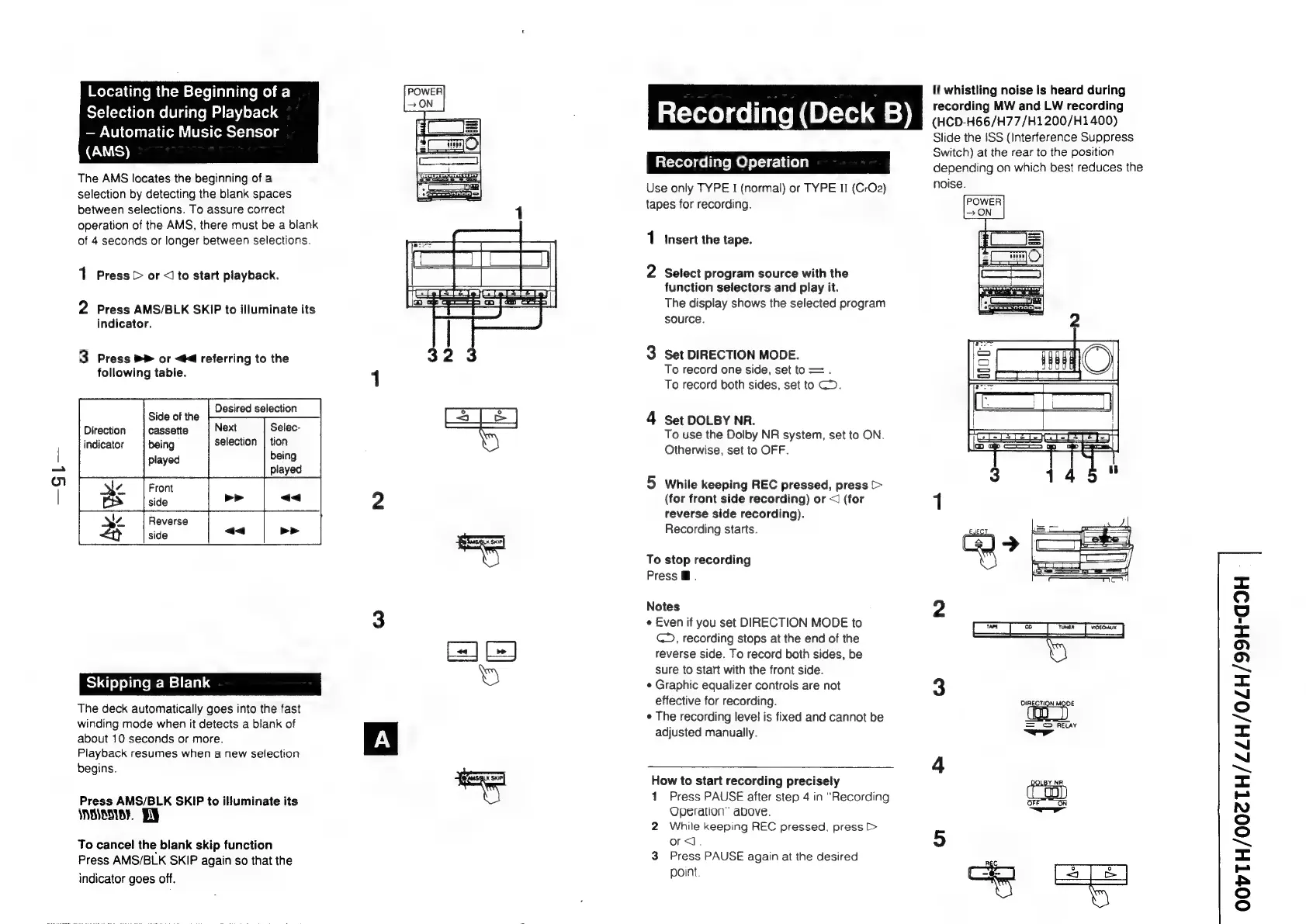
Locating
the
Beginning
of
a
Selection
during
Playback
Automatic
Music
Sensor
EWS)
The
AMS
locates
the
beginning
of
a
selection
by
detecting
the
blank
spaces
between
selections.
To
assure
correct
operation
of
the
AMS,
there
must
be
a
blank
of
4
seconds
or
longer
between
selections.
1
Press
>
or
<Jto
start
playback.
2
Press
AMS/BLK
SKIP
to
illuminate
its
indicator.
3
Press
PP
or
<4
referring
to
the
following
table.
Desired
selection
Next
selection
Side
of
the
cassette
being
played
Selec-
tion
being
Reverse
side
Skipping
a
Blank
The
deck
automatically
goes
into
the
fast
winding
mode
when
it
detects
a
blank
of
about
10
seconds
or
more.
Playback
resumes
when
a
new
selection
begins.
Press
AMS/BLK
SKIP
to
illuminate
its
SNOIENIOY.
To
cancel
the
blank
skip
function
Press
AMS/BLK
SKIP
again
so
that
the
indicator
goes
off.
at-rexelael
late
n
(B{-16,.@
=)
Lat-vere)
cei
late
MO)
el-ur-1
Uo
8)
Use
only
TYPE
I
(normal)
or
TYPE
II
(CrO2)
tapes
for
recording.
1
insert
the
tape.
2
Select
program
source
with
the
function
selectors
and
play
it.
The
display
shows
the
selected
program
source.
oa
Set
DIRECTION
MODE.
To
record
one
side,
set
to
=.
To
record
both
sides,
set
to
CD.
>
Set
DOLBY
NR.
To
use
the
Dolby
NR
system,
set
to
ON.
Otherwise,
set
to
OFF.
oa
While
keeping
REC
pressed,
press
>
(for
front
side
recording)
or
<
(for
reverse
side
recording).
Recording
starts.
To
stop
recording
Press
@.
Notes
¢
Even
if
you
set
DIRECTION
MODE
to
C5,
recording
stops
at
the
end
of
the
reverse
side.
To
record
both
sides,
be
sure
to
start
with
the
front
side.
¢
Graphic
equalizer
controls
are
not
effective
for
recording.
e
The
recording
level
is
fixed
and
cannot
be
adjusted
manually.
How
to
start
recording
precisely
1
Press
PAUSE
after
step
4
in
“Recording
Operation”
above.
2
While
keeping
REC
pressed,
press
[>
ord.
3
Press
PAUSE
again
at
the
desired
point.
If
whistling
noise
is
heard
during
recording
MW
and
LW
recording
(HCD-H66/H77/H1200/H1400)
Slide
the
ISS
(Interference
Suppress
Switch)
at
the
rear
to
the
position
depending
on
which
best
reduces
the
noise.
won
oii
=
©
RELAY
=p”
DOLBY
NA.
<)
ON
OOvVTH/002TH/ZZH/0ZH/99H-G9H

Related product manuals