EasyManua.ls Logo

Sony HCD-H77 - DECK SECTION Operation

Sony HCD-H77
71 pages
Print Icon
To Next Page IconTo Next Page
To Previous Page IconTo Previous Page
Loading...
2-5.
DECK
SECTION
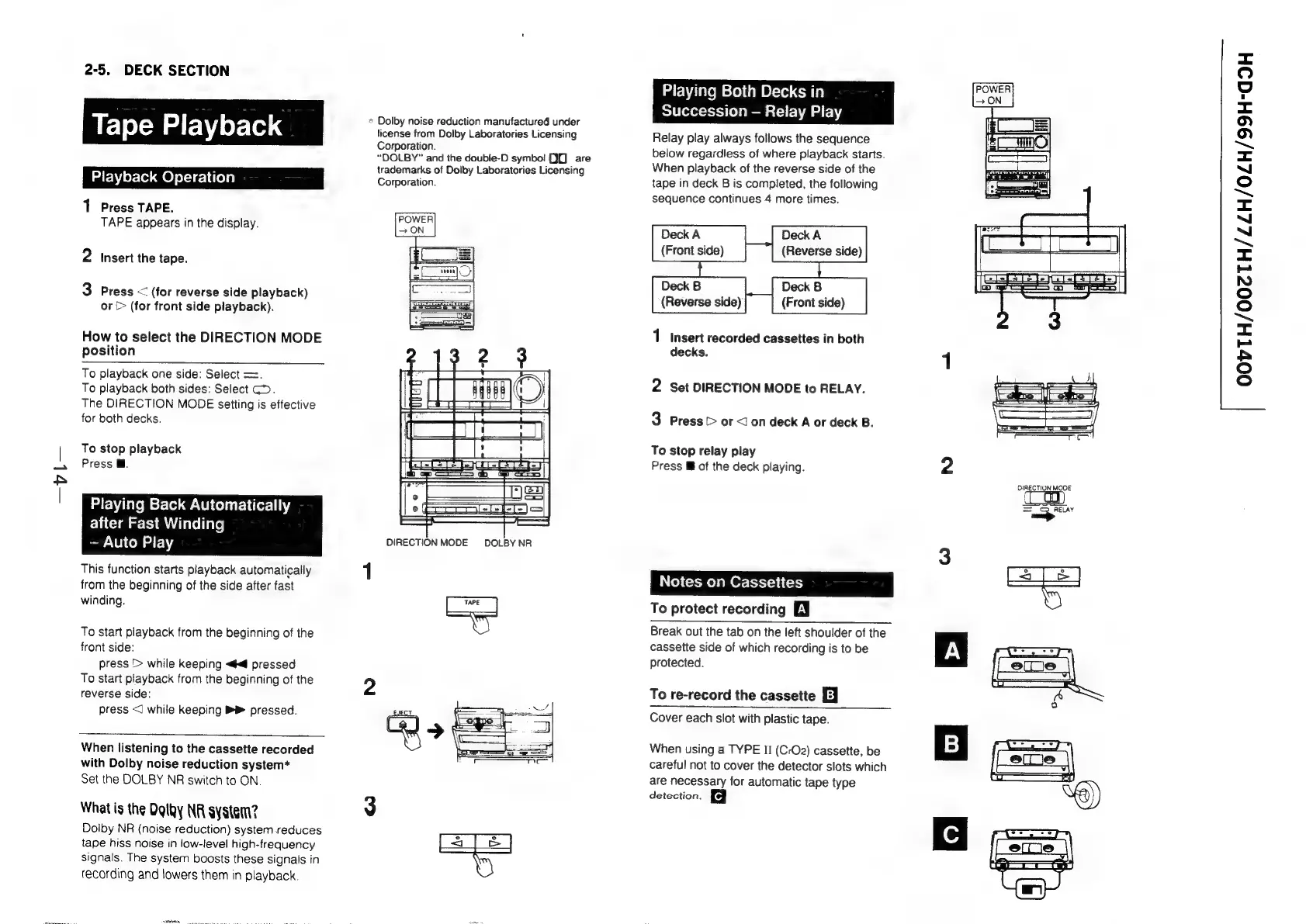
Tape
Playback
1
Press
TAPE.
TAPE
appears
in
the
display.
2
Insert
the
tape.
3
Press
<
(for
reverse
side
playback)
or
>
(for
front
side
playback).
How
to
select
the
DIRECTION
MODE
position
To
playback
one
side:
Select
==.
To
playback
both
sides:
Select
GD.
The
DIRECTION
MODE
setting
is
effective
for
both
decks.
To
stop
playback
Press
@.
Playing
Back
Automatically
after
Fast
Winding
Auto
Play
This
function
starts
playback
automatically
from
the
beginning
of
the
side
after
fast
winding.
To
start
playback
from
the
beginning
of
the
front
side:
press
>
while
keeping
«#4
pressed
To
start
playback
from
the
beginning
of
the
reverse
side:
press
<]
while
keeping
pressed.
When
listening
to
the
cassette
recorded
with
Dolby
noise
reduction
system*
Set
the
DOLBY
NR
switch
to
ON.
What
is
the
Dgtky
NR
system?
Dolby
NR
(noise
reduction)
system
reduces
tape
hiss
noise
in
low-level
high-frequency
signals.
The
system
boosts
these
signals
in
recording
and
lowers
them
in
playback.
nn
a
eee
»
Dolby
noise
reduction
manufactured
under
license
from
Dolby
Laboratories
Licensing
Corporation.
“DOLBY”
and
the
doubie-D
symbo!
90)
are
trademarks
of
Dolby
Laboratories
Licensing
Corporation.
DIRECTION
MODE
DOLBY
NR
Baie
Playing
Both
Decks
in
Succession
Relay
Play
Relay
play
always
follows
the
sequence
below
regardless
of
where
playback
starts.
When
playback
of
the
reverse
side
of
the
tape
in
deck
B
is
completed,
the
following
sequence
continues
4
more
times.
Deck
A
(Front
side)
Deck
A
(Reverse
side)
Deck
B
(Front
side)
1
Insert
recorded
cassettes
in
both
decks.
Deck
B
(Reverse
side)
2
Set
DIRECTION
MODE
to
RELAY.
3
Press
or
<Jon
deck
A
or
deck
B.
To
stop
relay
play
Press
lM
of
the
deck
playing.
Notes
on
Cassettes
To
protect
recording
EY
Break
out
the
tab
on
the
left
shoulder
of
the
cassette
side
of
which
recording
is
to
be
protected.
To
re-record
the
cassette
EJ
Cover
each
slot
with
plastic
tape.
When
using
a
TYPE
II
(CrO2)
cassette,
be
careful
not
to
cover
the
detector
slots
which
are
necessary
for
automatic
tape
type
detection.
Hho
&
DIRECTION
MODE
RELAY
OOVTH/002TH/ZZH/0ZLH/99H-G9H

Related product manuals