31
<CURSOR>
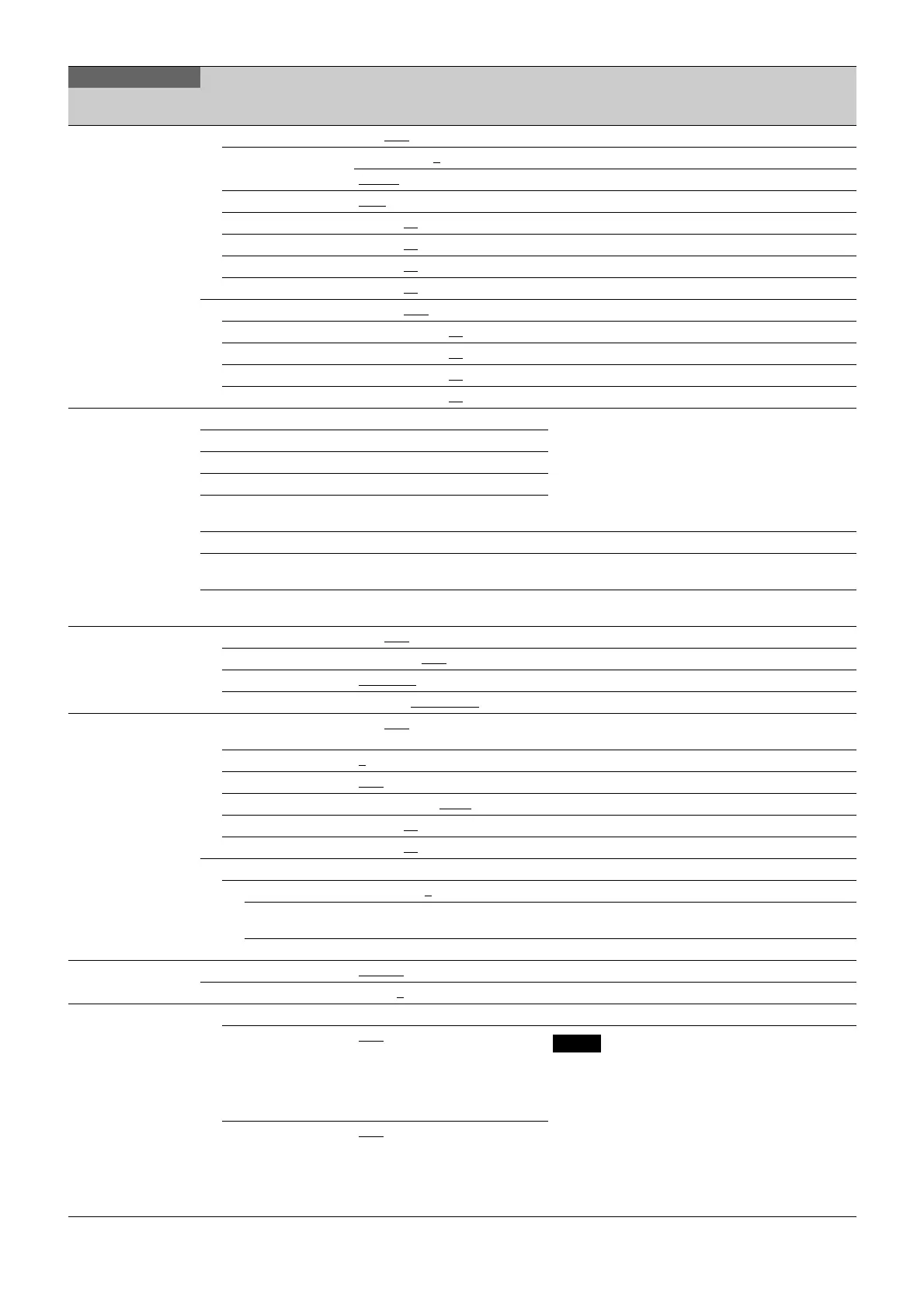
09 (U07)
CURSOR ON, OFF
LEVEL MIN, 1 to 10, 4
WHITE, BLACK, DOT
BOX/CROSS BOX
, CROSS
H POSITION 0 to 99, 50
V POSITION 0 to 99, 50
WIDTH 0 to 99, 50
HEIGHT 0 to 99, 50
BOX MEMORY 1/2/3/4: OFF, ON
H POSI 1/2/3/4: 0 to 99, 50
V POSI 1/2/3/4: 0 to 99, 50
WIDTH 1/2/3/4: 0 to 99, 50
HEIGHT 1/2/3/4: 0 to 99, 50
<BOX CURSOR
FILE>
10
1: Select BOX CURSOR FILE and enters a BOX
CURSOR FILE name.
Set the cursor to the left of the number when you
select BOX CURSOR FILE.
Set the cursor to the right of the number when you
enter a BOX CURSOR FILE name.
See “To specify a character string” (page 19).
2:
3:
4:
5:
STORE Stores a BOX CURSOR FILE name in the camera.
READ (USBtCAM) Transfers BOX CURSOR FILE from a USB drive to the
camera.
WRITE (CAMtUSB) Transfers BOX CURSOR FILE from the camera to a
USB drive.
<VF DYNAMIC
CONTRAST>
11
DYNAMIC CONTRAST ON, OFF
, (OFF) “(OFF)” is displayed when BARS is ON.
GAIN 0 to 100%, 30%
FILTER NARROW, MIDDLE, WIDE
MODE LINEAR, HIGHLIGHT
, FOGGY
<SPIRIT LEVEL>
12
INDICATOR ON, OFF
When this is set to ON, BOX MEMORY for
<CURSOR> does not function.
MODE 1
, 2 Switches the display method of the indicator.
REVERSE OFF
, ON Inverts the movement of the indicator horizontally.
SCALE 50% to 150%, 100%
Adjusts the horizontal width of the indicator.
H POSITION 0 to 99, 50
V POSITION 0 to 99, 97
ANGLE Displays the inclination angle (display only).
OFFSET –90 to +90, 0
SET ZERO
ANGLE
Execute using ENTER. Designates the current angle as level (0°).
CLEAR Execute using ENTER. Sets OFFSET to 0.
<VF OUT>
13 (U01)
VF OUT COLOR
, Y, R, G, B
CHARACTER LEVEL 1 to 5, 4
<SWITCH ASSIGN>
14
LENS Display only
VTR S/S OFF
, FOCUS POS METER,
FOCUS POS MKR1, FOCUS
POS MKR2, FOCUS POS MKR3,
FOCUS ASSIST, SPIRIT LEVEL,
VF DETAIL, ZEBRA, DIGITAL
EXTENDER, 5600K, VTR S/S
Note
DIGITAL EXTENDER is enabled only when OUTPUT
FORMAT is HD (excluding HFR).
RET OFF
, FOCUS POS METER,
FOCUS POS MKR1, FOCUS
POS MKR2, FOCUS POS MKR3,
FOCUS ASSIST, SPIRIT LEVEL,
VF DETAIL, ZEBRA, DIGITAL
EXTENDER, 5600K, VTR S/S
OPERATION
Page name
Page No.
Item Settings Description



 To Next Page