Chapter 10
Setup Menus
Chapter 10
Setup Menus 10-29
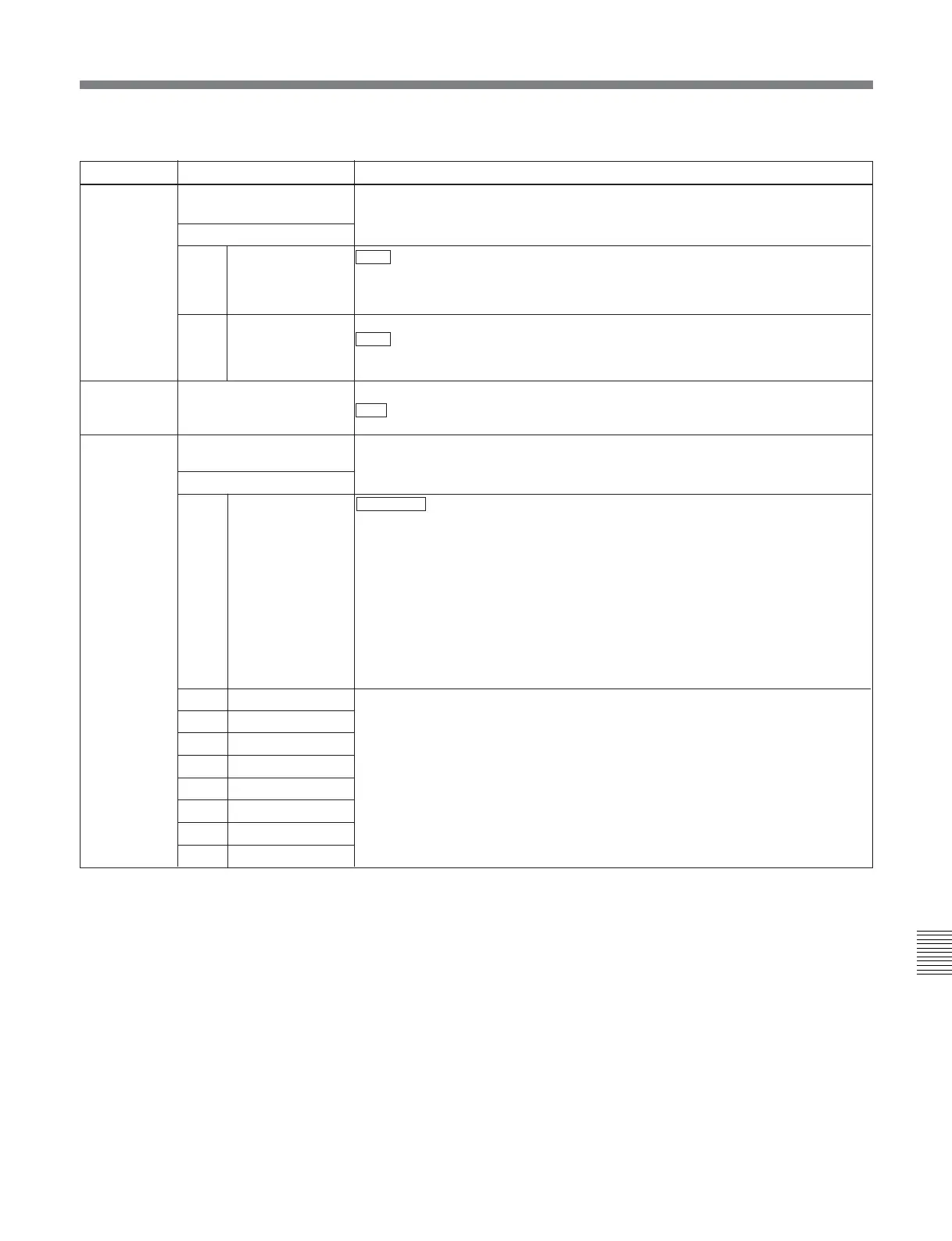
826 AUDIO PB VOLUME
SELECT
Selects which PB control knobs are assigned to control playback of digital audio
channels.
Sub-item
0 ALL CH DEFAULT : Use the following settings.
CH1: Control knob 1
CH2: Control knob 2
CH3: Control knob 3
CH4: Control knob 4
CH5: Unity
CH6: Unity
CH7: Unity
CH8: Unity
UNITY: Set all channels to unity, and disable the control knobs.
MENU: Use the following menu settings.
1 CH1
2 CH2
3 CH3
4 CH4
5 CH5
6 CH6
7 CH7
8 CH8
UNITY: Set playback level to unity.
VOL1: Assign playback level control to control knob 1.
VOL2: Assign playback level control to control knob 2
VOL3: Assign playback level control to control knob 3.
VOL4: Assign playback level control to control knob 4.
824
Item number
Item name
Settings
ANALOG OUTPUT
SELECT
Select the analog audio signals (tracks 1 to 8) to be assigned to audio output
channels 1 to 4.
Sub-item
1
CH1/CH2
tr1/2 : Tracks 1 and 2 assigned to audio output channels 1 and 2.
tr3/4: Tracks 3 and 4 assigned to audio output channels 1 and 2.
tr5/6: Tracks 5 and 6 assigned to audio output channels 1 and 2.
tr7/8: Tracks 7 and 8 assigned to audio output channels 1 and 2.
2
CH3/CH4
tr1/2: Tracks 1 and 2 assigned to audio output channels 3 and 4.
tr3/4 : Tracks 3 and 4 assigned to audio output channels 3 and 4.
tr5/6: Tracks 5 and 6 assigned to audio output channels 3 and 4.
tr7/8: Tracks 7 and 8 assigned to audio output channels 3 and 4.
825 AUDIO ADVANCE MODE
Set the audio output phase.
OFF : Same as the video output phase
ON: One frame ahead of the video output phase
Menu items in the range 800 to 899, relating to audio control (Continued)



 To Next Page