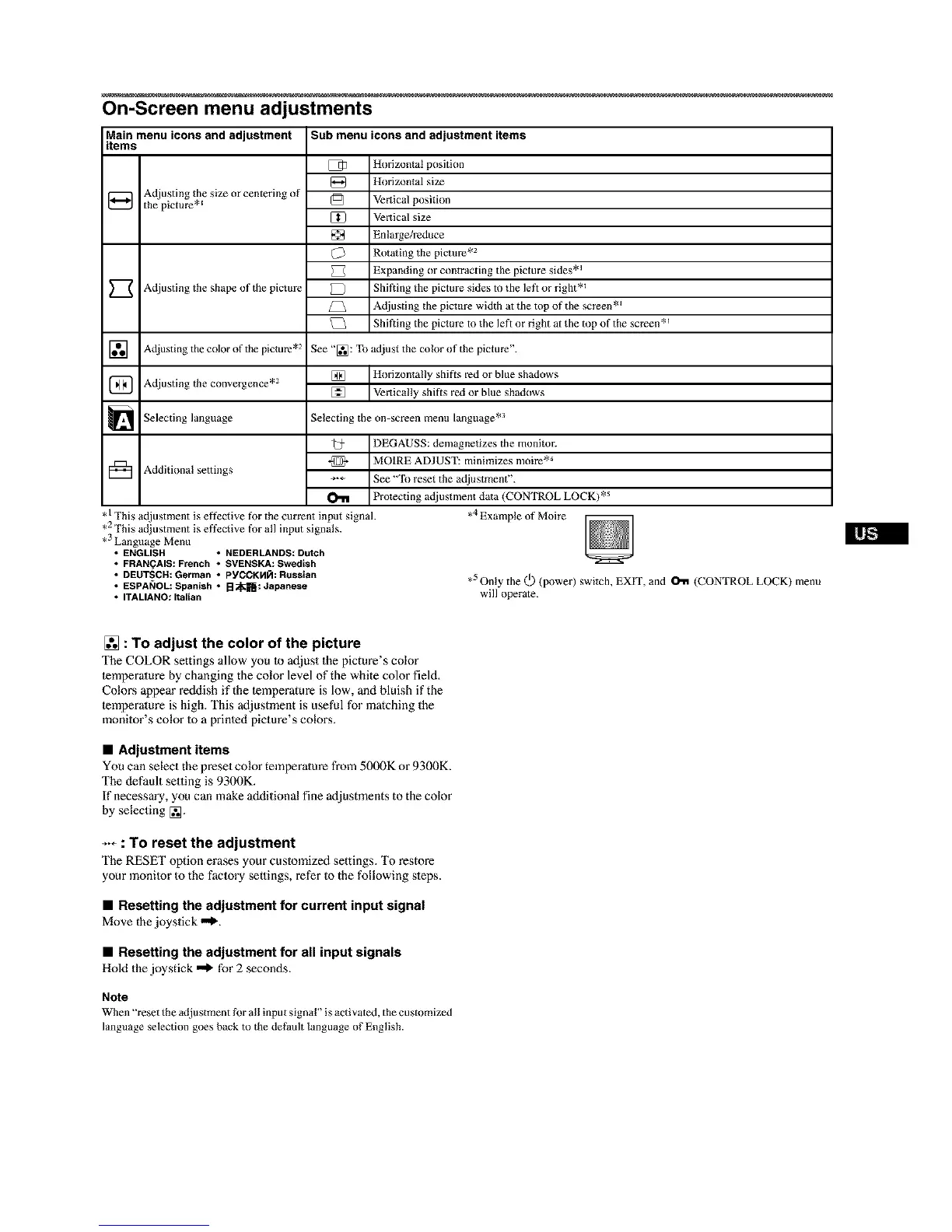
On-Screen menu adjustments
Main menu icons and adjustment
items
Adjusting the size or centering of
the picture *E
Adjusting the shape of the picture
] Adjusting the color of tile picture .2
] Adjusting the convergence .2
Selecting language
[_ Additiona! settings
Sub menu icons and adjustment items
[ q_ Horizontal position
[_ Horizontal size
_J Vertical position
[_1 Vertical size
Enlarge/reduce
Rotating the picture .2
Expanding or contracting the picture sides *_
Shifting the picture sides to the left or right *_
{_ Adjusting the picture width at the top of the screen *_
Shifting the picture to the left or right at the mp of the screen *_
See "[_: To adjust the color of the picture".
[] Horizontally shifts red or blue shadows
[] Vertically shifts red or blue shadows
Selecting the on-screen menu language .3
,1 This adjustment is effective for the current input signal.
,2 This adjustment is effective for all input signals.
,3 Language Menu
• ENGLISH • NEDERLANDS: Dutch
• FRAN(_AIS: French • SVENSKA: Swedish
• DEUTSCN: German • PYCCKHR: Russian
• ESPA_IOL: Spanish • [:I_K[[_: Japanese
• ITALIANO: Italian
_@ DEGAUSS: demagnetizes the monitor.
*_ MOIRE ADJUST: minimizes moire *_
÷-÷ See "To reset the adjustment".
O"11 Protecting adjustment data (CONTROL LOCK) *s
,4 Example of Moire
,5 Only the (_) (power) switch, EXIT, and _ (CONTROL LOCK) menu
will operate.
[] : To adjust the color of the picture
The COLOR settings allow you Io adjust the picture's color
lemperature by changing the color level of the white color field,
Colors appear reddish if the lemperature is low, and bluish if the
lemperature is high. This adjustment is useful for matching the
monilor's color Io a prinled picture's colors.
• Adjustment items
You can select the preset color temperature from 5000K or 9300K.
The default setting is 9300K.
If necessary, you can make additional fine adjustments to the color
by selecting [_.
_-_ : To reset the adjustment
The RESET option erases your customized settings. To restore
your monitor to the factory settings, refer to the following steps.
• Resetting the adjustment for current input signal
Move the joystick "_.
• Resetting the adjustment for all input signals
Hold the joystick "_ for 2 seconds.
Note
When "reset the adjustment for all inpu t signal" is activated, the customized
language selection goes back to the default language of English.



 To Next Page