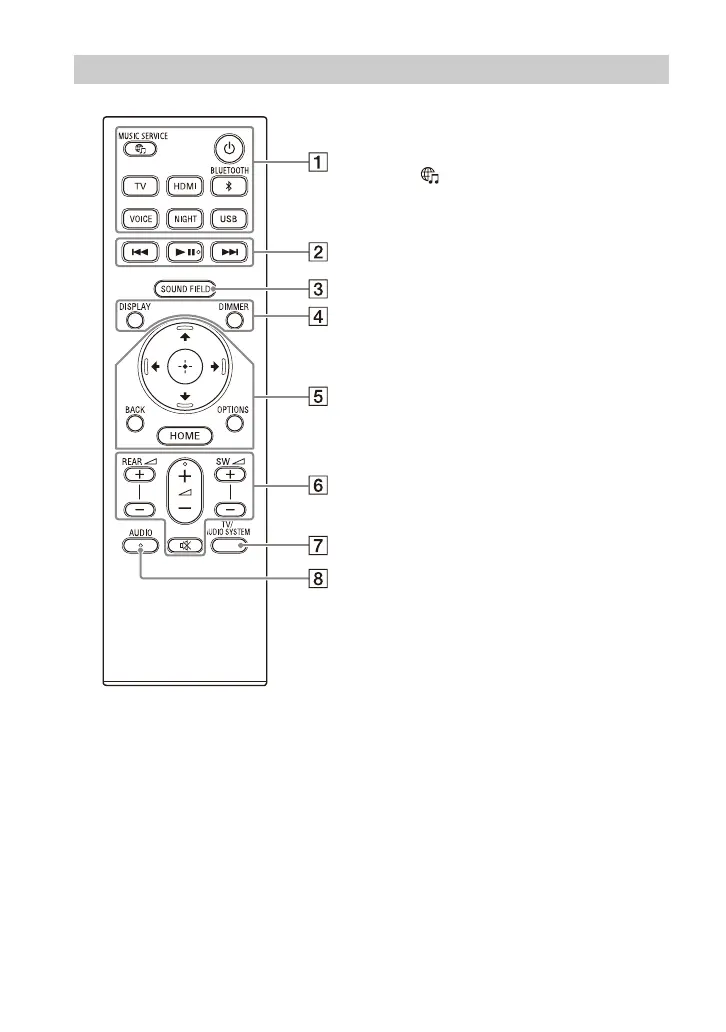
12
GB
(power)
Turns on the speaker system or
sets it to standby mode.
(MUSIC SERVICE) button
If you have previously played
music on Spotify on the speaker
system, you can resume playback
by pressing this button.
This button may not be available
in some countries/regions.
BLUETOOTH (page 29)
TV (page 26)
HDMI (page 26)
USB (page 31)
VOICE (page 38)
NIGHT (page 38)
Playback operation buttons
/ (previous/next)
Selects the previous/next track or
file.
Pressing and holding it searches
backward or forward (rewind/fast
forward) during playback.
(play/pause)*
Starts, pauses, or re-starts
playback (resume play).
SOUND FIELD (page 37)
DIMMER (page 43)
DISPLAY
Displays playback information on
the TV screen.
Playback information is displayed
in the front panel display for TV
input.
Remote Control



 To Next Page