19
GB
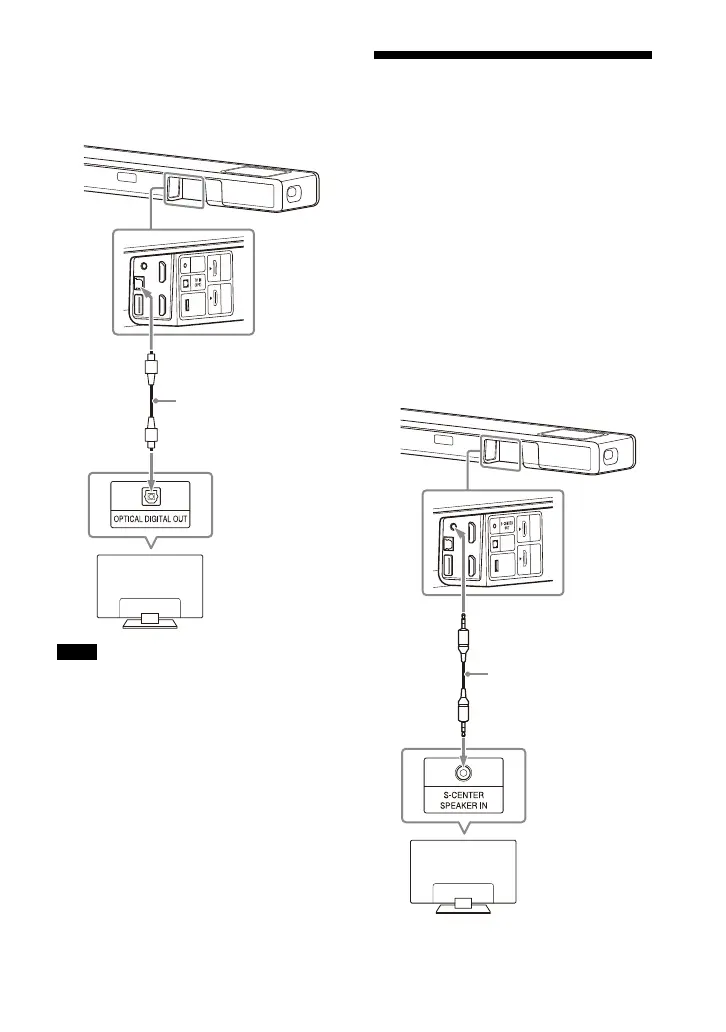
2 Connect the optical digital output
jack on the TV and the TV IN (OPT)
jack on the speaker system with an
optical digital cable (not supplied).
• Make sure that the connectors are firmly
inserted.
• Insert a plug of the optical digital cable in
the correct direction by checking the
shape of the plug and connector on the
bar speaker and TV. If the plug is forcibly
inserted in the wrong direction, the
connector and plug may be damaged.
When Your TV Has the S-
CENTER SPEAKER IN Jack
You can output the center part of the
speaker system sound from the TV by
connecting the TV with the following
method.
1 Connect the speaker system and
TV with the HDMI cable (supplied)
(page 18).
2 Connect the S-CENTER SPEAKER IN
jack on the TV and the S-CENTER
OUT jack on the speaker system
with the TV center speaker mode
cable (supplied).
Notes
TV
Optical digital cable
(not supplied)
TV
TV center speaker
mode cable
(supplied)



 To Next Page