22
GB
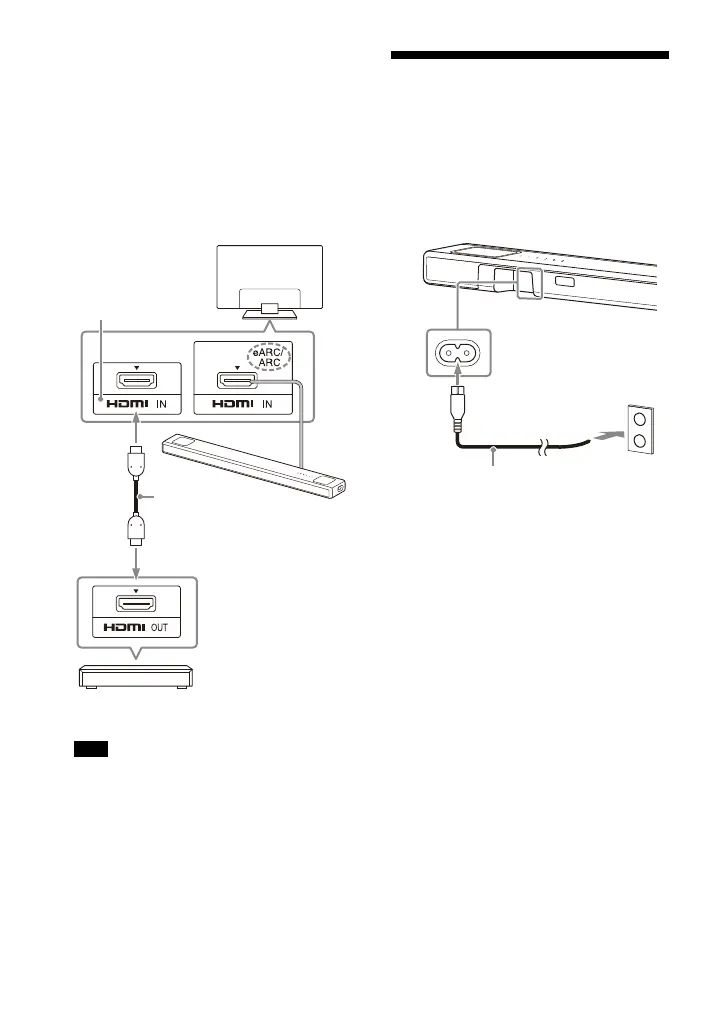
When the eARC compatible
HDMI IN jack on the TV does not
support the 8K video input:
Connect the HDMI OUT jack on an
AV device to the HDMI IN jack
compatible with the 8K video input
on a TV with an HDMI cable (not
supplied).
Make sure that the eARC function of
the TV is on.
Make sure that the connectors are firmly
inserted.
Tip
Select the appropriate HDMI cable and
[HDMI Signal Format] setting according to
the video formats output from the device
connected to the speaker system. For
details, refer to Help Guide.
Connecting to the AC
Outlet (mains)
1 Connect the AC power cord (mains
lead) (supplied) to the AC inlet on
the speaker system, then connect
to the AC outlet (mains).
Note
Blu-ray Disc player, set-top
box, gaming console, etc.
HDMI cable
(not supplied)
TV
Compatible with
8K video input
AC power cord (mains lead)
(supplied)



 To Next Page