18
GB
Connecting to a TV
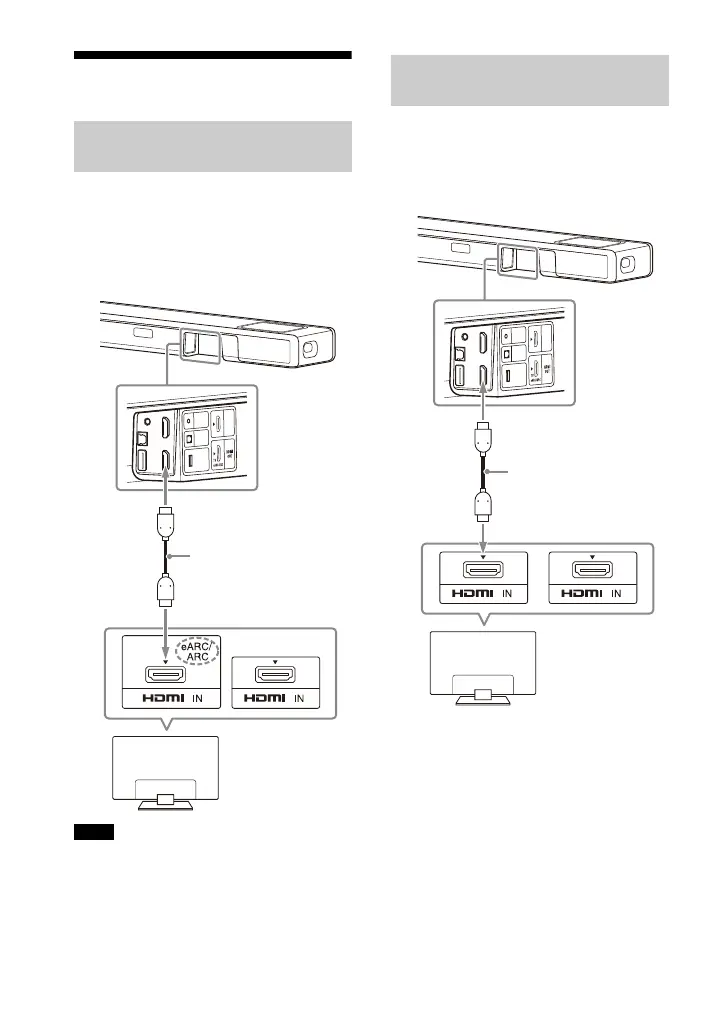
1 Connect the HDMI IN jack
compatible with ARC/eARC on the
TV and HDMI OUT (TV eARC/ARC)
jack on the speaker system with
the HDMI cable (supplied).
• Make sure that the connectors are firmly
inserted.
• Enable the Control for HDMI function on
the TV. If the Control for HDMI function on
the TV is not enabled, TV sound will not be
output from the speaker system.
1 Connect the HDMI IN jack on the TV
and HDMI OUT (TV eARC/ARC) jack
on the speaker system with the
HDMI cable (supplied).
Connecting a TV Compatible
with ARC/eARC
Notes
Connecting a TV That Is not
Compatible with ARC/eARC



 To Next Page