20
GB
Make sure that the connectors are firmly
inserted.
Tip
If the length of the TV center speaker mode
cable is not sufficient, use a commercially
available stereo mini cable.
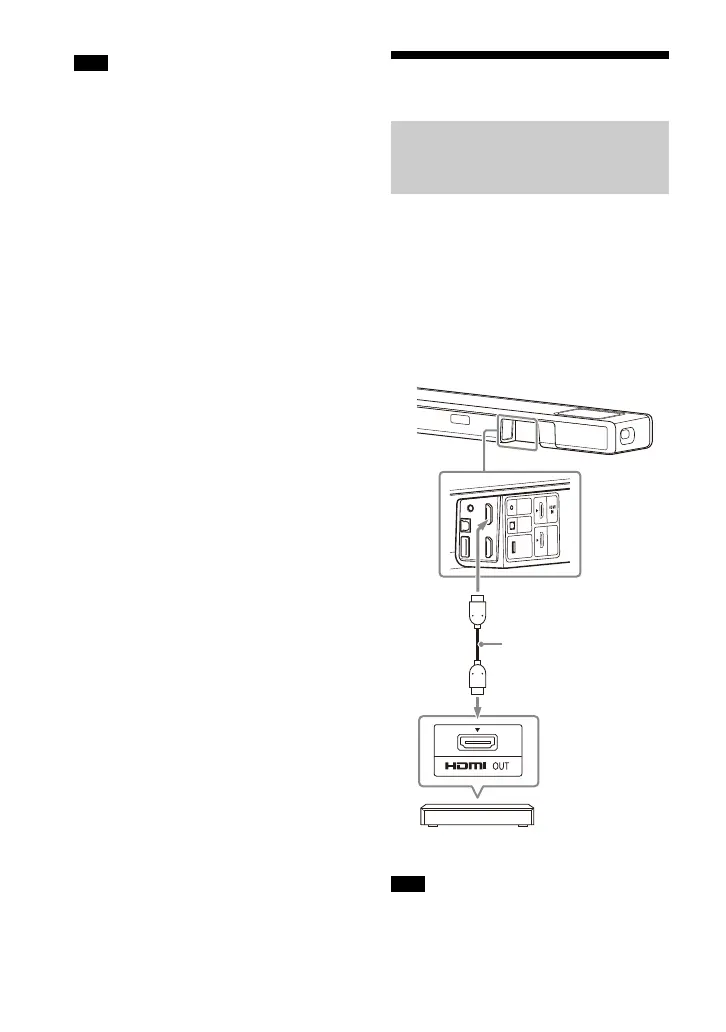
Connecting an AV Device
You can output sound such as Dolby
Atmos, Dolby TrueHD, and DTS:X in high
quality by connecting an AV device to
the speaker system.
1 Connect the HDMI OUT jack on the
AV device and HDMI IN jack on the
speaker system with an HDMI
cable (not supplied).
Make sure that the connectors are firmly
inserted.
Note
Connecting an AV Device
Compatible with the 2K/4K
Video Format
Note
Blu-ray Disc player, set-top
box, gaming console, etc.
HDMI cable
(not supplied)



 To Next Page