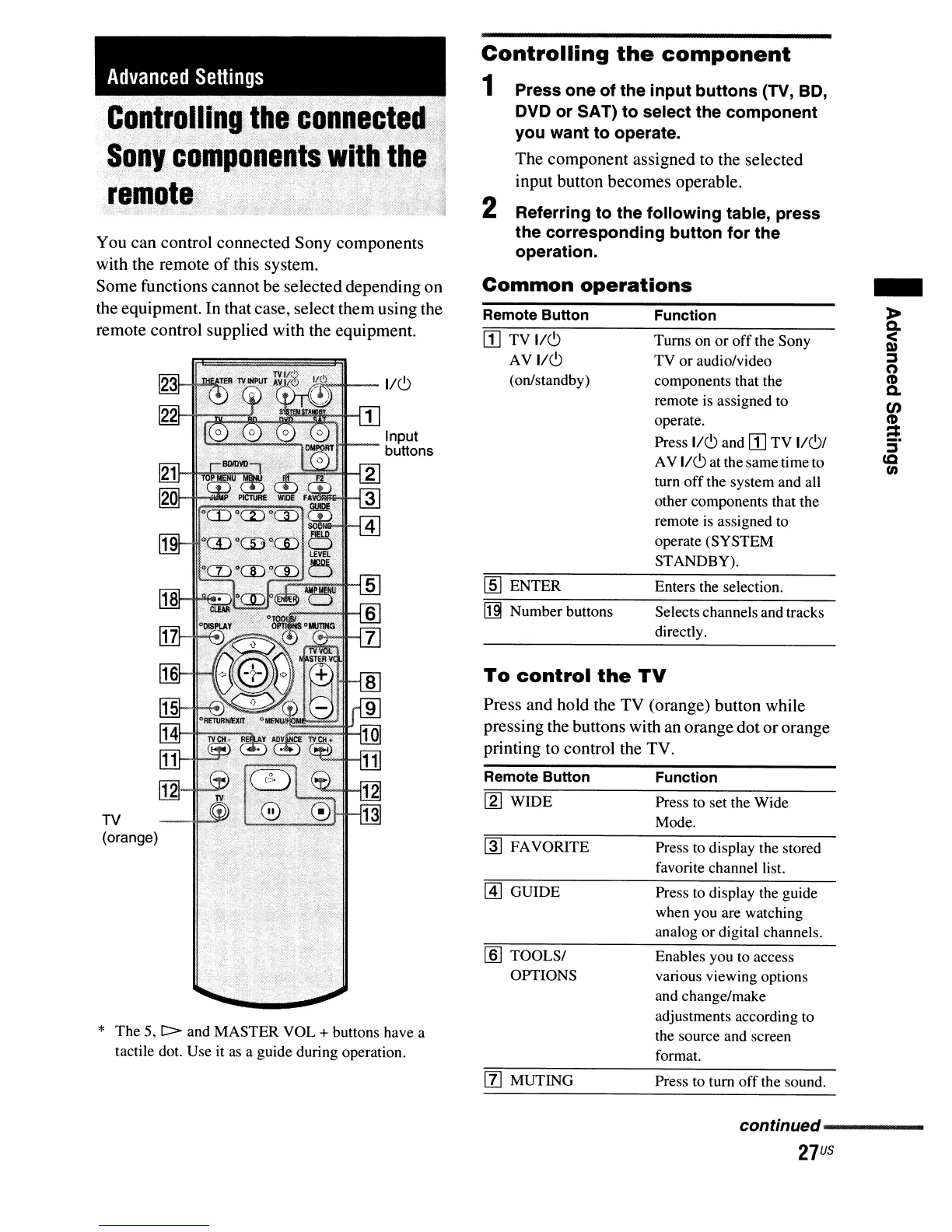
To
control
the
TV
Enables you to access
various viewing options
and change/make
adjustments according to
the source and screen
format.
Press
to
display the guide
when you are watching
analog or digital channels.
Press to set the Wide
Mode.
Press to display the stored
favorite channel list.
Function
Selects channels and tracks
directly.
Enters the selection.
Function
Turns on or
off
the Sony
TV or audio/video
components that the
remote
is
assigned to
operate.
Press
1/(9 and
rn
TV 1/(9/
AV 1/(9 at the same time to
turn
off
the system and all
other components that the
remote
is
assigned to
operate (SYSTEM
STANDBY).
~
FAVORITE
Remote Button
[1] GUIDE
[2] WIDE
1m
TOOLS/
OPTIONS
rn
TV 1/(9
AV 1/(9
(on/standby)
Itl Number buttons
lID
ENTER
Press and hold the TV (orange) button while
pressing the buttons with an orange dot ororange
printing to control the TV.
Remote Button
Controlling
the
component
1 Press one of the input buttons (TV, BD,
DVD or SAT) to select the component
you want to operate.
The component assigned to the selected
input button becomes operable.
2 Referring to the following table, press
the corresponding button for the
operation.
Common
operations
Input
buttons
1/(9
Advanced
Settings
TV
(orange)
* The 5,
C>
and MASTER VOL + buttons have a
tactile dot. Use it
as
a guide during operation.
You can control connected Sony components
with the remote
of
this system.
Some functions cannot be selected depending on
the equipment. In that case, select them using the
remote control supplied with the equipment.
[l] MUTING
Press to tum
off
the sound.
continued-----
27
US



 To Next Page