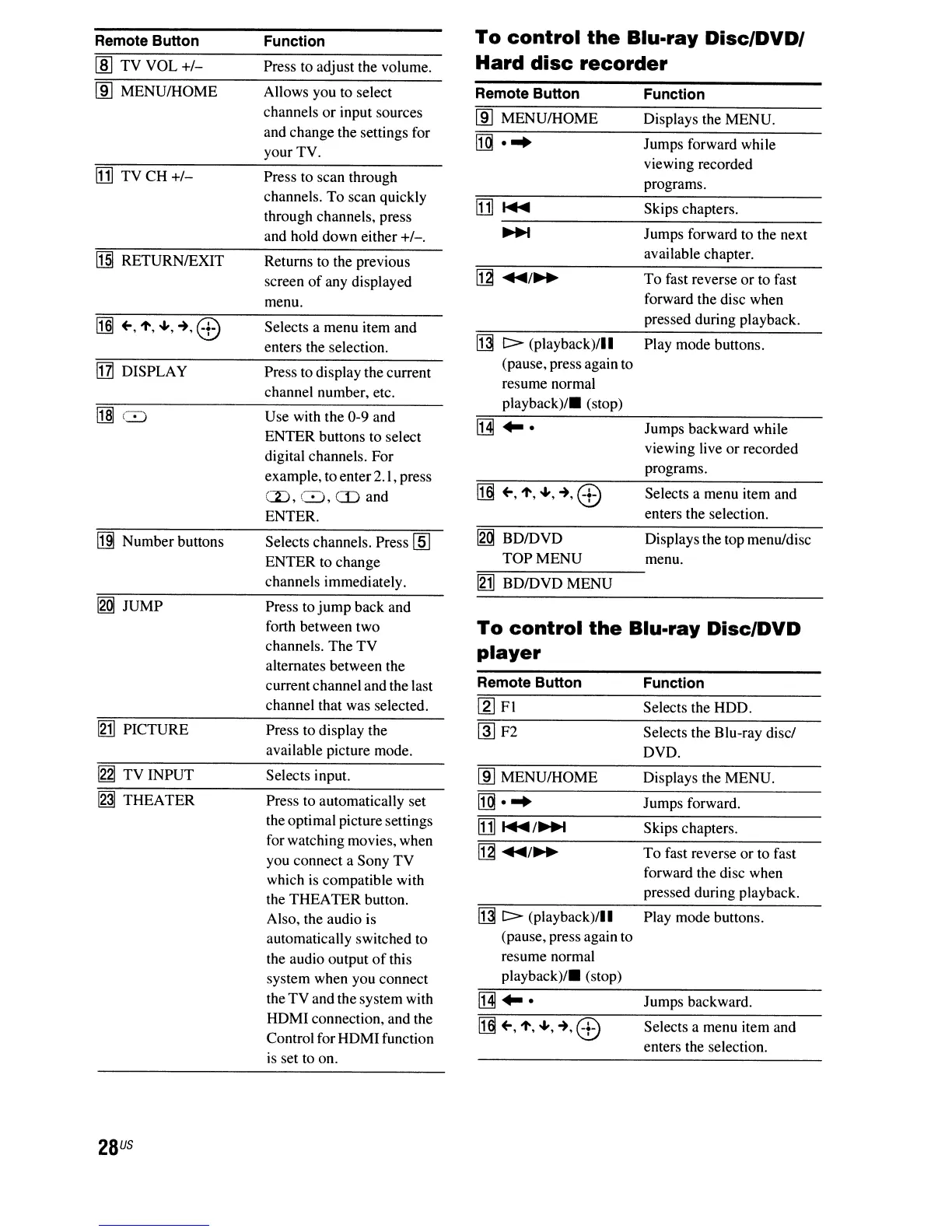
Remote Button
Function
To
control
the
Blu-ray
Disc/DVD/
1m
TV VOL
+/-
Press to adjust the volume.
Hard
disc
recorder
lID
MENU/HOME
Allows you to select
Remote Button Function
channels or input sources
lID
MENU/HOME
Displays the MENU.
and change the settings for
[g
...
Jumps forward while
your TV.
[1]
TV CH
+/-
Press to scan through
viewing recorded
programs.
channels. To scan quickly
[1]
....
Skips chapters.
through channels, press
and hold down either
+/-.
~
Jumps forward to the next
II§]
RETURNIEXIT
Returns to the previous
available chapter.
screen
of
any displayed
~
....
/~
To fast reverse
or
to fast
menu.
forward the disc when
[§]
~,1',
...
,~,8)
Selects a menu item and
pressed during playback.
enters the selection.
~
C>
(playback)/II
Play mode buttons.
!IZI
DISPLAY
Press to display the current
(pause, press again to
channel number, etc.
resume normal
Ml8
Use with the 0-9 and
playback)/.
(stop)
ENTER buttons to select
[j]
...
Jumps backward while
digital channels. For
viewing live
or
recorded
example, to enter2.1, press
programs.
a),8,mand
[§]
~,
1', ...,
~,
8)
Selects a menu item and
ENTER.
enters the selection.
[j]j
Number buttons
Selects channels. Press
[ID
~
BDIDVD Displays the top menu/disc
ENTER to change
TOP MENU
menu.
channels immediately.
[2]
BDIDVDMENU
~
JUMP
Press to jump back and
forth between two
To
control
the
Blu-ray
Disc/DVD
channels. The TV
player
alternates between the
current channel and the last
Remote Button
Function
channel that was selected.
[gJ
FI Selects the HDD.
[2] PICTURE
Press to display the
~F2
Selects the Blu-ray disci
available picture mode.
DVD.
~
TV INPUT
Selects input.
lID
MENU/HOME
Displays the MENU.
~
THEATER
Press to automatically set
[g
...
Jumps forward.
the optimal picture settings
[1]
....
/~
Skips chapters.
for watching movies, when
~
....
/~
To fast reverse or to fast
you connect a Sony TV
which
is
compatible with
forward the disc when
the THEATER button.
pressed during playback.
Also, the audio is
~
C>
(playback)/II
Play mode buttons.
automatically switched to
(pause, press again to
the audio output
of
this
resume normal
system when you connect
playback)/.
(stop)
the TV and the system with
[j]
...
Jumps backward.
HDMI connection, and the
[§]~,
1', ...
,~,
8)
Selects a menu item and
Control for HDMI function
enters the selection.
is
set to on.
28
US



 To Next Page