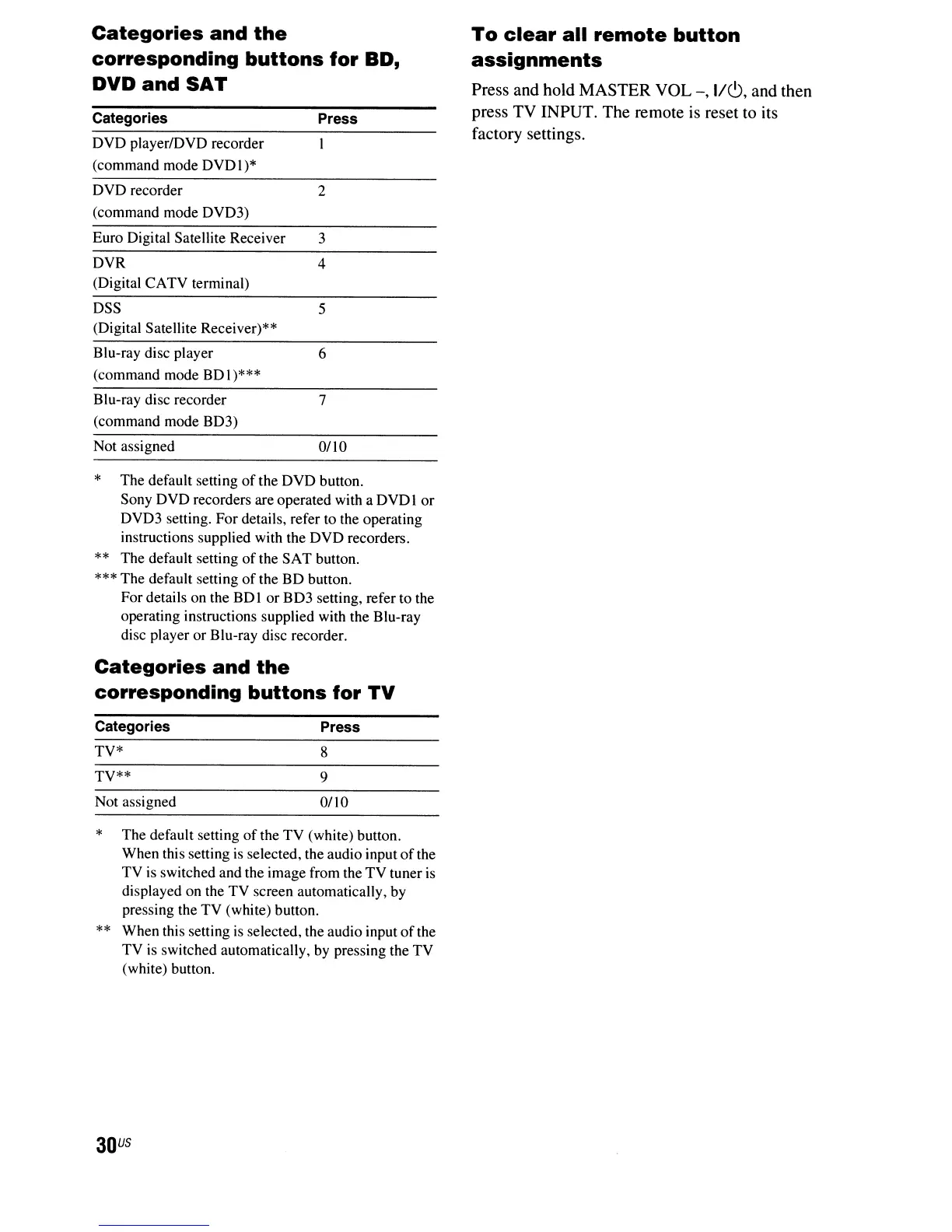
Categories
and
the
corresponding
buttons
for
SD,
DVD
and
SAT
Categories
DVD
playerlDVD recorder
(command mode
DVDI)*
DVD recorder
(command mode DVD3)
Euro Digital Satellite Receiver
DVR
(Digital CATV terminal)
Press
2
3
4
To
clear
all
remote
button
assignments
Press and hold MASTER VOL
-,
1/6,
and then
press TV INPUT. The remote is reset to its
factory settings.
*
DSS 5
(Digital Satellite Receiver)**
Blu-ray disc player 6
(command mode
8D\)***
Blu-ray disc recorder 7
(command mode
8D3)
Not assigned
0110
* The default setting
of
the
DVD
button.
Sony
DVD
recorders are operated with a
DVDI
or
DVD3 setting. For details, refer to the operating
instructions supplied with the
DVD
recorders.
** The default setting
of
the
SAT
button.
*** The default setting
of
the
8D
button.
For details on the
BDI
or
BD3 setting, refer to the
operating instructions supplied with the Blu-ray
disc player
or
B1u-ray disc recorder.
Categories
and
the
corresponding
buttons
for
TV
Categories Press
TV* 8
TV**
9
Not assigned
OlIO
The default setting
of
the
TV
(white) button.
When this setting
is
selected, the audio input
of
the
TV
is switched and the image from the
TV
tuner is
displayed on the
TV
screen automatically, by
pressing the
TV
(white) button.
**
When this setting
is
selected, the audio input
of
the
TV
is
switched automatically, by pressing the
TV
(white) button.
30
US



 To Next Page