":,:>',",,,,:.,,
"
~
;';"
,,,,,
.'
••
<~
.
~:d
'."j
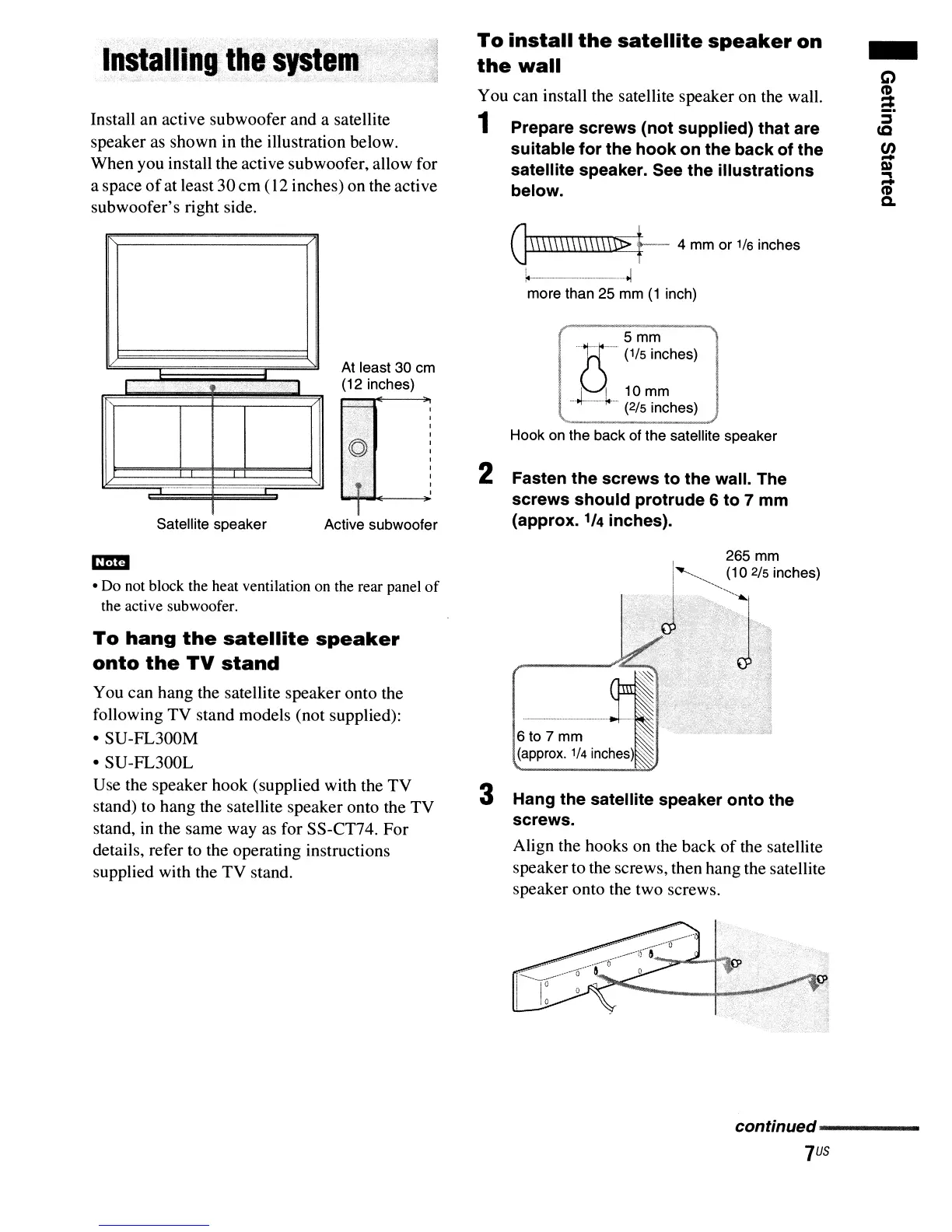
Install an active subwoofer and a satellite
speaker as shown in the illustration below.
When you install the active subwoofer, allow for
a space
of
at least 30cm (12 inches) on the active
subwoofer's right side.
To
install
the
satellite
speaker
on
the
wall
You can install the satellite speaker on the wall.
1 Prepare screws (not supplied) that are
suitable for the hook on the back of the
satellite speaker. See the illustrations
below.
G\\\\\\\\\\\\\\n>
t--
4 mm or 1/6 inches
~--_._-_._
...
~
more than 25 mm
(1
inch)
-
C)
e.
~
(Q
en
-
OJ
~
C'D
Q.
Satellite speaker
n_
--.
At least
30
cm
(12 inches)
Active subwoofer
Hook on the back of the satellite speaker
2 Fasten the screws to the wall. The
screws should protrude 6 to 7 mm
(approx.
1/4
inches).
em
• Do not block the heat ventilation on the rear panel
of
the active subwoofer.
To
hang
the
satellite
speaker
onto
the
TV
stand
You can hang the satellite speaker onto the
following TV stand models (not supplied):
• SU-FL300M
• SU-FL300L
Use the speaker hook (supplied with the TV
stand) to hang the satellite speaker onto the TV
stand,
in
the same way as for SS-CT74. For
details, refer to the operating instructions
supplied with the TV stand.
6t07mm
~
(approx.
1/4 inches)
'~
3 Hang the satellite speaker onto the
screws.
Align the hooks on the back
of
the satellite
speaker to the screws, then hang the satellite
speaker onto the two screws.
continued-----
JUs



 To Next Page