6
GB
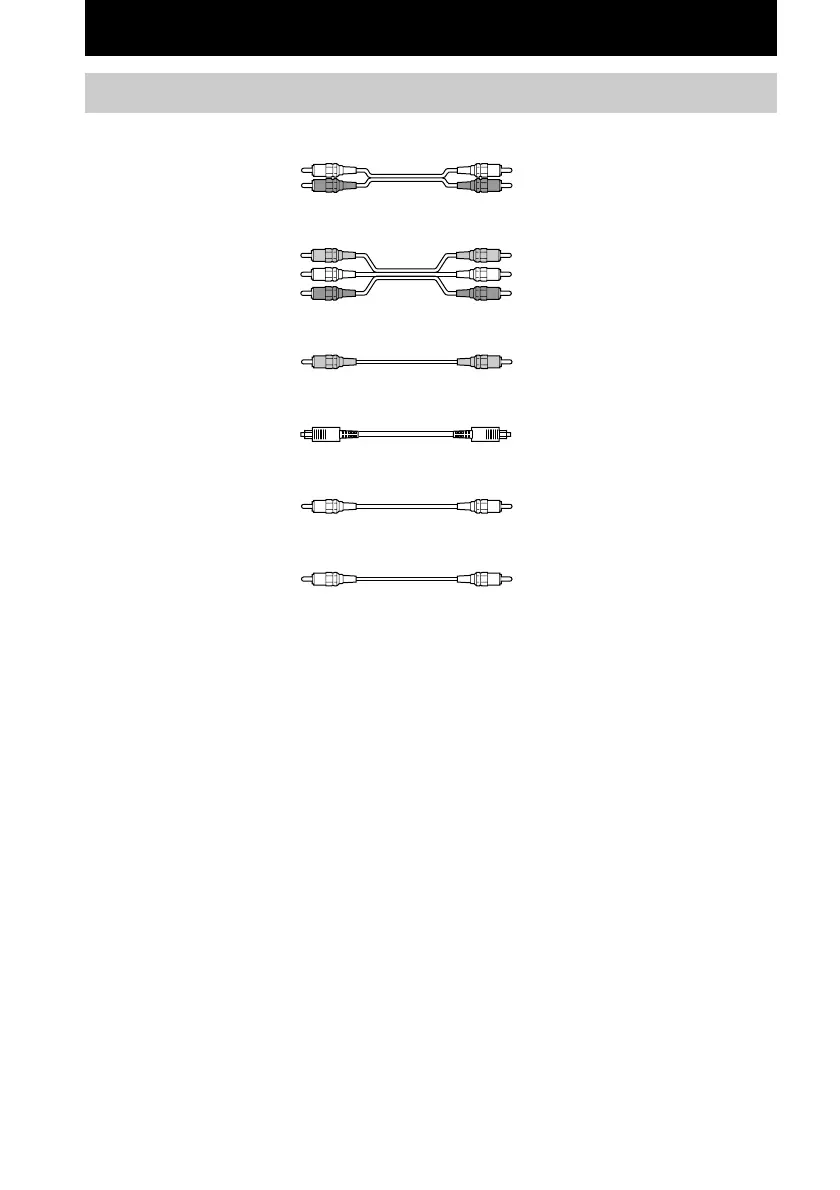
Required cords
A Audio cord (not supplied)
White (L) White (L)
Red (R) Red (R)
B Audio/video cord (not supplied)
Yellow (video) Yellow (video)
White (L/audio) White (L/audio)
Red (R/audio) Red (R/audio)
C Video cord (not supplied)
Yellow (video) Yellow (video)
D Optical digital cord (not supplied)
Black Black
E Coaxial digital cord (supplied)
Orange Orange
F Monaural audio cord (not supplied)
Black Black
Before you get started
• Turn off the power to all components before making any connections.
• Do not connect the AC power cord until all of the connections are completed.
• Be sure to make connections firmly to avoid hum and noise.
• When connecting an audio/video cord, be sure to match the color-coded pins to the appropriate jacks on
the components: yellow (video) to yellow; white (left, audio) to white; and red (right, audio) to red.
• When you connect optical digital cords, insert the cord plugs straight in until they click into place.
• Do not bend or tie the optical digital cord.
Hooking Up the Components




 To Next Page