11
GB
Connecting a TV with an
HDMI Cable and/or
Optical Cable
Refer to Startup Guide (separate
document).
Connecting an Audio
Device with an Analog
Audio Cable
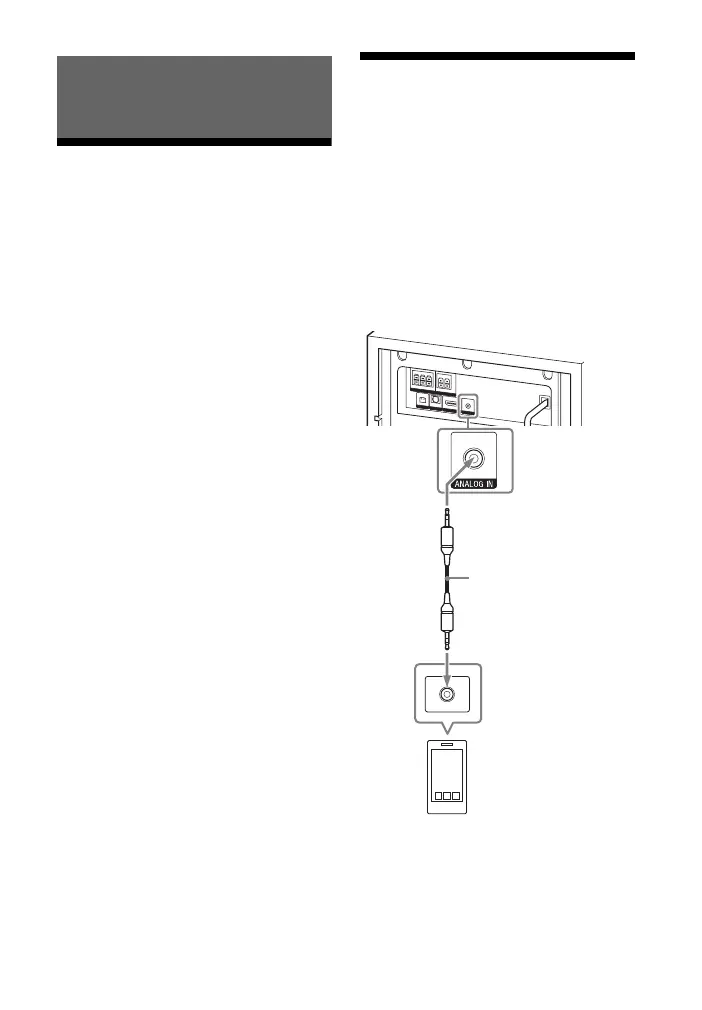
To connect portable audio devices such
as smartphones and WALKMAN® to the
system, connect them via the ANALOG
IN jack on the system.
For listening to the connected device,
see “Listening to a TV and Other
Devices” (page 16).
Connecting to a TV or Audio
Device
Smartphone,
WALKMAN®, other
audio devices, etc.
Analog
audio out
Analog audio cable
(not supplied)



 To Next Page