Chapter 5 Maintenance 63
Chapter 5 Maintenance
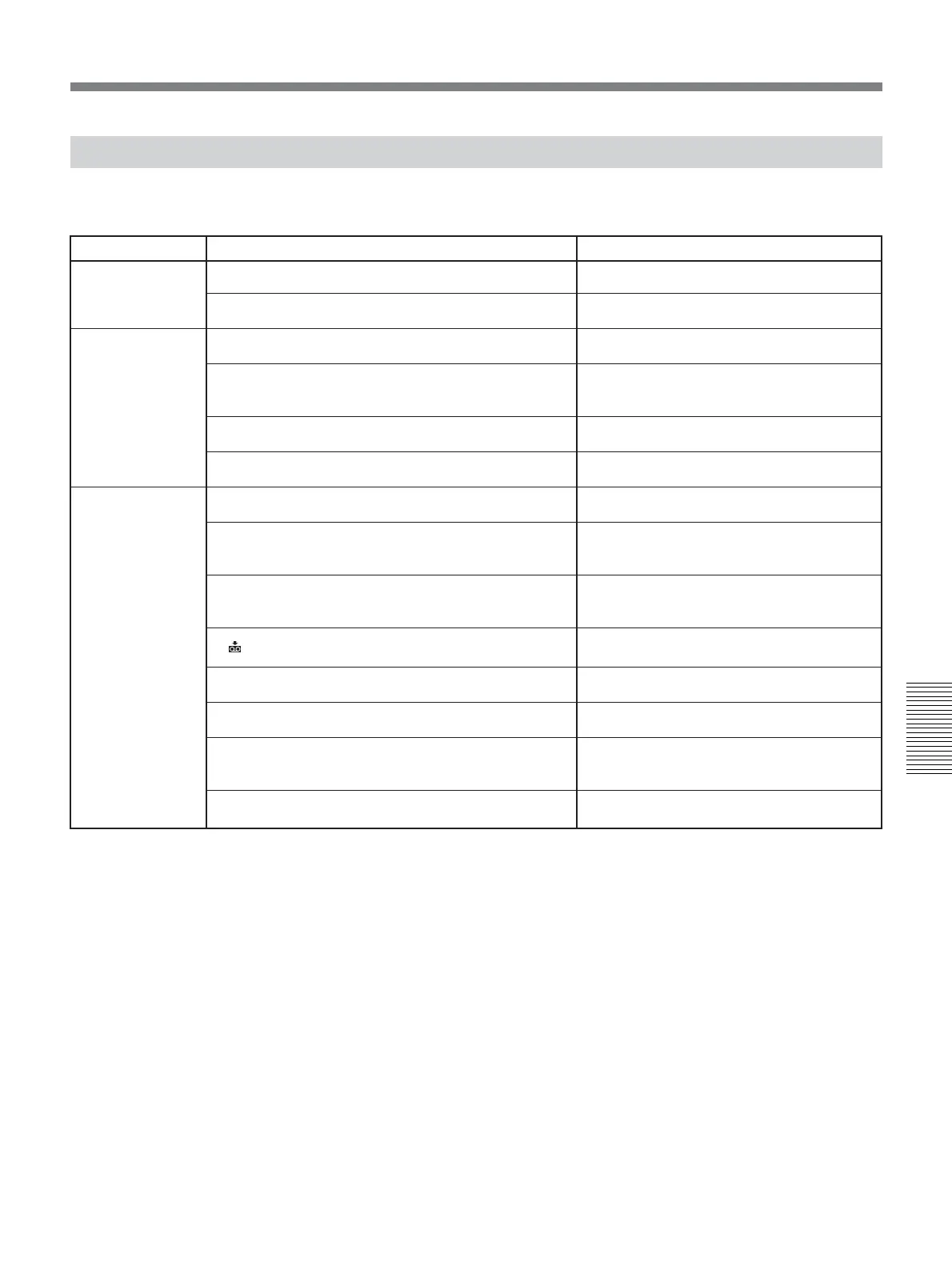
Alarm Messages
The following alarm messages appear with the alarm indicators. Take appropriate action according to the
displayed message.
Item Message Cause/Corrective Action
% Z Moisture condensation. Eject the cassette.
% Moisture condensation. Turn off for 1H.
Q Insert a cassette.
Z Reinsert the cassette.
Q Z The tape is locked -check the tab.
Q The tape has reached the end.
Cannot record due to copyright protection.
Change to correct tape format.
No output image in “HDV/DV SEL”. Change format.
x Dirty video head. Use a cleaning cassette.
Unplug power cable.
Reinsert the cassette.
Invalid input signal.
Power voltage error.
Moisture
condensation
Cassette/Tape
Others
t
See page 66 for details.
t
See page 66 for details.
t
See page 21.
• Check for damage on a tape or other
irregularities.
t
See page 20.
—
—
• This is an unsupported format and cannot be
played back.
Stop playback or signal input, or change
[HDV/DV SEL] setting
(page 46)
.
t
See page 64.
—
—
The signal that has been input to the unit is
invalid. Check the input signal.
—


 To Next Page