EasyManua.ls Logo

Sony Hyper HAD SPT-M124 - Page 3

Sony Hyper HAD SPT-M124
9 pages
Print Icon
To Next Page IconTo Next Page
To Previous Page IconTo Previous Page
Loading...
emission
limits.
AVERTISSEMENT
Afin
d’eviter
tout
risque
d’incendie
ou
d’electrocution,
ne
pas
exposer
cet
appareil
a
la
pluie
ou
a
I’humidite.
Afin
decarter
tout
risque
d’electrocution,
garder
le
coffret
ferme.
Ne
confier
I’entretien
de
I’appareil
qu’a
un
personnel
qualifie.
ADVERTENCIA
Para
prevenlr
el
riesgo
de
incendios
o
de
electrocucion,
no
exponga
la
unidad
a
la
lluvia
ni
a
la
humedad.
Para
evitar
descargas
electricas,
no
abra
la
unidad.
En
caso
de
averia,
solicite
el
servicio
de
personal
cualificado
unicamente.
DC:
For
auto
iris
lenses
controlled
by
DC
signals
VIDEO:
For
auto
iris
lenses
controlled
by
video
signals
Note
When
the
auto
iris
lens
selection
switch
is
set
to
VIDEO,
“hunting”
may
occur.
If
this
occurs,
use
the
LEVEL
IVH
adjustment
screw
on
the
lens
to
change
the
incident
light
level.
When
adjusting
the
incident
light
level,
set
the
ALC
(Automatic
Light
Control)
adjustment
screw
to
Av.
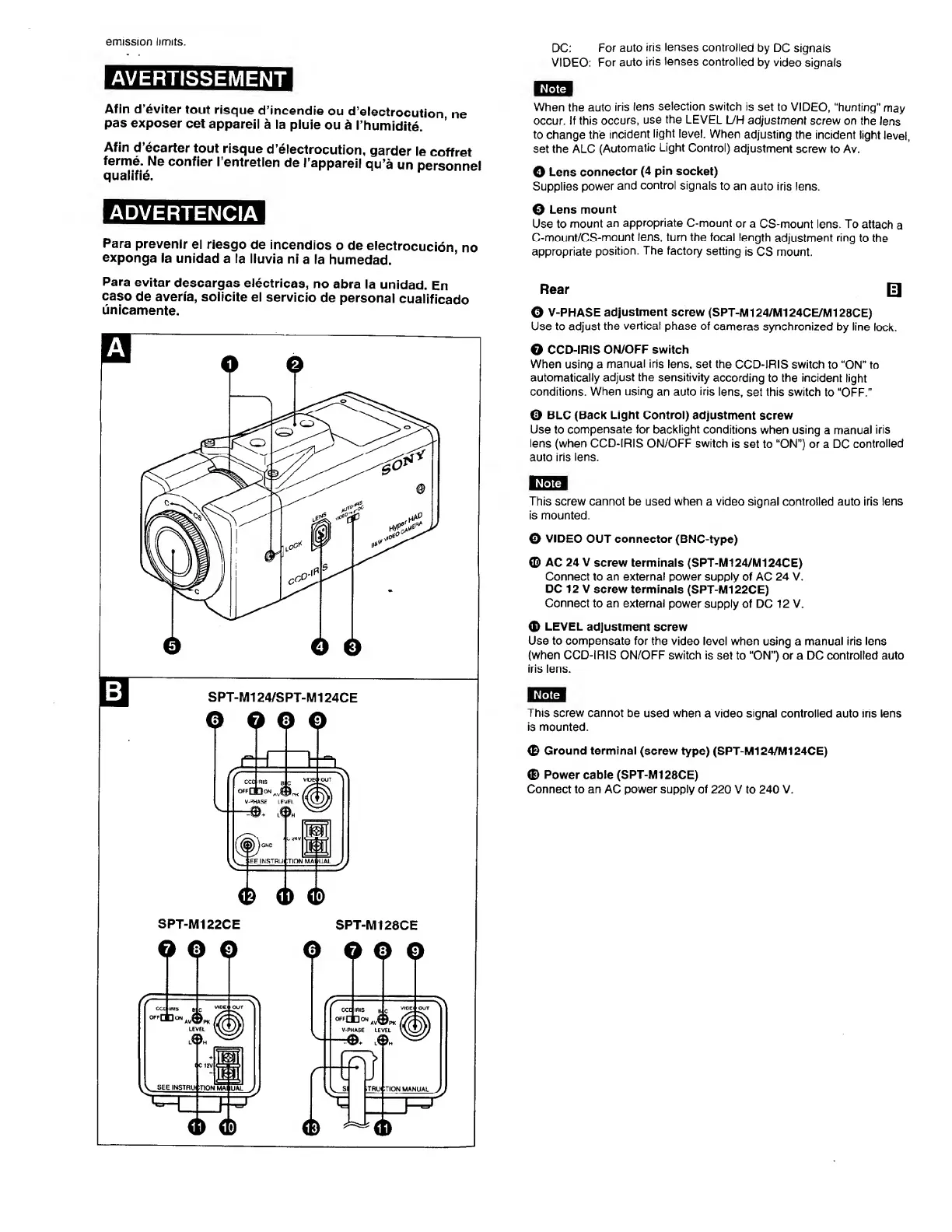
O
Lens
connector
(4
pin
socket)
Supplies
power
and
control
signals
to
an
auto
iris
lens.
0
Lens
mount
Use
to
mount
an
appropriate
C-mount
or
a
CS-mount
lens.
To
attach
a
C-mount/CS-mount
lens,
turn
the
focal
length
adjustment
ring
to
the
appropriate
position.
The
factory
setting
is
CS
mount.
Rear
O
V-PHASE
adjustment
screw
(SPT-M124/MI
24CE/M128CE)
Use
to
adjust
the
vertical
phase
of
cameras
synchronized
by
line
lock.
0
CCD-IRIS
ON/OFF
switch
When
using
a
manual
iris
lens,
set
the
CCD-IRIS
switch
to
“ON”
to
automatically
adjust
the
sensitivity
according
to
the
incident
light
conditions.
When
using
an
auto
iris
lens,
set
this
switch
to
“OFF.”
0
BLC
(Back
Light
Control)
adjustment
screw
Use
to
compensate
for
backlight
conditions
when
using
a
manual
iris
lens
(when
CCD-IRIS
ON/OFF
switch
is
set
to
“ON”)
or
a
DC
controlled
auto
iris
lens.
This
screw
cannot
be
used
when
a
video
signal
controlled
auto
iris
lens
is
mounted.
0
VIDEO
OUT
connector
(BNC-type)
©
AC
24
V
screw
terminals
(SPT-M124/MI24CE)
Connect
to
an
external
power
supply
of
AC
24
V.
DC
12
V
screw
terminals
(SPT-M122CE)
Connect
to
an
external
power
supply
of
DC
12
V.
0
LEVEL
adjustment
screw
Use
to
compensate
for
the
video
level
when
using
a
manual
iris
lens
(when
CCD-IRIS
ON/OFF
switch
is
set
to
“ON”)
or
a
DC
controlled
auto
iris
lens.
Note
This
screw
cannot
be
used
when
a
video
signal
controlled
auto
iris
lens
is
mounted.
0
Ground
terminal
(screw
type)
(SPT-M124/MI
24CE)
0
Power
cable
(SPT-M128CE)
Connect
to
an
AC
power
supply
of
220
V
to
240
V.

Related product manuals